We Explore Earth
A community-driven event planning platform.
Role
Product Designer
Timeline
Sep 2025 - Present
Skills
Product Strategy
User Research
Prototyping
Team
5 Designers
10 Developers
OVERVIEW
What is We Explore Earth (WEE)?
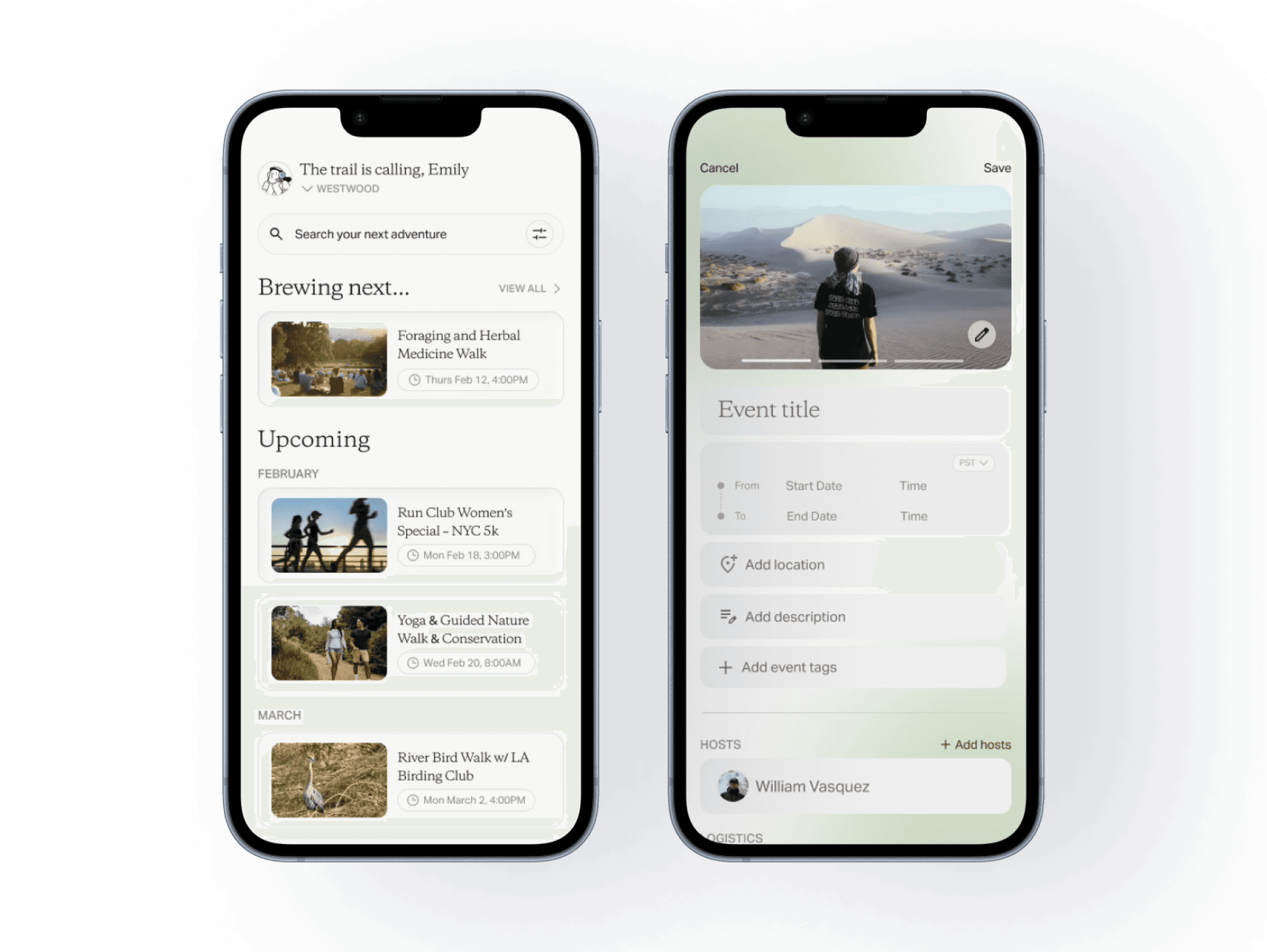
We Explore Earth is a nonprofit dedicated to encouraging people to explore and attend outdoor-focused events. My team is designing the WEE event app, enabling users to discover, explore, and RSVP to community events.
THE PROBLEM
No Centralized Home for WEE Events
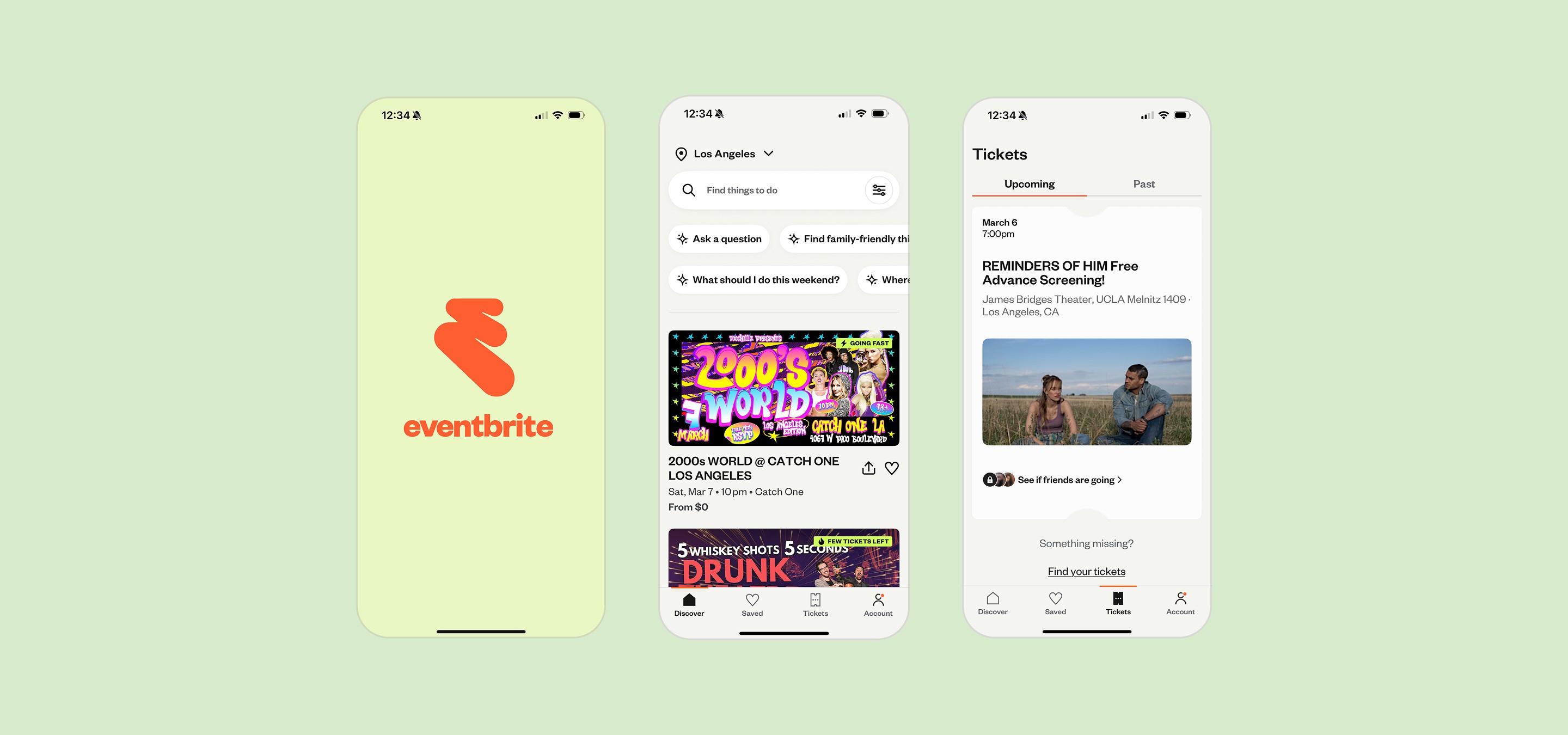
Currently, WEE hosts and manages events through Eventbrite, where users browse and RSVP. While functional, this setup limits brand presence and community-building opportunities. We identified the need for a dedicated platform that centralizes event discovery, strengthens WEE’s identity, and creates a more cohesive experience for users.
OUR GOAL
Design a unified event platform that:
Allows users to discover and RSVP to WEE events seamlessly
Enables admins to create and manage events efficiently
Provides real-time analytics on attendance and engagement
Transitions WEE from Eventbrite to a fully owned platform
EVENTBRITE UI
CONSTRAINTS
Designing for Minor Privacy
Because the majority of WEE event attendees are minors, privacy and safety were critical considerations. We carefully evaluated which features to include and how user data would be displayed to ensure personal information remained protected. These constraints shaped key design decisions, requiring us to balance transparency, usability, and technical feasibility.
Research
COMPETITIVE ANALYSIS
Evaluating Existing Platforms
We conducted a competitive analysis across platforms that shared key features relevant to WEE’s goals. Rather than replicating a single product, we examined how different apps approached event discovery, engagement, rewards, privacy, and social interaction.

Luma
Luma
Treecard
Strava

Seek
Seek

Proton
Proton
OPPORTUNITY MAPPING
Information Architecture
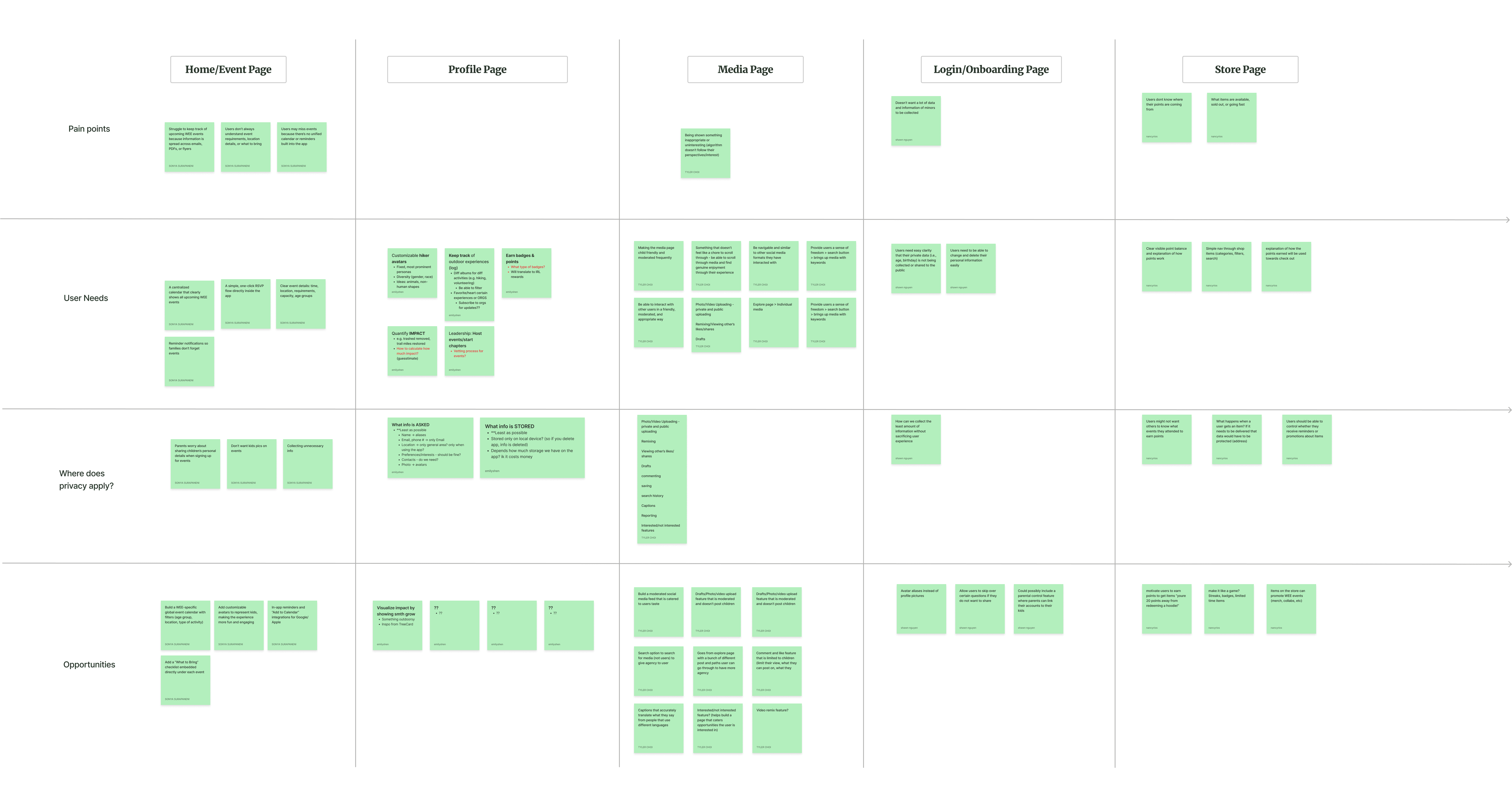
Based on insights from our competitive analysis, we mapped features into clear page categories to define the app’s structure.
We also organized each feature by the problem it addressed — including user pain points, user needs, privacy considerations, and future opportunity areas.
This framework ensured every page had a clear purpose and that our design decisions remained grounded in both user impact and product strategy.
KEY FEATURES
Finalized Core Features
Once we analyzed our competitive analysis and opportunity mapping, we decided on the core features.
Global Event Calendar
A centralized home page where users browse upcoming WEE events, view details, and RSVP. Admins can post events, track capacity, and monitor attendance in real time.
Event Pages
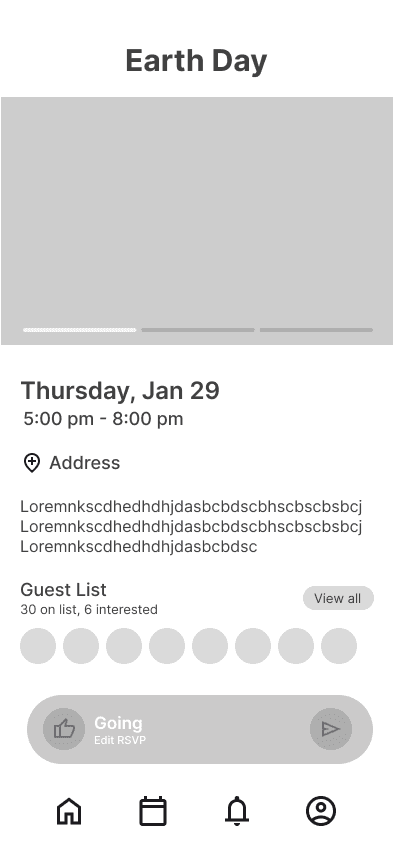
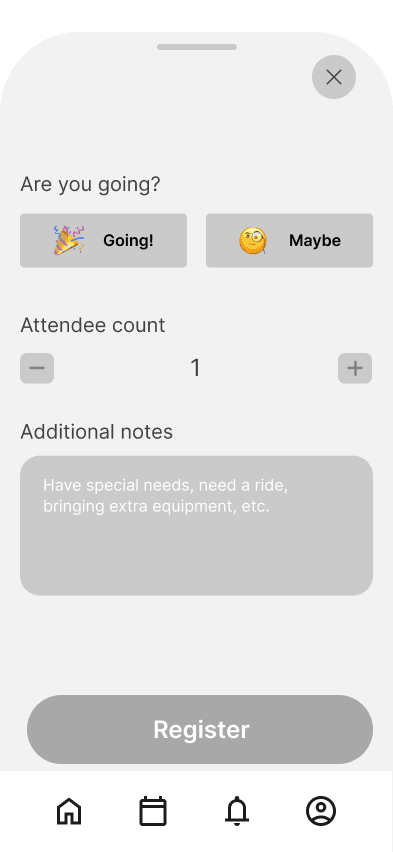
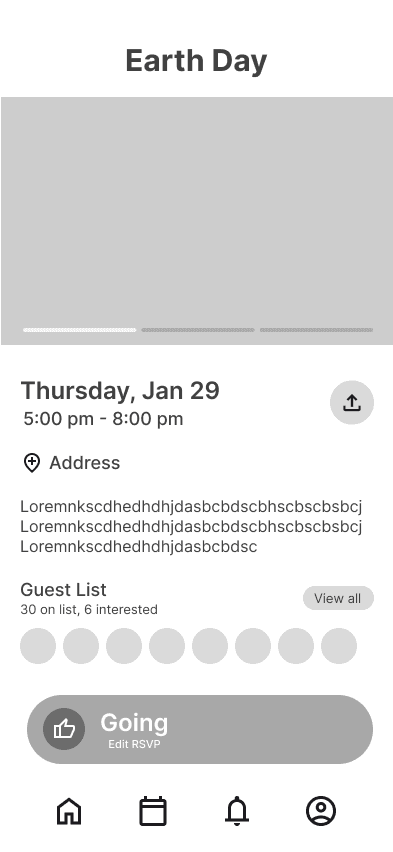
Each event includes key details — title, summary, date/time, location, capacity, and what to bring — with lightweight RSVP functionality (“Going” or “Maybe”).
User Profiles
A personalized hub where users track their outdoor activity, log hikes or clean-ups, earn badges and points, and view their event history.
Admin Dashboard
Admins manage events, track RSVPs, check in attendees, adjust rewards, and monitor platform-wide impact metrics like miles hiked or trash removed.
Role-Based Authentication
Separate login flows for users and admins ensure distinct permissions — users explore and participate, while admins manage events and community growth.
USER FLOWS
Mapping the User Journey
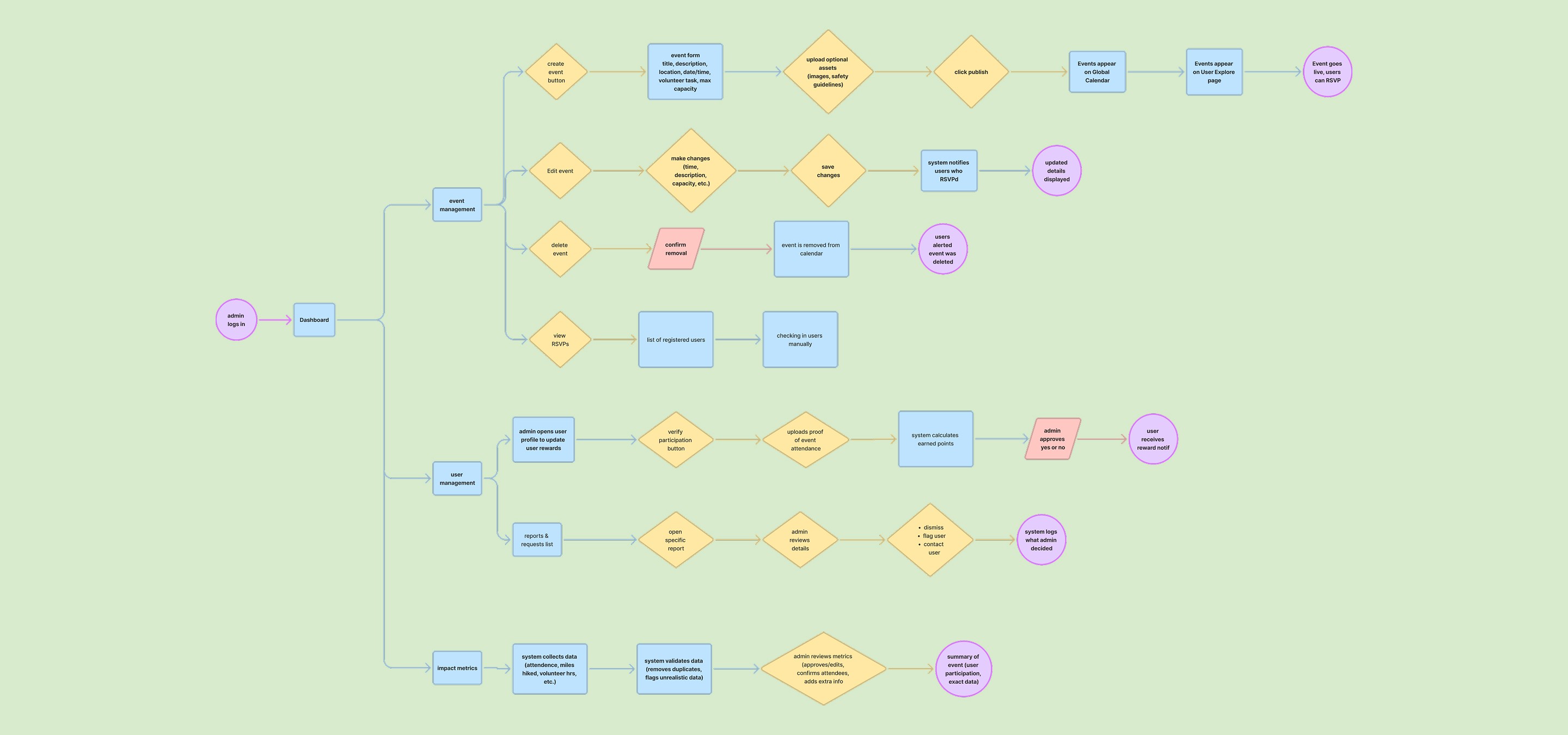
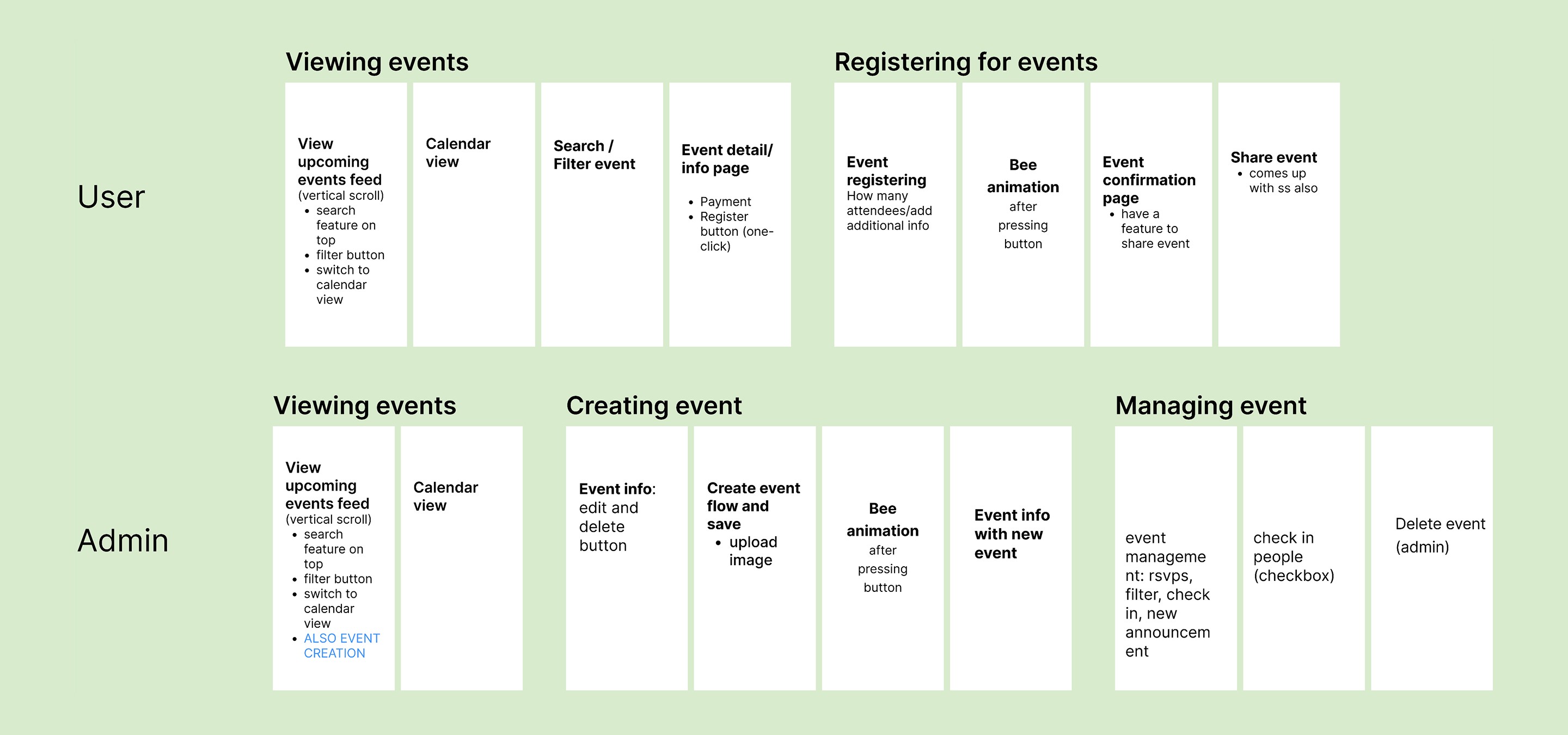
My team and I mapped user flows for each core feature of the WEE event app. This process allowed us to identify the necessary pages, define interaction patterns, and ensure a seamless experience from discovery to RSVP.
Intentional Design Decision
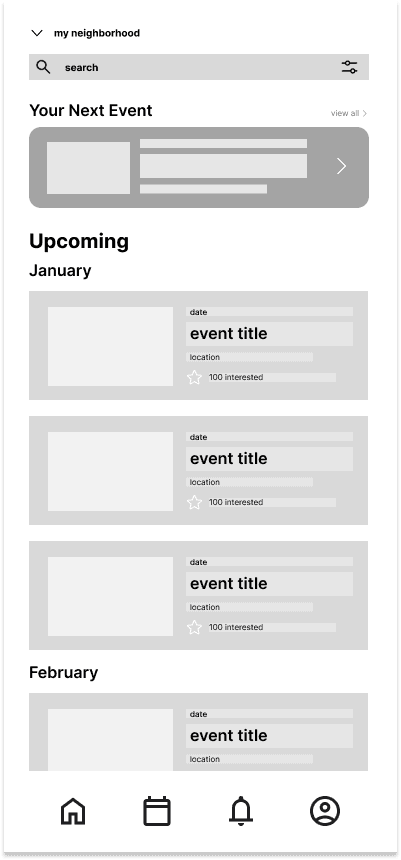
We revisited our user flows and translated them into real screen layouts. This helped us better visualize required pages and design more intentional low-fidelity prototypes.
LOW-FIDELITY PROTOTYPES
Designing for Iteration
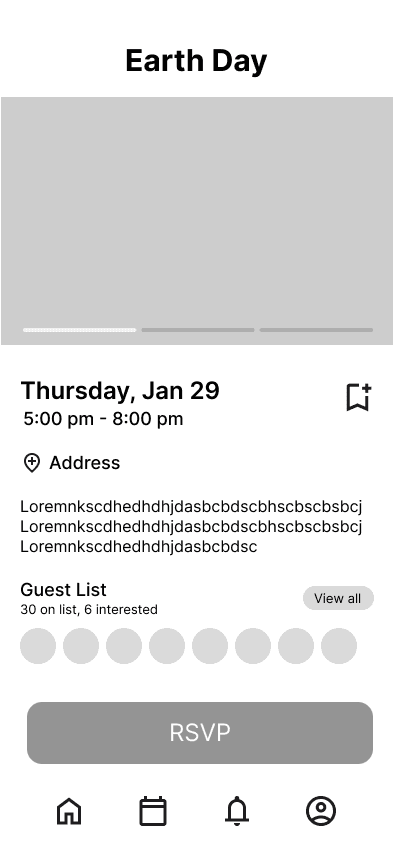
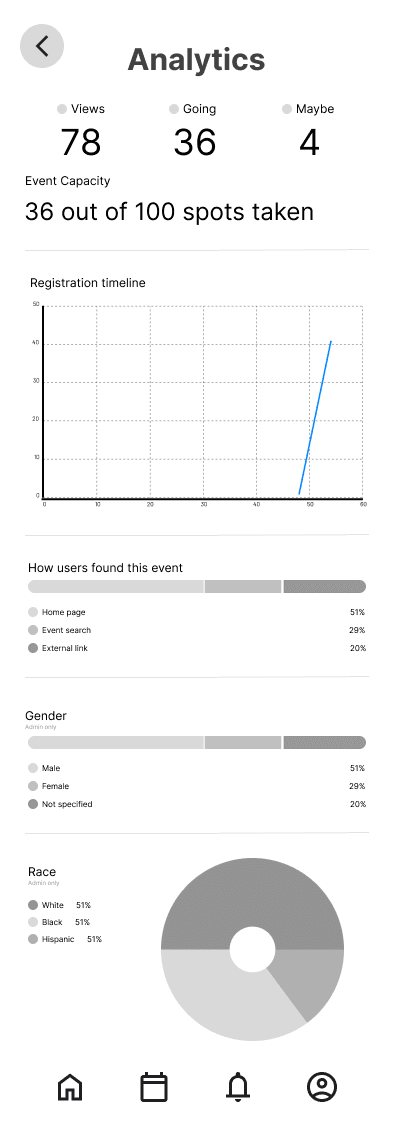
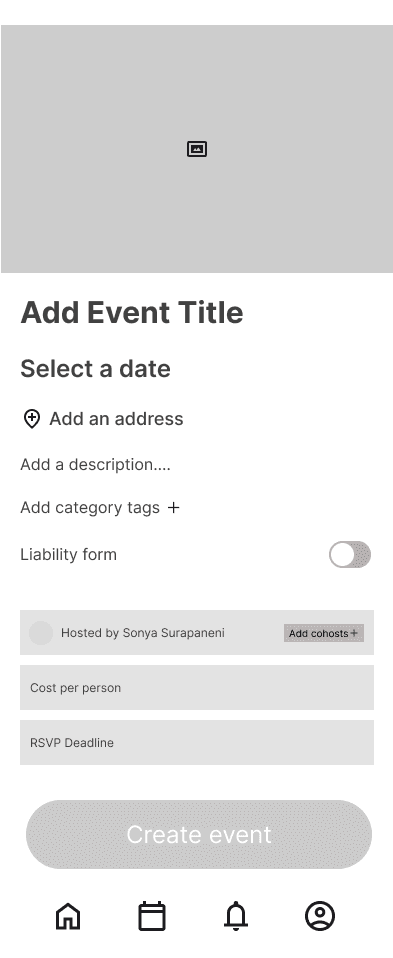
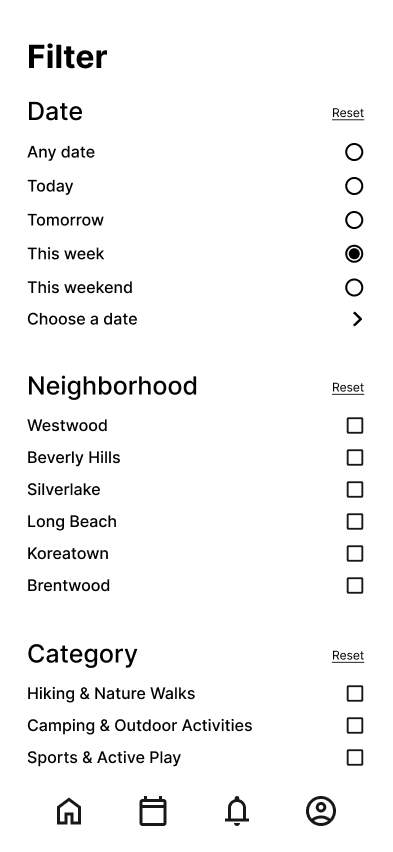
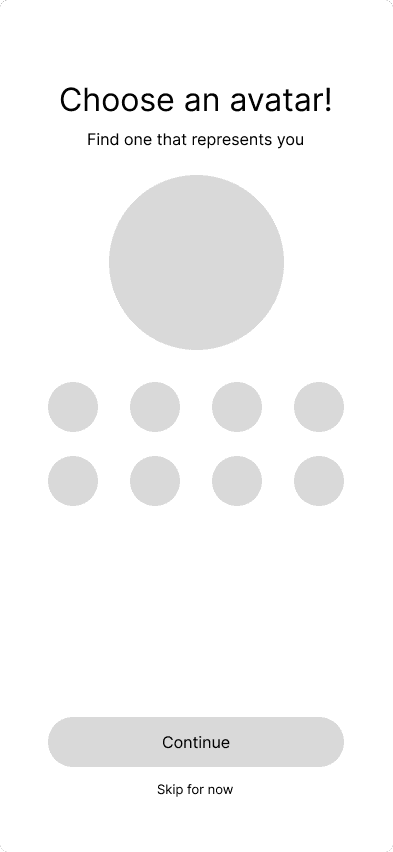
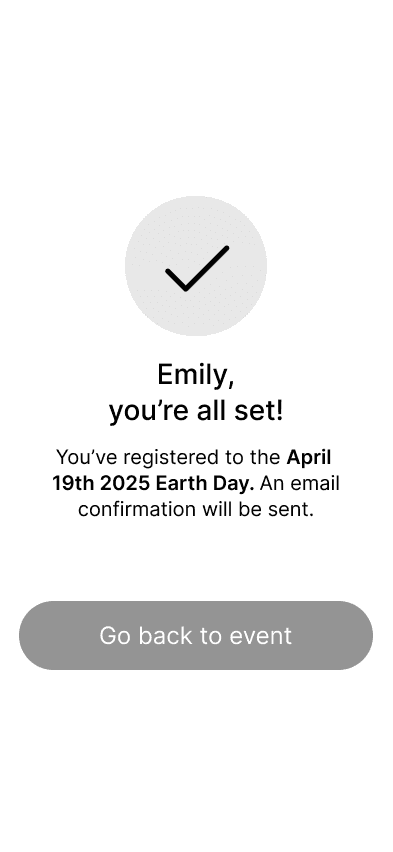
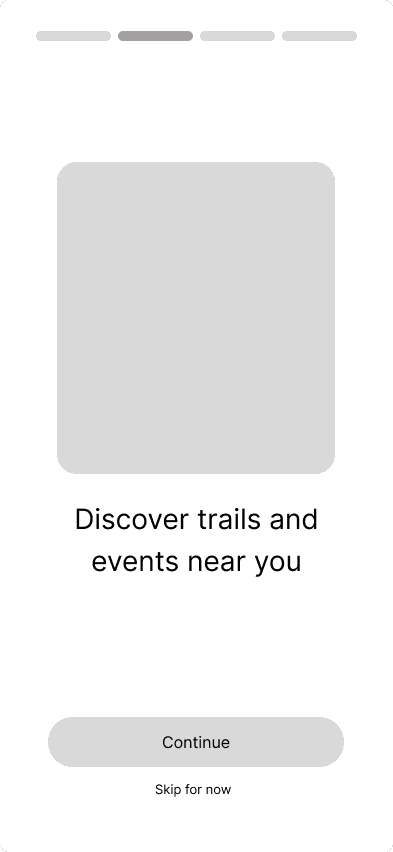
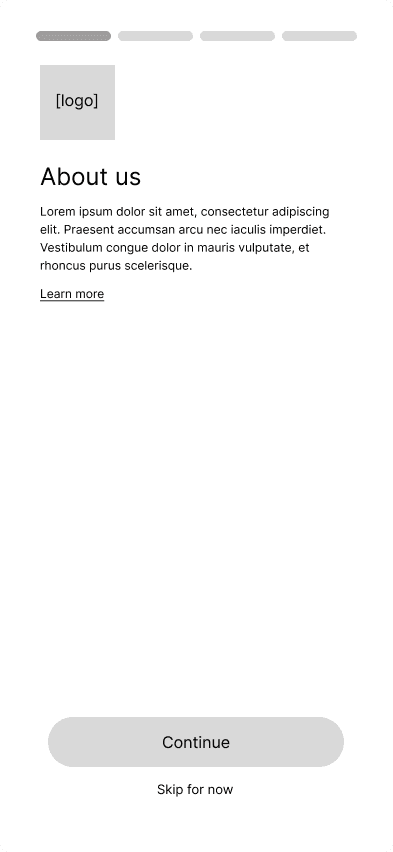
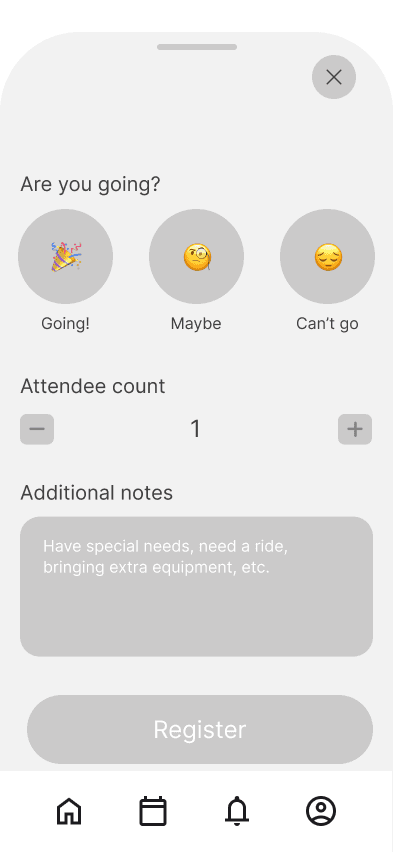
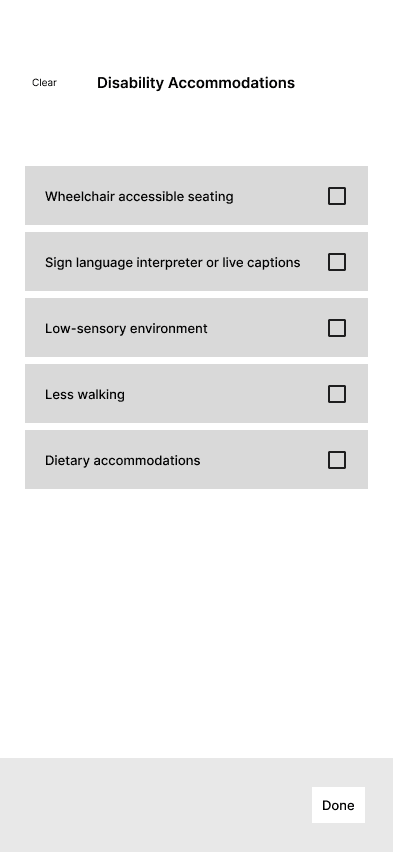
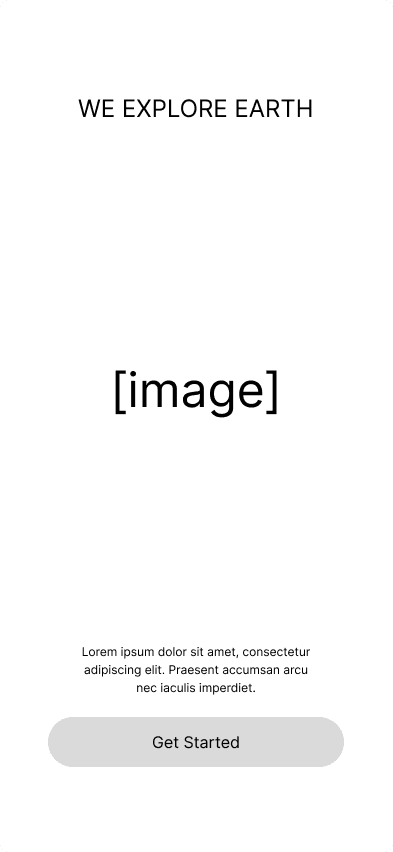
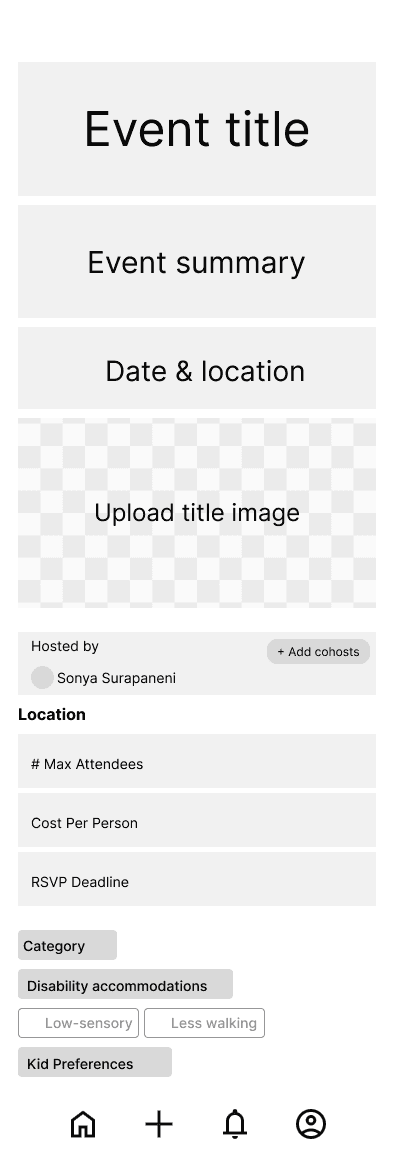
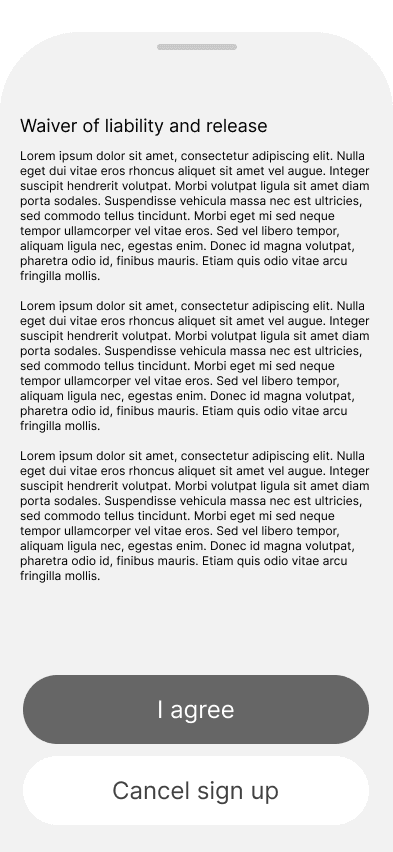
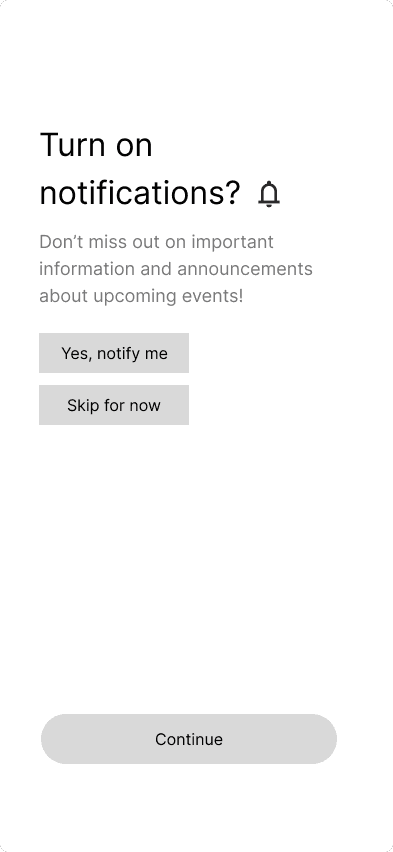
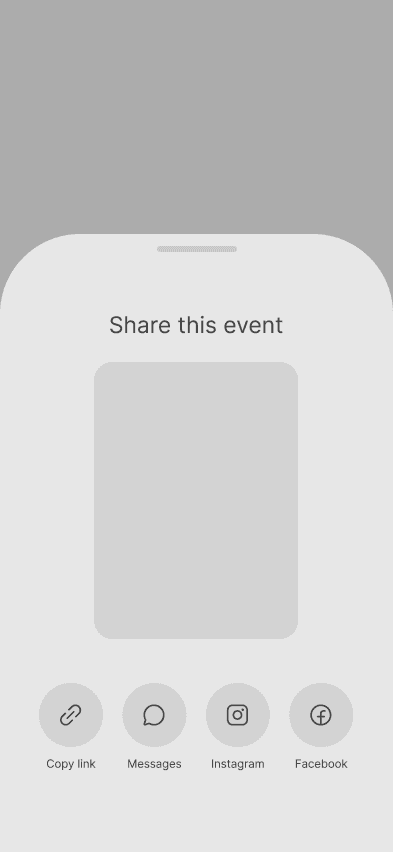
We developed low-fidelity prototypes to test our core flows in usability sessions. By intentionally keeping the designs minimal, we made it easier to iterate quickly based on feedback without becoming attached to visual details too early.
USABILITY TESTING
Validating the Experience
We conducted usability testing sessions with WEE administrators to evaluate both user-facing and admin flows. Participants were asked to browse events, apply filters, complete the RSVP process, and interpret the calendar system.
Iterations Based on Feedback
1
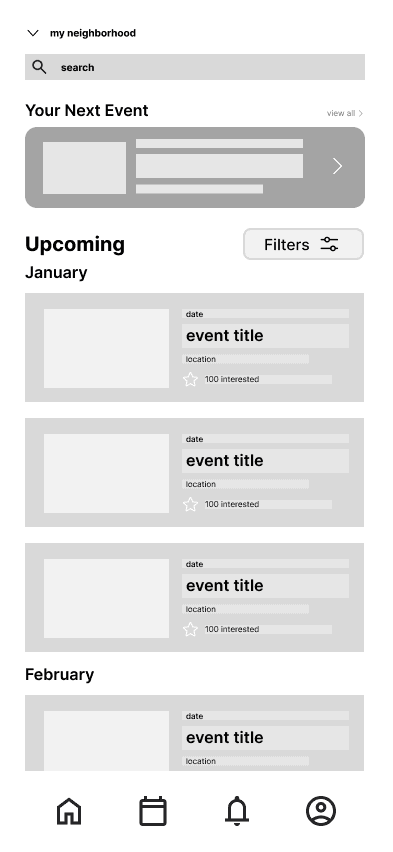
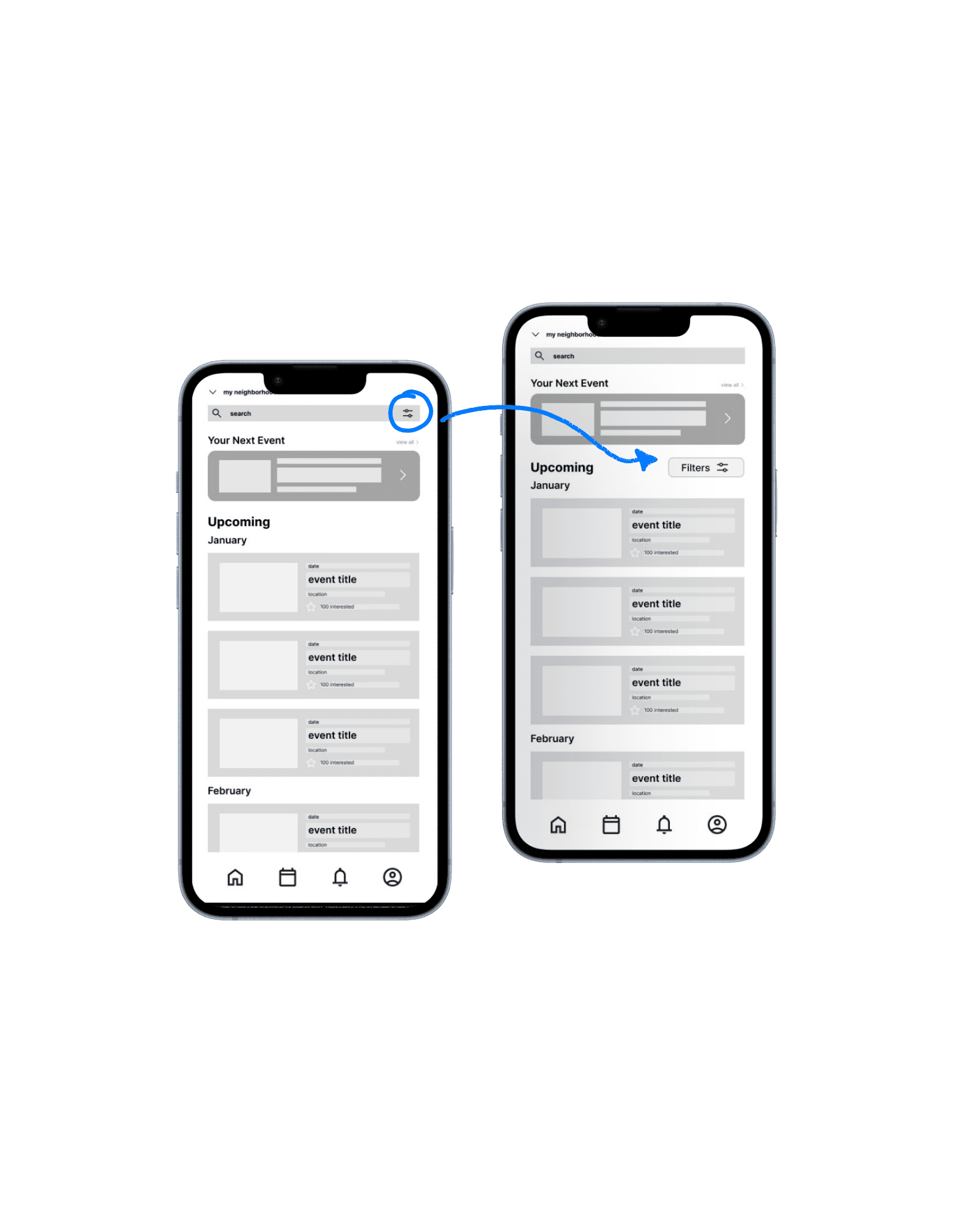
Filters Button Enlarged
Users struggled to quickly locate the filter option when browsing events.
We replaced the small filter icon with a clearly labeled “Filters” button, increased its size, and repositioned it on the screen for better visibility. This improved discoverability and reduced friction when customizing event preferences.
2
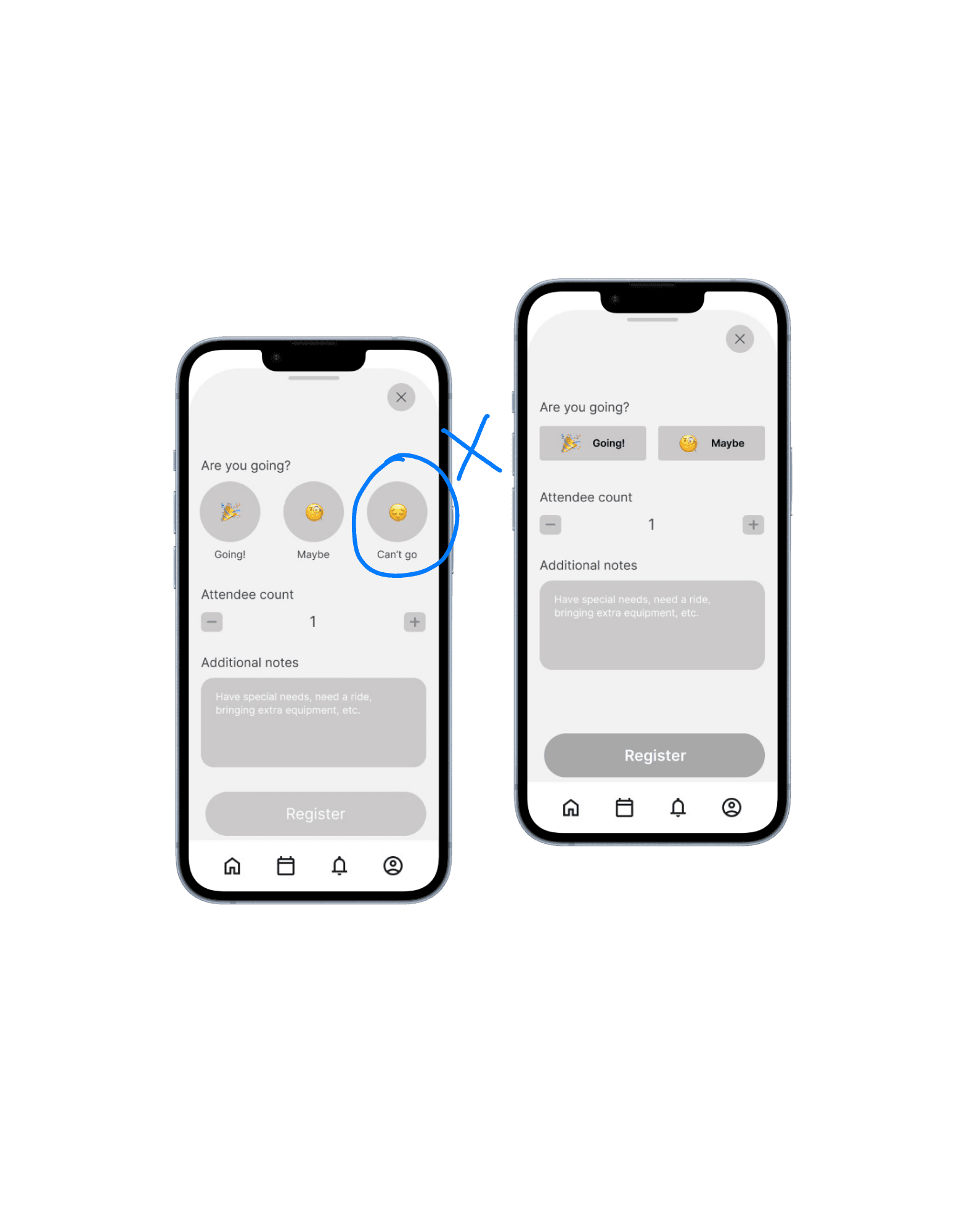
Removed the “Can’t Go” Option
Users were confused by the “Can’t go” option after already clicking RSVP.
We removed the “Can’t go” selection to simplify the RSVP flow. Since RSVP already implies intent to attend, including an option to opt out immediately after created unnecessary friction.
3
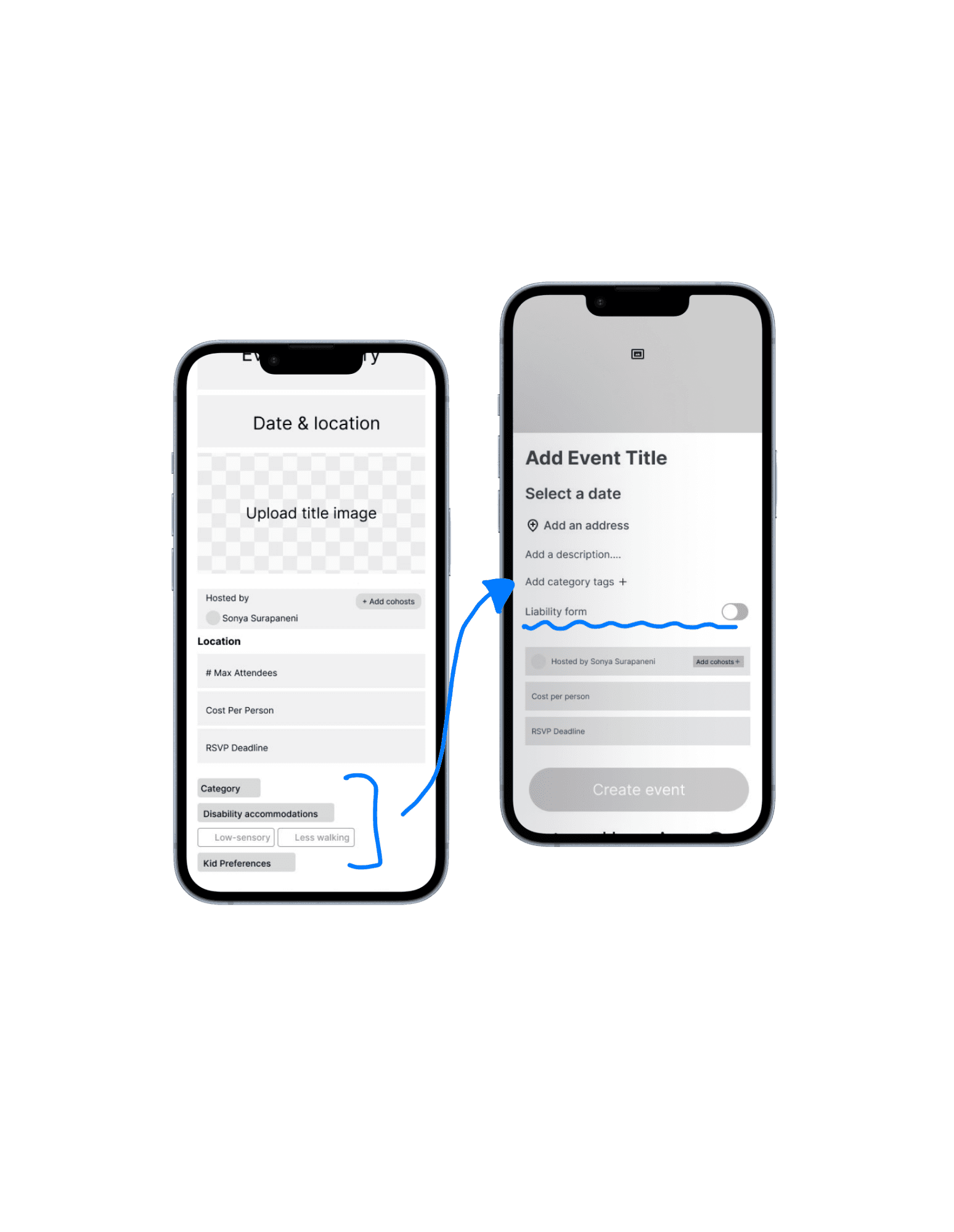
Category Tags & Liability Form
Admins struggled to apply category tags and requested a liability form feature.
We made category tagging more prominent within the event creation flow and added a toggle to attach liability forms. These updates streamlined event setup while addressing safety and organizational needs.
4
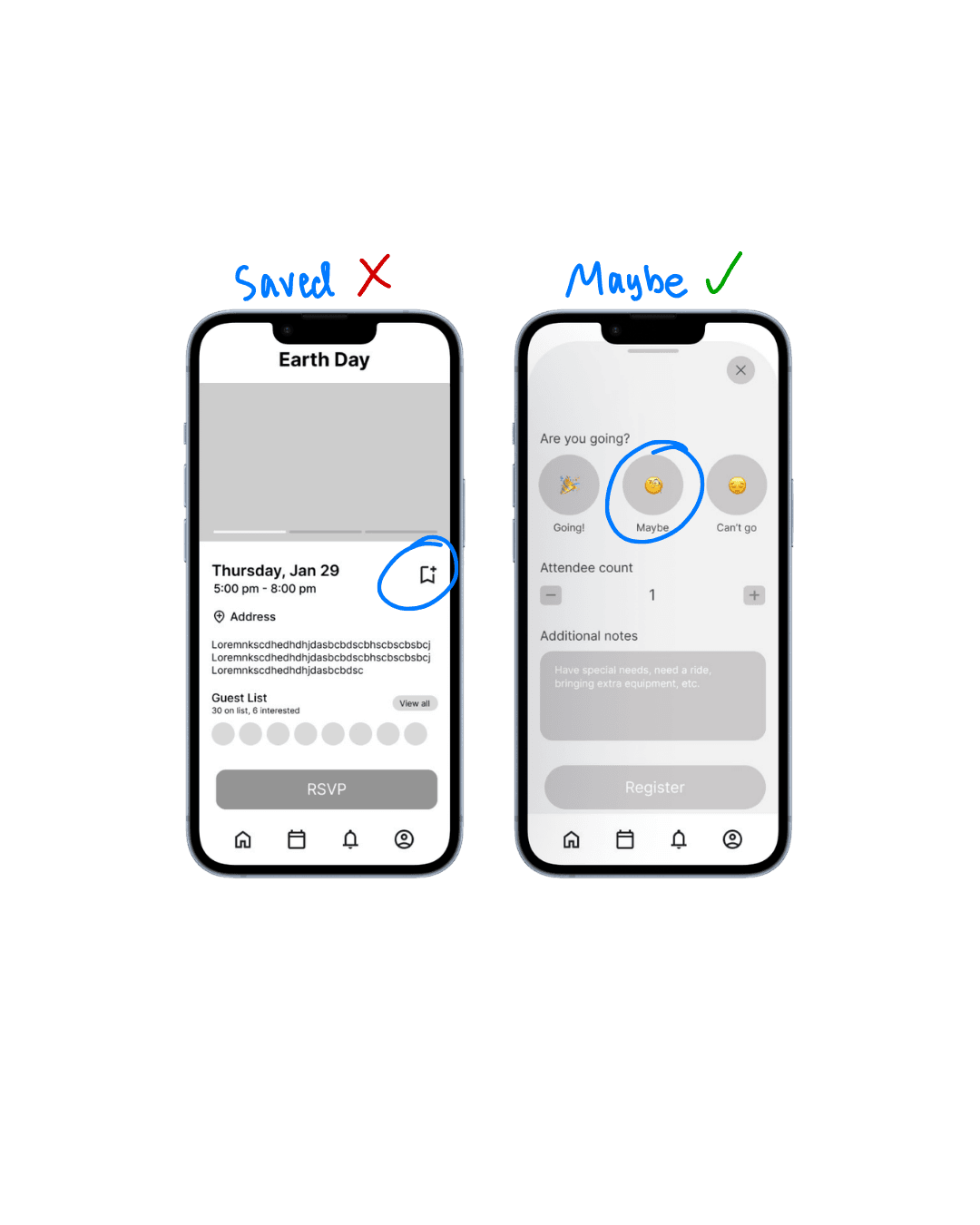
A/B Testing: “Saved” vs “Maybe”
Users preferred the "Maybe" RSVP flow.
We conducted A/B testing between a “Saved” flow and a “Maybe” RSVP option. Results showed that users preferred selecting “Maybe” when they were uncertain, as it better reflected their intent.
VISUAL EXPLORATION
Exploring Visual Direction
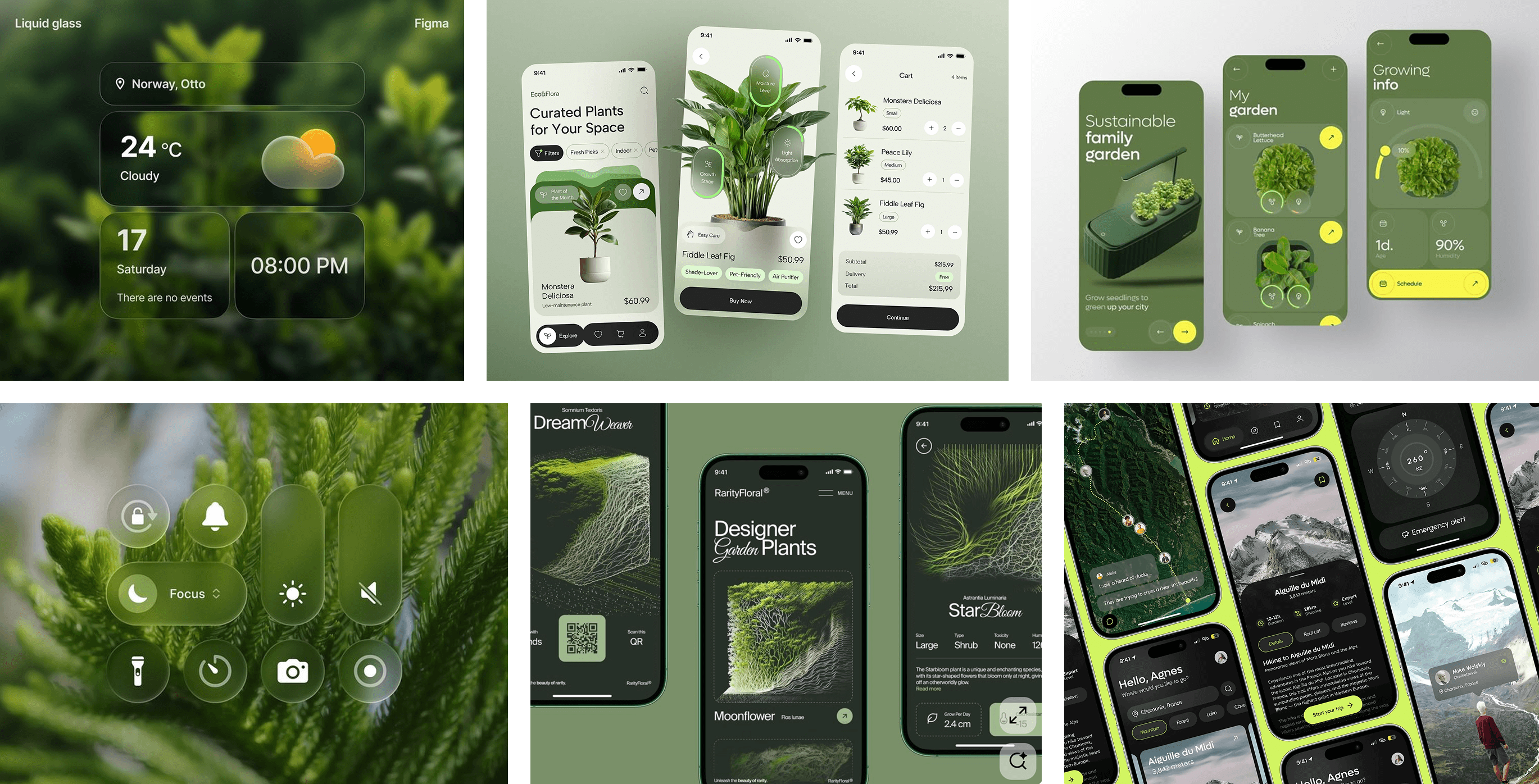
We knew that since WEE is a nature focused app, we wanted to go for a sleek, clean, naturalistic look. Take a look at our inspo!
FINAL PROTOTYPE
Introducing the WEE App!
USER
Filtering System
Users can customize their Explore page by filtering events based on category, location, and accessibility preferences.
USER
Event RSVP Flow
Users can RSVP to events and view their upcoming and past events, with a digital ticket for entry.
ADMIN
Event Analytics Dashboard
Admins can view event analytics including attendance, registration timeline, and the number of users who marked going, maybe, or viewed the event.
ADMIN
Event Creation
Admins can create events by adding preview images, location, title, description, and category filters.
Reflections
Since the WEE app is still a work in progress, there are many areas we continue to explore and refine. However, with this process, I have learned a lot! Here are some of my insights:
HIGHLIGHTS
Leading Usability Testing
I led my first end-to-end usability testing session, facilitating task-based scenarios and synthesizing findings into actionable design changes. The process uncovered critical friction points that directly informed our iteration cycle.
Proposing & Implementing a Feature
I introduced an accessibility accommodations filter that allows admins to tag events with relevant accessibility details. This feature improves transparency for users and was successfully implemented into the final design.
Presenting & Defending Design Decisions
I presented our design rationale to the broader LA Blueprint team, clearly articulating user insights and iteration logic. This strengthened cross-team alignment and improved communication between designers and developers.
IMPROVEMENTS
Deepen Competitive & Transition Strategy
To ensure a smoother migration from Eventbrite to a dedicated WEE platform, I would conduct a deeper analysis of user onboarding patterns and feature parity across event tools. This would help minimize friction during transition and reinforce WEE’s platform independence.
Role
Product Designer
Timeline
Sep 2025 - Present
Skills
Product Strategy
User Research
Prototyping
Team
5 Designers
10 Developers
OVERVIEW
What is We Explore Earth (WEE)?
We Explore Earth is a nonprofit dedicated to encouraging people to explore and attend outdoor-focused events. My team is designing the WEE event app, enabling users to discover, explore, and RSVP to community events.
THE PROBLEM
No Centralized Home for WEE Events
Currently, WEE hosts and manages events through Eventbrite, where users browse and RSVP. While functional, this setup limits brand presence and community-building opportunities. We identified the need for a dedicated platform that centralizes event discovery, strengthens WEE’s identity, and creates a more cohesive experience for users.
OUR GOAL
Design a unified event platform that:
Allows users to discover and RSVP to WEE events seamlessly
Enables admins to create and manage events efficiently
Provides real-time analytics on attendance and engagement
Transitions WEE from Eventbrite to a fully owned platform
EVENTBRITE UI
CONSTRAINTS
Designing for Minor Privacy
Because the majority of WEE event attendees are minors, privacy and safety were critical considerations. We carefully evaluated which features to include and how user data would be displayed to ensure personal information remained protected. These constraints shaped key design decisions, requiring us to balance transparency, usability, and technical feasibility.
Research
COMPETITIVE ANALYSIS
Evaluating Existing Platforms
We conducted a competitive analysis across platforms that shared key features relevant to WEE’s goals. Rather than replicating a single product, we examined how different apps approached event discovery, engagement, rewards, privacy, and social interaction.
Luma
Treecard
Strava
Seek
Proton
OPPORTUNITY MAPPING
Information Architecture
Based on insights from our competitive analysis, we mapped features into clear page categories to define the app’s structure.
We also organized each feature by the problem it addressed — including user pain points, user needs, privacy considerations, and future opportunity areas.
This framework ensured every page had a clear purpose and that our design decisions remained grounded in both user impact and product strategy.
KEY FEATURES
Finalized Core Features
Once we analyzed our competitive analysis and opportunity mapping, we decided on the core features.
Global Event Calendar
A centralized home page where users browse upcoming WEE events, view details, and RSVP. Admins can post events, track capacity, and monitor attendance in real time.
Event Pages
Each event includes key details — title, summary, date/time, location, capacity, and what to bring — with lightweight RSVP functionality (“Going” or “Maybe”).
User Profiles
A personalized hub where users track their outdoor activity, log hikes or clean-ups, earn badges and points, and view their event history.
Admin Dashboard
Admins manage events, track RSVPs, check in attendees, adjust rewards, and monitor platform-wide impact metrics like miles hiked or trash removed.
Role-Based Authentication
Separate login flows for users and admins ensure distinct permissions — users explore and participate, while admins manage events and community growth.
USER FLOWS
Mapping the User Journey
My team and I mapped user flows for each core feature of the WEE event app. This process allowed us to identify the necessary pages, define interaction patterns, and ensure a seamless experience from discovery to RSVP.
Intentional Design Decision
We revisited our user flows and translated them into real screen layouts. This helped us better visualize required pages and design more intentional low-fidelity prototypes.
LOW-FIDELITY PROTOTYPES
Designing for Iteration
We developed low-fidelity prototypes to test our core flows in usability sessions. By intentionally keeping the designs minimal, we made it easier to iterate quickly based on feedback without becoming attached to visual details too early.
USABILITY TESTING
Validating the Experience
We conducted usability testing sessions with WEE administrators to evaluate both user-facing and admin flows. Participants were asked to browse events, apply filters, complete the RSVP process, and interpret the calendar system.
Iterations Based on Feedback
1
Filters Button Enlarged
Users struggled to quickly locate the filter option when browsing events.
We replaced the small filter icon with a clearly labeled “Filters” button, increased its size, and repositioned it on the screen for better visibility. This improved discoverability and reduced friction when customizing event preferences.
2
Removed the “Can’t Go” Option
Users were confused by the “Can’t go” option after already clicking RSVP.
We removed the “Can’t go” selection to simplify the RSVP flow. Since RSVP already implies intent to attend, including an option to opt out immediately after created unnecessary friction.
3
Category Tags & Liability Form
Admins struggled to apply category tags and requested a liability form feature.
We made category tagging more prominent within the event creation flow and added a toggle to attach liability forms. These updates streamlined event setup while addressing safety and organizational needs.
4
A/B Testing: “Saved” vs “Maybe”
Users preferred the "Maybe" RSVP flow.
We conducted A/B testing between a “Saved” flow and a “Maybe” RSVP option. Results showed that users preferred selecting “Maybe” when they were uncertain, as it better reflected their intent.
VISUAL EXPLORATION
Exploring Visual Direction
We knew that since WEE is a nature focused app, we wanted to go for a sleek, clean, naturalistic look. Take a look at our inspo!
FINAL PROTOTYPE
Introducing the WEE App!
USER
Filtering System
Users can customize their Explore page by filtering events based on category, location, and accessibility preferences.
USER
Event RSVP Flow
Users can RSVP to events and view their upcoming and past events, with a digital ticket for entry.
ADMIN
Event Analytics Dashboard
Admins can view event analytics including attendance, registration timeline, and the number of users who marked going, maybe, or viewed the event.
ADMIN
Event Creation
Admins can create events by adding preview images, location, title, description, and category filters.
Reflections
Since the WEE app is still a work in progress, there are many areas we continue to explore and refine. However, with this process, I have learned a lot! Here are some of my insights:
HIGHLIGHTS
Leading Usability Testing
I led my first end-to-end usability testing session, facilitating task-based scenarios and synthesizing findings into actionable design changes. The process uncovered critical friction points that directly informed our iteration cycle.
Proposing & Implementing a Feature
I introduced an accessibility accommodations filter that allows admins to tag events with relevant accessibility details. This feature improves transparency for users and was successfully implemented into the final design.
Presenting & Defending Design Decisions
I presented our design rationale to the broader LA Blueprint team, clearly articulating user insights and iteration logic. This strengthened cross-team alignment and improved communication between designers and developers.
IMPROVEMENTS
Deepen Competitive & Transition Strategy
To ensure a smoother migration from Eventbrite to a dedicated WEE platform, I would conduct a deeper analysis of user onboarding patterns and feature parity across event tools. This would help minimize friction during transition and reinforce WEE’s platform independence.
We Explore Earth
A community-driven event planning platform.
Role
Product Designer
Timeline
Sep 2025 - Present
Skills
Product Strategy
User Research
Prototyping
Team
5 Designers
10 Developers
OVERVIEW
What is We Explore Earth (WEE)?
We Explore Earth is a nonprofit dedicated to encouraging people to explore and attend outdoor-focused events. My team is designing the WEE event app, enabling users to discover, explore, and RSVP to community events.
THE PROBLEM
No Centralized Home for WEE Events
Currently, WEE hosts and manages events through Eventbrite, where users browse and RSVP. While functional, this setup limits brand presence and community-building opportunities. We identified the need for a dedicated platform that centralizes event discovery, strengthens WEE’s identity, and creates a more cohesive experience for users.
OUR GOAL
Design a unified event platform that:
Allows users to discover and RSVP to WEE events seamlessly
Enables admins to create and manage events efficiently
Provides real-time analytics on attendance and engagement
Transitions WEE from Eventbrite to a fully owned platform
EVENTBRITE UI
CONSTRAINTS
Designing for Minor Privacy
Because the majority of WEE event attendees are minors, privacy and safety were critical considerations. We carefully evaluated which features to include and how user data would be displayed to ensure personal information remained protected. These constraints shaped key design decisions, requiring us to balance transparency, usability, and technical feasibility.
Research
COMPETITIVE ANALYSIS
Evaluating Existing Platforms
We conducted a competitive analysis across platforms that shared key features relevant to WEE’s goals. Rather than replicating a single product, we examined how different apps approached event discovery, engagement, rewards, privacy, and social interaction.
Luma
Luma
Treecard
Strava
Seek
Seek
Proton
Proton
OPPORTUNITY MAPPING
Information Architecture
Based on insights from our competitive analysis, we mapped features into clear page categories to define the app’s structure.
We also organized each feature by the problem it addressed — including user pain points, user needs, privacy considerations, and future opportunity areas.
This framework ensured every page had a clear purpose and that our design decisions remained grounded in both user impact and product strategy.
KEY FEATURES
Finalized Core Features
Once we analyzed our competitive analysis and opportunity mapping, we decided on the core features.
Global Event Calendar
A centralized home page where users browse upcoming WEE events, view details, and RSVP. Admins can post events, track capacity, and monitor attendance in real time.
Event Pages
Each event includes key details — title, summary, date/time, location, capacity, and what to bring — with lightweight RSVP functionality (“Going” or “Maybe”).
User Profiles
A personalized hub where users track their outdoor activity, log hikes or clean-ups, earn badges and points, and view their event history.
Admin Dashboard
Admins manage events, track RSVPs, check in attendees, adjust rewards, and monitor platform-wide impact metrics like miles hiked or trash removed.
Role-Based Authentication
Separate login flows for users and admins ensure distinct permissions — users explore and participate, while admins manage events and community growth.
USER FLOWS
Mapping the User Journey
My team and I mapped user flows for each core feature of the WEE event app. This process allowed us to identify the necessary pages, define interaction patterns, and ensure a seamless experience from discovery to RSVP.
Intentional Design Decision
We revisited our user flows and translated them into real screen layouts. This helped us better visualize required pages and design more intentional low-fidelity prototypes.
LOW-FIDELITY PROTOTYPES
Designing for Iteration
We developed low-fidelity prototypes to test our core flows in usability sessions. By intentionally keeping the designs minimal, we made it easier to iterate quickly based on feedback without becoming attached to visual details too early.
USABILITY TESTING
Validating the Experience
We conducted usability testing sessions with WEE administrators to evaluate both user-facing and admin flows. Participants were asked to browse events, apply filters, complete the RSVP process, and interpret the calendar system.
Iterations Based on Feedback
1
Filters Button Enlarged
Users struggled to quickly locate the filter option when browsing events.
We replaced the small filter icon with a clearly labeled “Filters” button, increased its size, and repositioned it on the screen for better visibility. This improved discoverability and reduced friction when customizing event preferences.
2
Removed the “Can’t Go” Option
Users were confused by the “Can’t go” option after already clicking RSVP.
We removed the “Can’t go” selection to simplify the RSVP flow. Since RSVP already implies intent to attend, including an option to opt out immediately after created unnecessary friction.
3
Category Tags & Liability Form
Admins struggled to apply category tags and requested a liability form feature.
We made category tagging more prominent within the event creation flow and added a toggle to attach liability forms. These updates streamlined event setup while addressing safety and organizational needs.
4
A/B Testing: “Saved” vs “Maybe”
Users preferred the "Maybe" RSVP flow.
We conducted A/B testing between a “Saved” flow and a “Maybe” RSVP option. Results showed that users preferred selecting “Maybe” when they were uncertain, as it better reflected their intent.
VISUAL EXPLORATION
Exploring Visual Direction
We knew that since WEE is a nature focused app, we wanted to go for a sleek, clean, naturalistic look. Take a look at our inspo!
FINAL PROTOTYPE
Introducing the WEE App!
USER
Filtering System
Users can customize their Explore page by filtering events based on category, location, and accessibility preferences.
USER
Event RSVP Flow
Users can RSVP to events and view their upcoming and past events, with a digital ticket for entry.
ADMIN
Event Analytics Dashboard
Admins can view event analytics including attendance, registration timeline, and the number of users who marked going, maybe, or viewed the event.
ADMIN
Event Creation
Admins can create events by adding preview images, location, title, description, and category filters.
Reflections
Since the WEE app is still a work in progress, there are many areas we continue to explore and refine. However, with this process, I have learned a lot! Here are some of my insights:
HIGHLIGHTS
Leading Usability Testing
I led my first end-to-end usability testing session, facilitating task-based scenarios and synthesizing findings into actionable design changes. The process uncovered critical friction points that directly informed our iteration cycle.
Proposing & Implementing a Feature
I introduced an accessibility accommodations filter that allows admins to tag events with relevant accessibility details. This feature improves transparency for users and was successfully implemented into the final design.
Presenting & Defending Design Decisions
I presented our design rationale to the broader LA Blueprint team, clearly articulating user insights and iteration logic. This strengthened cross-team alignment and improved communication between designers and developers.
IMPROVEMENTS
Deepen Competitive & Transition Strategy
To ensure a smoother migration from Eventbrite to a dedicated WEE platform, I would conduct a deeper analysis of user onboarding patterns and feature parity across event tools. This would help minimize friction during transition and reinforce WEE’s platform independence.