PathEase
An accessibility-focused navigation app for UCLA students.

Role
Product Designer
Timeline
Oct 2025 - Dec 2025
Skills
Accessibility Design
User Research
Prototyping
Tools
Figma
Adobe Creative Cloud
OVERVIEW
What is PathEase?
PathEase is an accessibility-focused navigation app for UCLA students that uses customizable filters to generate routes tailored to individual mobility needs. By allowing users to prioritize options like ramps, elevators, or fewer stairs, it empowers students to navigate campus more independently and confidently.
THE PROBLEM
Navigating UCLA Without Reliable Accessibility Support
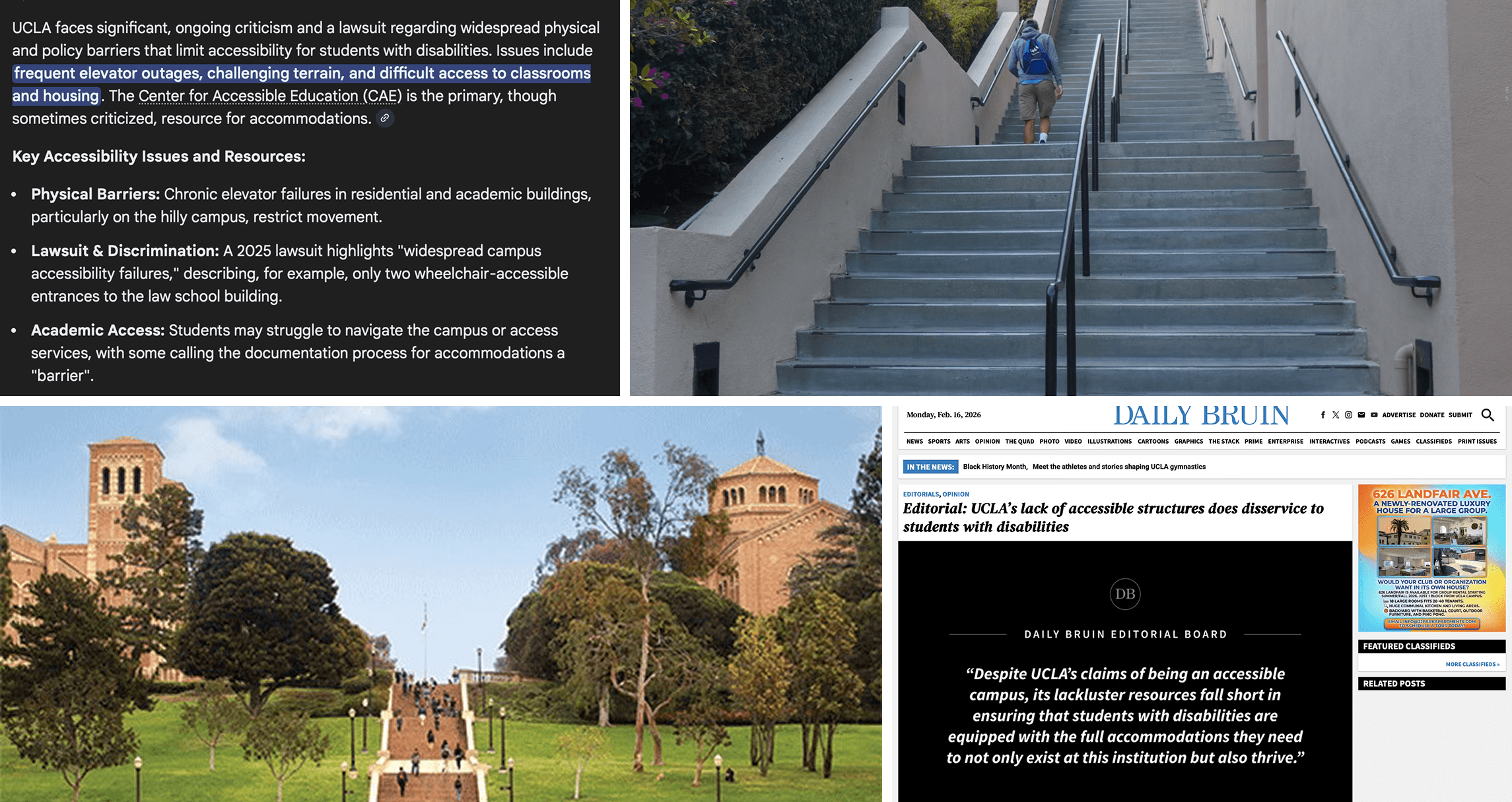
Students and faculty with disabilities at UCLA lack reliable, real-time information about accessible routes and facilities, hindering their ability to navigate campus independently and safely.
OUR GOAL
Design a navigation app that:
Allows users to customize routes based on their mobility needs, such as avoiding stairs or prioritizing ramps and elevators.
Surfaces clear, upfront information about accessible entrances, exits, and infrastructure so users know what to expect before choosing a route.
Enables users to report and view accessibility issues, like broken elevators, to prevent unexpected barriers mid-route.
Research
COMPETITIVE ANALYSIS
Evaluating Existing Accessibility Solutions
Over the course of one week, we evaluated a range of accessibility-focused and navigation tools to understand how existing products support users with mobility and accessibility needs.
Key Insights
Be My Eyes – Contextual, real-time cues (e.g., “approaching a ramp”) increase confidence by helping users anticipate their environment, not just react to it.
Google Maps – Familiar navigation patterns reduce cognitive load. Leveraging established map behaviors allows customization without forcing users to relearn core interactions.
Apple Maps – Clean visual hierarchy and predictable directions improve clarity, especially during time-sensitive navigation moments.
WheelMate – Surfacing accessibility infrastructure directly on the map (e.g., ramps, elevators, restrooms) empowers users to quickly identify spaces that meet their needs.


CONTEXTUAL INQUIRY
Understanding Campus Navigation Challenges
We conducted in-depth interviews with students experiencing temporary and permanent mobility challenges to understand how injuries impact campus navigation. Interviews focused on daily routines, academic challenges, mobility barriers, and existing navigation strategies.
Main Takeaways
Need for personalized navigation
“I don’t need the quickest route—I need the one that I can actually take on crutches.”
Lack of visibility into access points
“I won’t know if there’s a ramp or stairs until I’m already there, and by then it’s too late to turn back.”
Emotional and academic impact
“Missing one week of class put me so behind. It made me feel like campus just isn’t built for moments like this.”
USER FLOWS
Designing the Navigation Experience
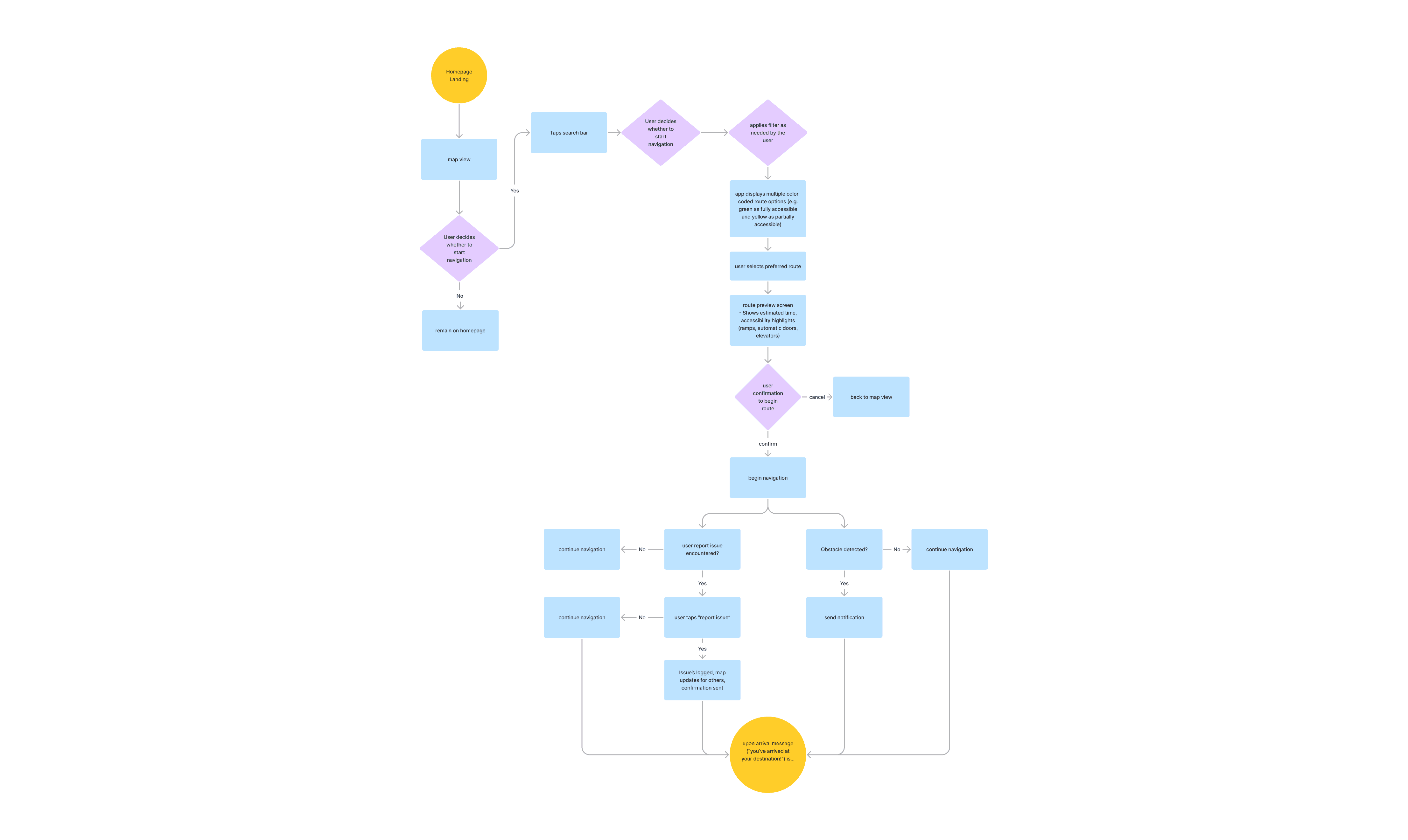
We mapped core user flows to ensure PathEase supports how students actually navigate campus with accessibility needs. These flows helped clarify key actions—setting filters, finding accessible routes, and reporting issues—while keeping the experience simple and low-effort.
LOW-FIDELITY PROTOTYPES
Personalized Accessibility Experience
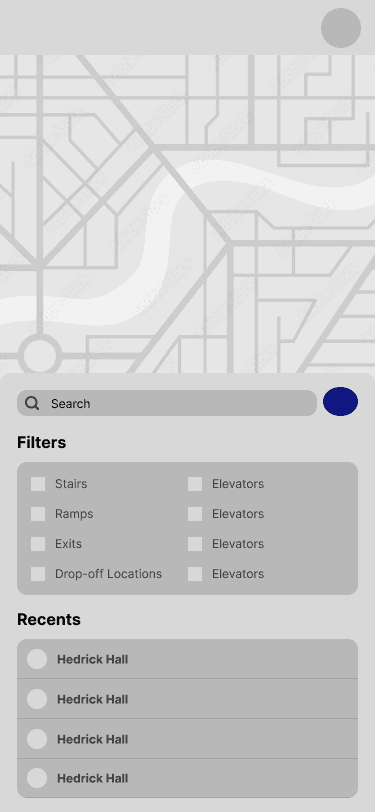
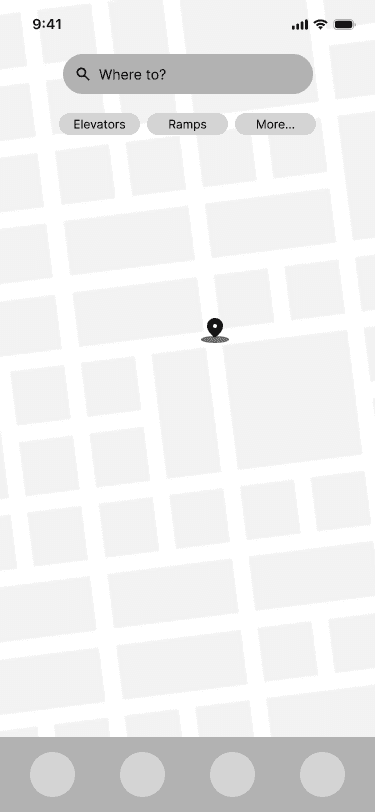
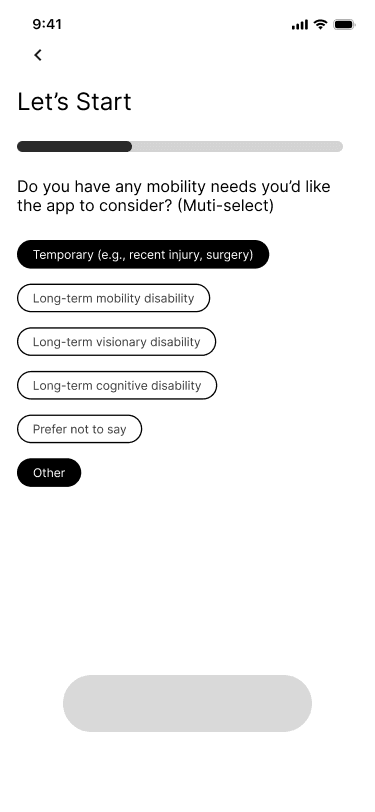
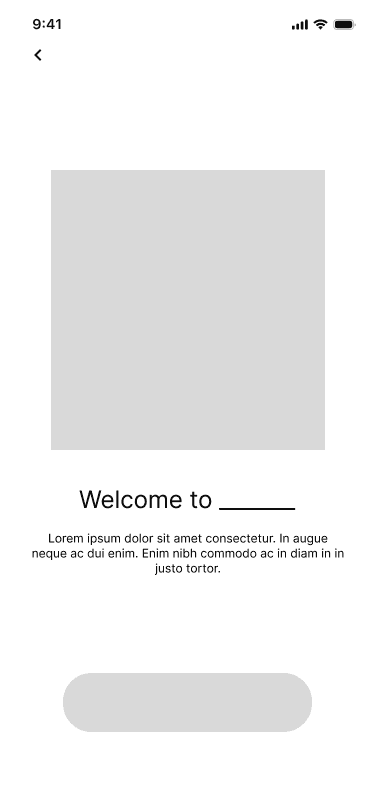
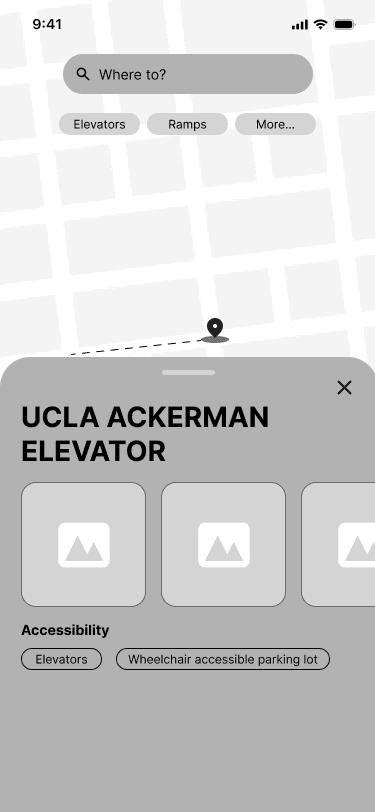
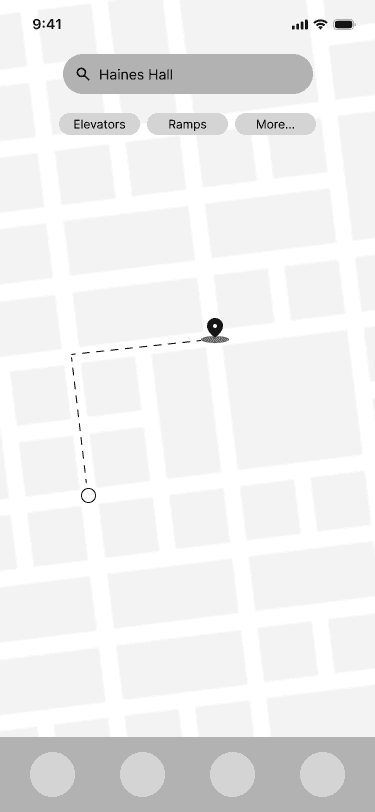
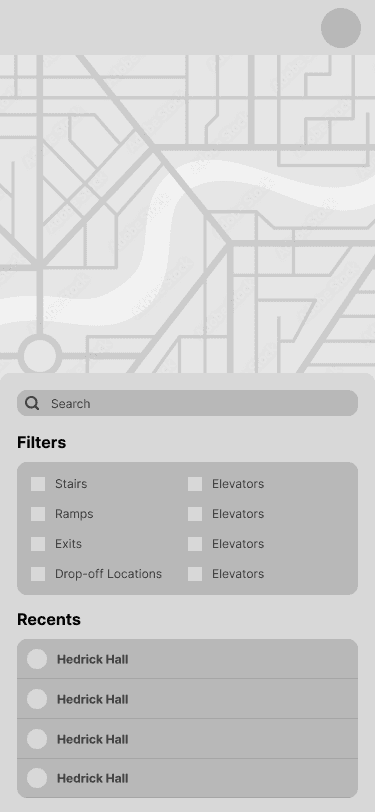
In the low-fidelity wireframing phase, my team and I worked closely together to explore how PathEase’s core features could come together in a way that felt simple and usable. We sketched and iterated quickly, focusing on making accessibility features easy to find and understand rather than getting caught up in visual details.



USABILITY TESTING
Validating the Experience
After developing low-fidelity wireframes, we conducted usability testing to evaluate interactions with PathEase’s core features. While users understood the value of personalized accessibility support, testing revealed friction around restrictive or unclear interactions—especially when users wanted quick information without committing to a full route.
Iterations Based on Feedback
1
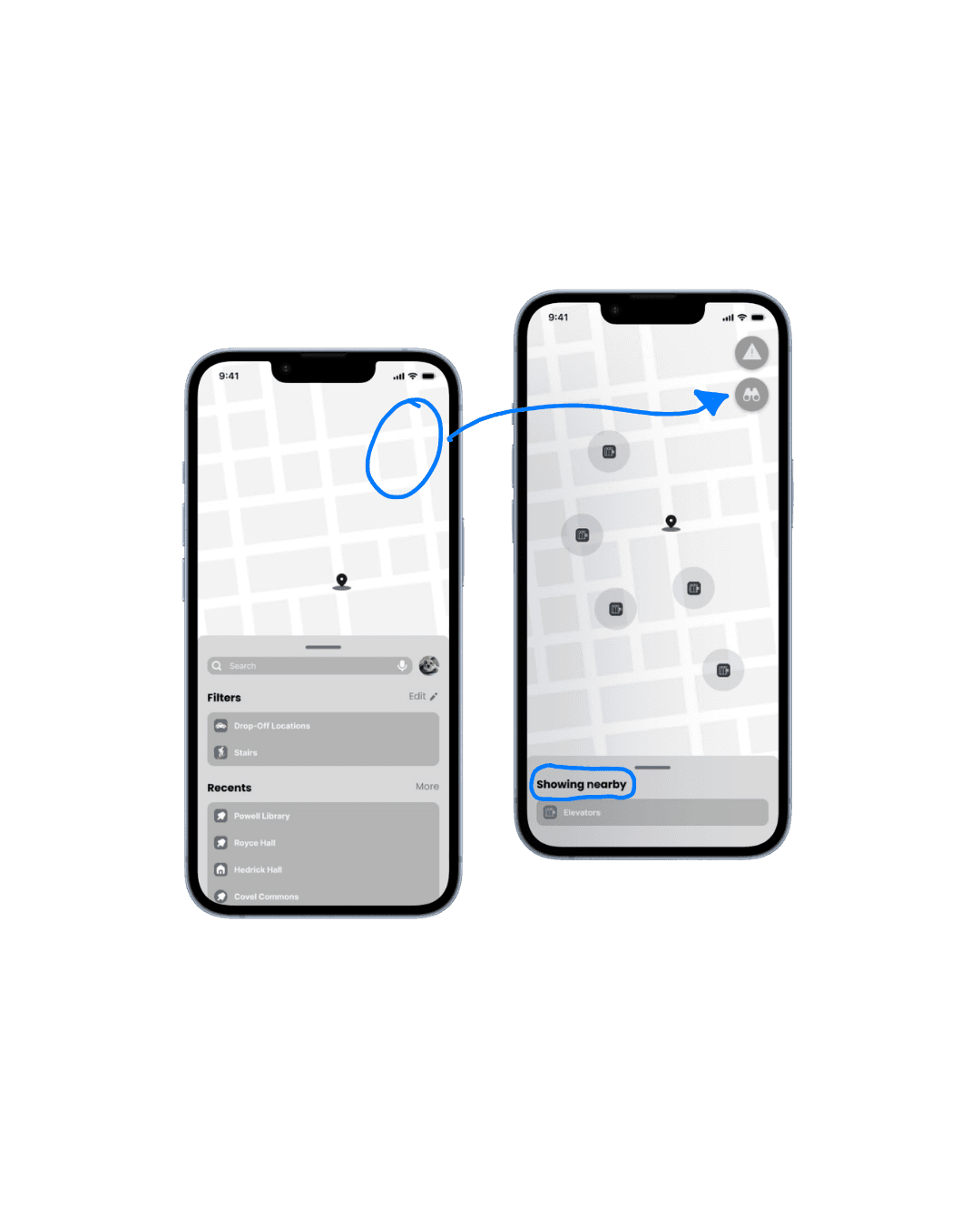
Added search for nearby accessibility features
Users wanted to find specific accessibility features (elevators, ramps) without committing to a full route.
In early prototypes, users had to begin navigation to locate accessibility features. We added a search feature so users can quickly view nearby elevators, ramps, and other resources without committing to a route.
2
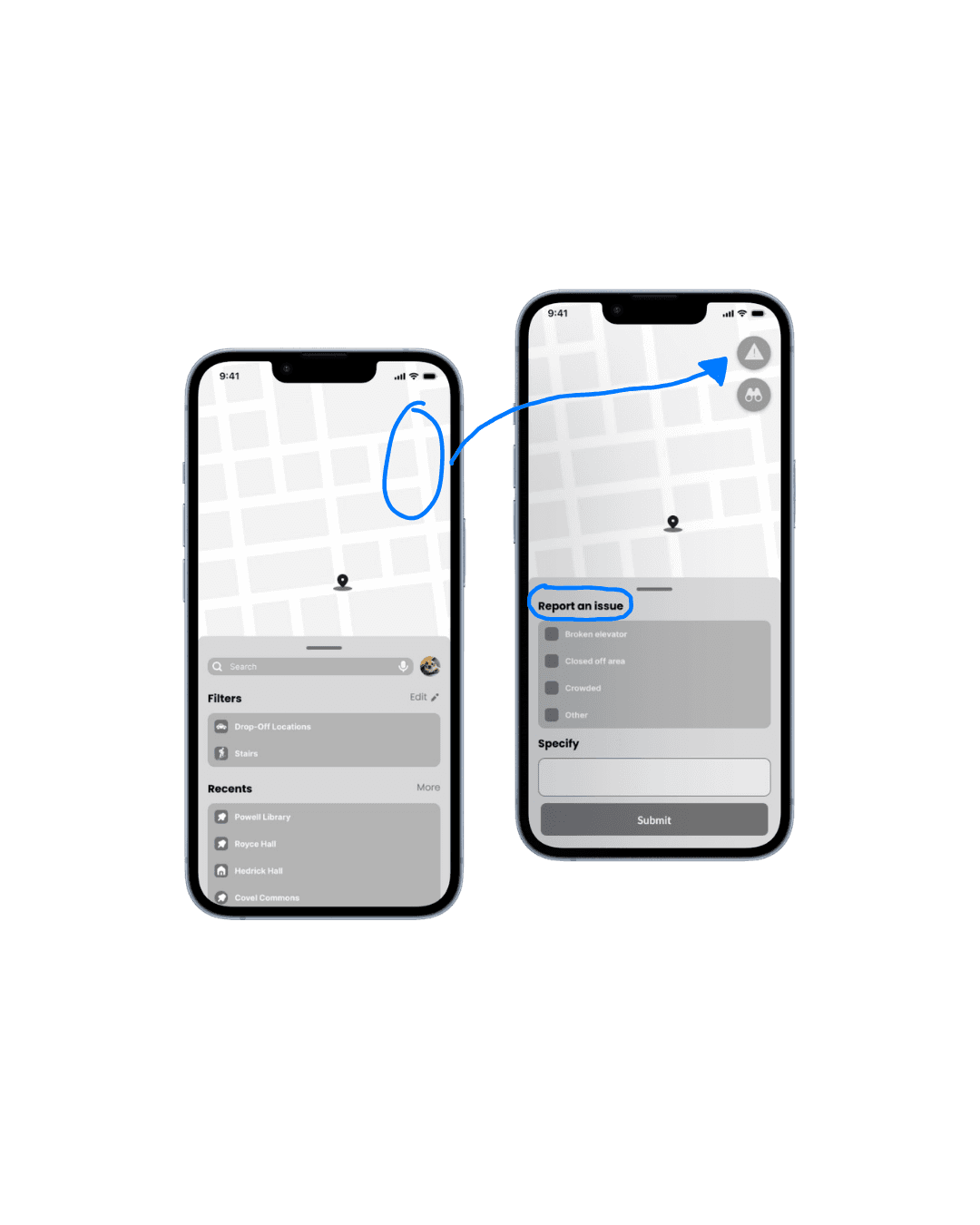
Added report issue feature
Users asked what would happen if an accessibility feature was unavailable.
We introduced a report issue feature so students can flag broken elevators, blocked paths, or crowded walkways and help others navigate more confidently.
3
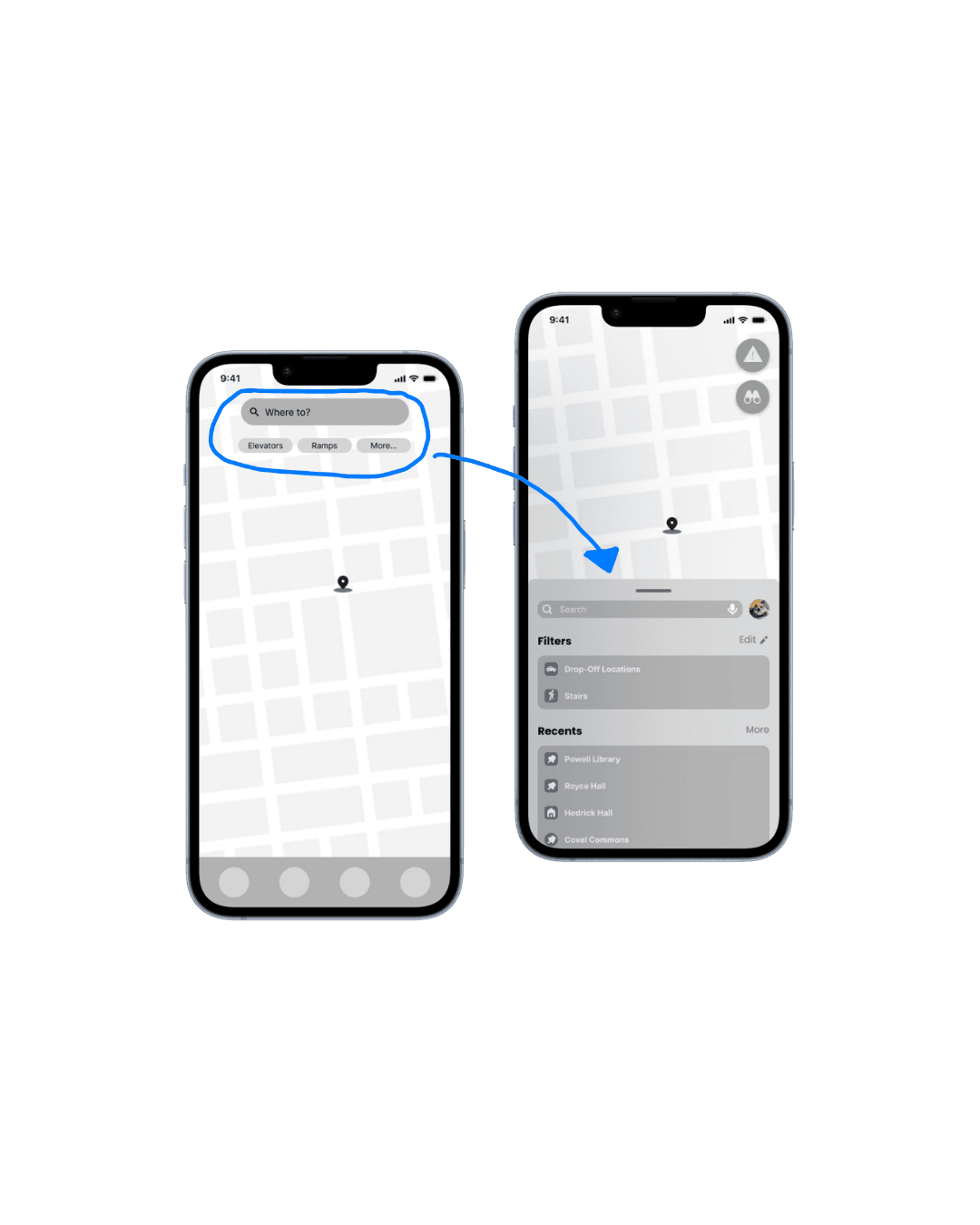
Removed unnecessary search tab
The extra search step created friction.
The initial design routed users through multiple search screens. We removed the redundant search tab to streamline the flow and reduce cognitive load.
Final Designs
DESIGN SYSTEM
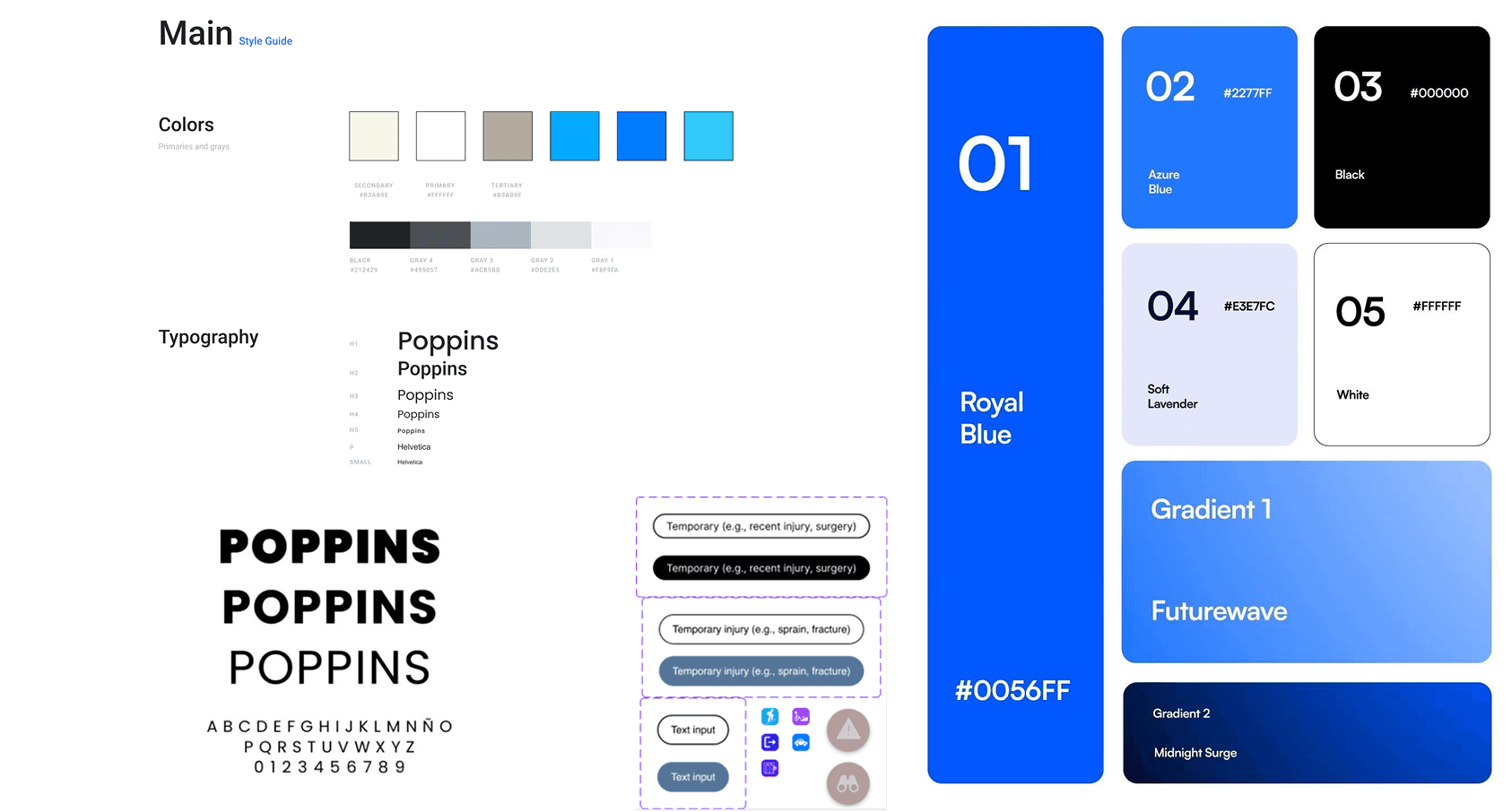
Establishing a Visual Foundation
The visual system was designed to reduce cognitive load by using familiar map patterns, high-contrast colors, and consistent iconography to highlight routes and accessibility resources.
Onboarding
We designed an onboarding flow that captures users’ accessibility needs without overwhelming them. Users can indicate temporary or long-term needs, select relevant categories, and choose preferred route features like ramps or elevators. PathEase also requests location access to support real-time, personalized navigation and nearby accessibility resources.
Sign-up Flow


Login Flow
Profile Management & Preferences
PathEase lets users update their profile as their needs change, including basic information and accessibility preferences such as required support and route settings. Users can also save favorite routes for frequently visited locations, making repeat trips easier. This flexibility supports both temporary injuries and long-term accessibility needs.
Quick Search & Reporting an Issue
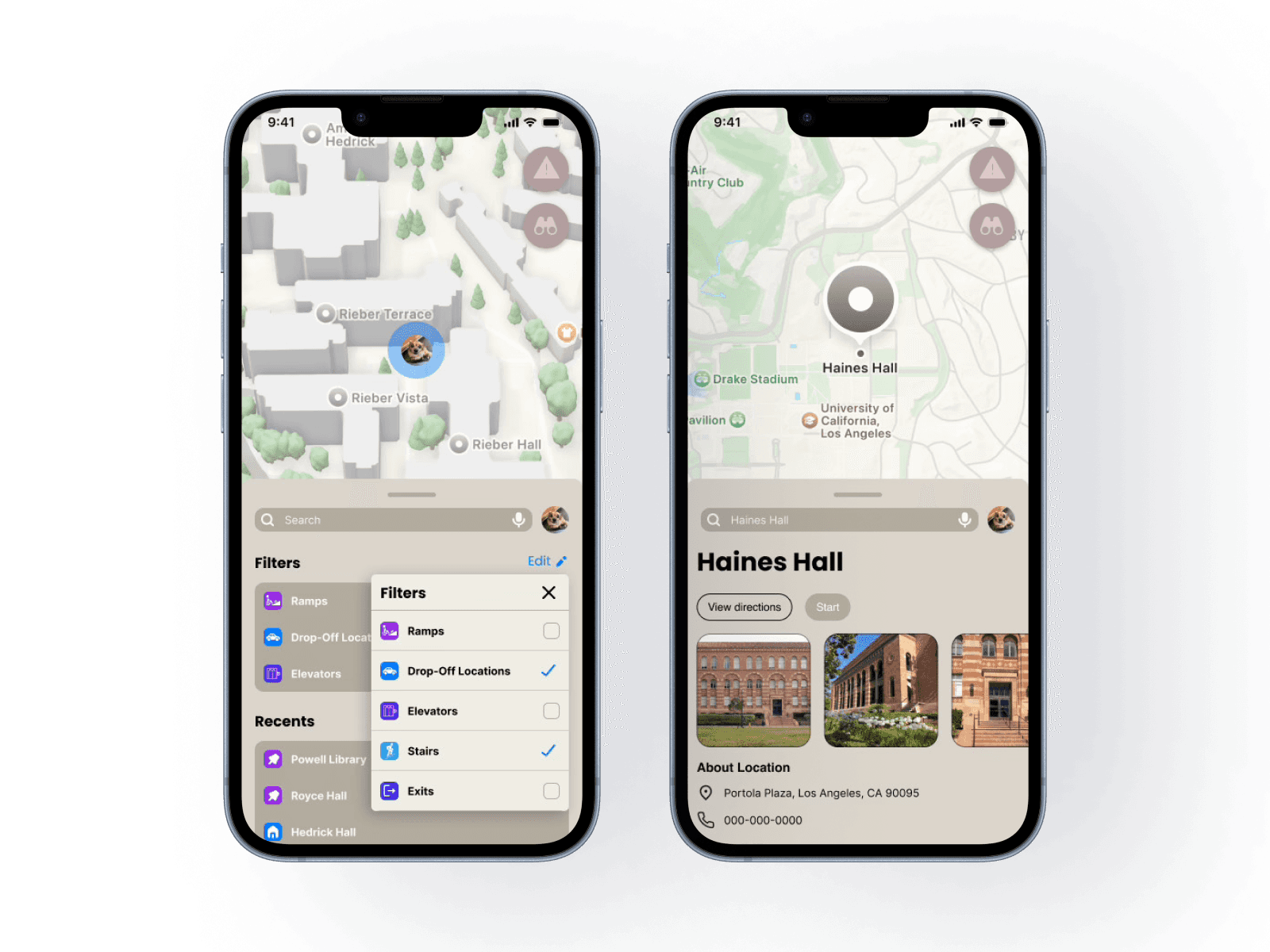
When selecting a route, PathEase lets users adjust accessibility filters in real time, such as avoiding stairs or prioritizing ramps and elevators. This flexibility acknowledges that mobility needs can change day to day and helps users choose routes that feel safe and realistic in the moment.
Quick Search
Reporting an Issue
Starting a Route
After selecting accessibility filters, users start guided navigation. The map shows a route to Haines Hall that prioritizes ramps, elevators, and drop-off locations, with accessible features highlighted in high-contrast colors for quick, confident navigation.
Reflections
I began designing PathEase as part of my onboarding project for LA Blueprint. The goal of this project was to align incoming design members on our design process and prepare us for working on real products for Los Angeles–based nonprofits. This experience served as my first opportunity to take a product from concept to prototype, moving through the full design process in a short time frame (1.5 weeks).
Working on PathEase taught me how to build a product from zero to one, balancing research, ideation, and execution while collaborating with other designers. Below are my key takeaways and reflections from the project.
HIGHLIGHTS
Staying Flexible With Ideas
Staying flexible with ideas allowed the product to evolve as we learned more from users, rather than committing to a single rigid solution.
Iterating Quickly Under Time Constraints
Completing the full design process within a week and a half strengthened my ability to prioritize and iterate quickly.
Communicating Design Rationale Clearly
Presenting the work to other designers and developers helped me communicate design rationale clearly and receive constructive feedback.
IMPROVEMENTS
Refining the Design System for Accessibility
I would further refine the design system, particularly the color palette, to better support users with visual impairments.
Who made PathEase come to life?
I loved getting the opportunity to work alongside my fellow designers, Shereen Ahmed, Ellie Huang, and Shawn Nguyen, and to learn from each of their perspectives throughout the project. We all put in a lot of effort to bring this onboarding project to life, and presenting it to the rest of LA Blueprint, including fellow design teams and developers, made the experience especially rewarding. Demo Day was a meaningful milestone, and I am grateful for the opportunity to be part of an organization that invests so intentionally in my growth as a designer. I am excited to continue collaborating with LA Blueprint members on We Explore Earth. Stay tuned for a fully fleshed out case study!
Nancy Rios
Designer

Ellie Huang
Designer
Shawn Nguyen
Designer
Shereen Ahmed
Designer
Role
Product Designer
Timeline
Oct 2025 - Dec 2025
Skills
Accessibility Design
User Research
Prototyping
Tools
Figma
Adobe Creative Cloud
OVERVIEW
What is PathEase?
PathEase is an accessibility-focused navigation app for UCLA students that uses customizable filters to generate routes tailored to individual mobility needs. By allowing users to prioritize options like ramps, elevators, or fewer stairs, it empowers students to navigate campus more independently and confidently.
THE PROBLEM
Navigating UCLA Without Reliable Accessibility Support
Students and faculty with disabilities at UCLA lack reliable, real-time information about accessible routes and facilities, hindering their ability to navigate campus independently and safely.
OUR GOAL
Design a navigation app that:
Allows users to customize routes based on their mobility needs, such as avoiding stairs or prioritizing ramps and elevators.
Surfaces clear, upfront information about accessible entrances, exits, and infrastructure so users know what to expect before choosing a route.
Enables users to report and view accessibility issues, like broken elevators, to prevent unexpected barriers mid-route.
Research
COMPETITIVE ANALYSIS
Evaluating Existing Accessibility Solutions
Over the course of one week, we evaluated a range of accessibility-focused and navigation tools to understand how existing products support users with mobility and accessibility needs.
Key Insights
Be My Eyes – Contextual, real-time cues (e.g., “approaching a ramp”) increase confidence by helping users anticipate their environment, not just react to it.
Google Maps – Familiar navigation patterns reduce cognitive load. Leveraging established map behaviors allows customization without forcing users to relearn core interactions.
Apple Maps – Clean visual hierarchy and predictable directions improve clarity, especially during time-sensitive navigation moments.
WheelMate – Surfacing accessibility infrastructure directly on the map (e.g., ramps, elevators, restrooms) empowers users to quickly identify spaces that meet their needs.
CONTEXTUAL INQUIRY
Understanding Campus Navigation Challenges
We conducted in-depth interviews with students experiencing temporary and permanent mobility challenges to understand how injuries impact campus navigation. Interviews focused on daily routines, academic challenges, mobility barriers, and existing navigation strategies.
Main Takeaways
Need for personalized navigation
“I don’t need the quickest route—I need the one that I can actually take on crutches.”
Lack of visibility into access points
“I won’t know if there’s a ramp or stairs until I’m already there, and by then it’s too late to turn back.”
Emotional and academic impact
“Missing one week of class put me so behind. It made me feel like campus just isn’t built for moments like this.”
USER FLOWS
Designing the Navigation Experience
We mapped core user flows to ensure PathEase supports how students actually navigate campus with accessibility needs. These flows helped clarify key actions—setting filters, finding accessible routes, and reporting issues—while keeping the experience simple and low-effort.
LOW-FIDELITY PROTOTYPES
Personalized Accessibility Experience
In the low-fidelity wireframing phase, my team and I worked closely together to explore how PathEase’s core features could come together in a way that felt simple and usable. We sketched and iterated quickly, focusing on making accessibility features easy to find and understand rather than getting caught up in visual details.
USABILITY TESTING
Validating the Experience
After developing low-fidelity wireframes, we conducted usability testing to evaluate interactions with PathEase’s core features. While users understood the value of personalized accessibility support, testing revealed friction around restrictive or unclear interactions—especially when users wanted quick information without committing to a full route.
Iterations Based on Feedback
1
Added search for nearby accessibility features
Users wanted to find specific accessibility features (elevators, ramps) without committing to a full route.
In early prototypes, users had to begin navigation to locate accessibility features. We added a search feature so users can quickly view nearby elevators, ramps, and other resources without committing to a route.
2
Added report issue feature
Users asked what would happen if an accessibility feature was unavailable.
We introduced a report issue feature so students can flag broken elevators, blocked paths, or crowded walkways and help others navigate more confidently.
3
Removed unnecessary search tab
The extra search step created friction.
The initial design routed users through multiple search screens. We removed the redundant search tab to streamline the flow and reduce cognitive load.
Final Designs
DESIGN SYSTEM
Establishing a Visual Foundation
The visual system was designed to reduce cognitive load by using familiar map patterns, high-contrast colors, and consistent iconography to highlight routes and accessibility resources.
Onboarding
We designed an onboarding flow that captures users’ accessibility needs without overwhelming them. Users can indicate temporary or long-term needs, select relevant categories, and choose preferred route features like ramps or elevators. PathEase also requests location access to support real-time, personalized navigation and nearby accessibility resources.
Sign-up Flow
Login Flow
Profile Management & Preferences
PathEase lets users update their profile as their needs change, including basic information and accessibility preferences such as required support and route settings. Users can also save favorite routes for frequently visited locations, making repeat trips easier. This flexibility supports both temporary injuries and long-term accessibility needs.
Quick Search & Reporting an Issue
When selecting a route, PathEase lets users adjust accessibility filters in real time, such as avoiding stairs or prioritizing ramps and elevators. This flexibility acknowledges that mobility needs can change day to day and helps users choose routes that feel safe and realistic in the moment.
Quick Search
Reporting an Issue
Starting a Route
After selecting accessibility filters, users start guided navigation. The map shows a route to Haines Hall that prioritizes ramps, elevators, and drop-off locations, with accessible features highlighted in high-contrast colors for quick, confident navigation.
Reflections
I began designing PathEase as part of my onboarding project for LA Blueprint. The goal of this project was to align incoming design members on our design process and prepare us for working on real products for Los Angeles–based nonprofits. This experience served as my first opportunity to take a product from concept to prototype, moving through the full design process in a short time frame (1.5 weeks).
Working on PathEase taught me how to build a product from zero to one, balancing research, ideation, and execution while collaborating with other designers. Below are my key takeaways and reflections from the project.
HIGHLIGHTS
Staying Flexible With Ideas
Staying flexible with ideas allowed the product to evolve as we learned more from users, rather than committing to a single rigid solution.
Iterating Quickly Under Time Constraints
Completing the full design process within a week and a half strengthened my ability to prioritize and iterate quickly.
Communicating Design Rationale Clearly
Presenting the work to other designers and developers helped me communicate design rationale clearly and receive constructive feedback.
IMPROVEMENTS
Refining the Design System for Accessibility
I would further refine the design system, particularly the color palette, to better support users with visual impairments.
Who made PathEase come to life?
I loved getting the opportunity to work alongside my fellow designers, Shereen Ahmed, Ellie Huang, and Shawn Nguyen, and to learn from each of their perspectives throughout the project. We all put in a lot of effort to bring this onboarding project to life, and presenting it to the rest of LA Blueprint, including fellow design teams and developers, made the experience especially rewarding. Demo Day was a meaningful milestone, and I am grateful for the opportunity to be part of an organization that invests so intentionally in my growth as a designer. I am excited to continue collaborating with LA Blueprint members on We Explore Earth. Stay tuned for a fully fleshed out case study!
Nancy Rios
Designer
Ellie Huang
Designer
Shawn Nguyen
Designer
Shereen Ahmed
Designer
PathEase
An accessibility-focused navigation app for UCLA students.
Role
Product Designer
Timeline
Oct 2025 - Dec 2025
Skills
Accessibility Design
User Research
Prototyping
Tools
Figma
Adobe Creative Cloud
OVERVIEW
What is PathEase?
PathEase is an accessibility-focused navigation app for UCLA students that uses customizable filters to generate routes tailored to individual mobility needs. By allowing users to prioritize options like ramps, elevators, or fewer stairs, it empowers students to navigate campus more independently and confidently.
THE PROBLEM
Navigating UCLA Without Reliable Accessibility Support
Students and faculty with disabilities at UCLA lack reliable, real-time information about accessible routes and facilities, hindering their ability to navigate campus independently and safely.
OUR GOAL
Design a navigation app that:
Allows users to customize routes based on their mobility needs, such as avoiding stairs or prioritizing ramps and elevators.
Surfaces clear, upfront information about accessible entrances, exits, and infrastructure so users know what to expect before choosing a route.
Enables users to report and view accessibility issues, like broken elevators, to prevent unexpected barriers mid-route.
Research
COMPETITIVE ANALYSIS
Evaluating Existing Accessibility Solutions
Over the course of one week, we evaluated a range of accessibility-focused and navigation tools to understand how existing products support users with mobility and accessibility needs.
Key Insights
Be My Eyes – Contextual, real-time cues (e.g., “approaching a ramp”) increase confidence by helping users anticipate their environment, not just react to it.
Google Maps – Familiar navigation patterns reduce cognitive load. Leveraging established map behaviors allows customization without forcing users to relearn core interactions.
Apple Maps – Clean visual hierarchy and predictable directions improve clarity, especially during time-sensitive navigation moments.
WheelMate – Surfacing accessibility infrastructure directly on the map (e.g., ramps, elevators, restrooms) empowers users to quickly identify spaces that meet their needs.
CONTEXTUAL INQUIRY
Understanding Campus Navigation Challenges
We conducted in-depth interviews with students experiencing temporary and permanent mobility challenges to understand how injuries impact campus navigation. Interviews focused on daily routines, academic challenges, mobility barriers, and existing navigation strategies.
Main Takeaways
Need for personalized navigation
“I don’t need the quickest route—I need the one that I can actually take on crutches.”
Lack of visibility into access points
“I won’t know if there’s a ramp or stairs until I’m already there, and by then it’s too late to turn back.”
Emotional and academic impact
“Missing one week of class put me so behind. It made me feel like campus just isn’t built for moments like this.”
USER FLOWS
Designing the Navigation Experience
We mapped core user flows to ensure PathEase supports how students actually navigate campus with accessibility needs. These flows helped clarify key actions—setting filters, finding accessible routes, and reporting issues—while keeping the experience simple and low-effort.
LOW-FIDELITY PROTOTYPES
Personalized Accessibility Experience
In the low-fidelity wireframing phase, my team and I worked closely together to explore how PathEase’s core features could come together in a way that felt simple and usable. We sketched and iterated quickly, focusing on making accessibility features easy to find and understand rather than getting caught up in visual details.
USABILITY TESTING
Validating the Experience
After developing low-fidelity wireframes, we conducted usability testing to evaluate interactions with PathEase’s core features. While users understood the value of personalized accessibility support, testing revealed friction around restrictive or unclear interactions—especially when users wanted quick information without committing to a full route.
Iterations Based on Feedback
1
Added search for nearby accessibility features
Users wanted to find specific accessibility features (elevators, ramps) without committing to a full route.
In early prototypes, users had to begin navigation to locate accessibility features. We added a search feature so users can quickly view nearby elevators, ramps, and other resources without committing to a route.
2
Added report issue feature
Users asked what would happen if an accessibility feature was unavailable.
We introduced a report issue feature so students can flag broken elevators, blocked paths, or crowded walkways and help others navigate more confidently.
3
Removed unnecessary search tab
The extra search step created friction.
The initial design routed users through multiple search screens. We removed the redundant search tab to streamline the flow and reduce cognitive load.
Final Designs
DESIGN SYSTEM
Establishing a Visual Foundation
The visual system was designed to reduce cognitive load by using familiar map patterns, high-contrast colors, and consistent iconography to highlight routes and accessibility resources.
Onboarding
We designed an onboarding flow that captures users’ accessibility needs without overwhelming them. Users can indicate temporary or long-term needs, select relevant categories, and choose preferred route features like ramps or elevators. PathEase also requests location access to support real-time, personalized navigation and nearby accessibility resources.
Sign-up Flow
Login Flow
Profile Management & Preferences
PathEase lets users update their profile as their needs change, including basic information and accessibility preferences such as required support and route settings. Users can also save favorite routes for frequently visited locations, making repeat trips easier. This flexibility supports both temporary injuries and long-term accessibility needs.
Quick Search & Reporting an Issue
When selecting a route, PathEase lets users adjust accessibility filters in real time, such as avoiding stairs or prioritizing ramps and elevators. This flexibility acknowledges that mobility needs can change day to day and helps users choose routes that feel safe and realistic in the moment.
Quick Search
Reporting an Issue
Starting a Route
After selecting accessibility filters, users start guided navigation. The map shows a route to Haines Hall that prioritizes ramps, elevators, and drop-off locations, with accessible features highlighted in high-contrast colors for quick, confident navigation.
Reflections
I began designing PathEase as part of my onboarding project for LA Blueprint. The goal of this project was to align incoming design members on our design process and prepare us for working on real products for Los Angeles–based nonprofits. This experience served as my first opportunity to take a product from concept to prototype, moving through the full design process in a short time frame (1.5 weeks).
Working on PathEase taught me how to build a product from zero to one, balancing research, ideation, and execution while collaborating with other designers. Below are my key takeaways and reflections from the project.
HIGHLIGHTS
Staying Flexible With Ideas
Staying flexible with ideas allowed the product to evolve as we learned more from users, rather than committing to a single rigid solution.
Iterating Quickly Under Time Constraints
Completing the full design process within a week and a half strengthened my ability to prioritize and iterate quickly.
Communicating Design Rationale Clearly
Presenting the work to other designers and developers helped me communicate design rationale clearly and receive constructive feedback.
IMPROVEMENTS
Refining the Design System for Accessibility
I would further refine the design system, particularly the color palette, to better support users with visual impairments.
Who made PathEase come to life?
I loved getting the opportunity to work alongside my fellow designers, Shereen Ahmed, Ellie Huang, and Shawn Nguyen, and to learn from each of their perspectives throughout the project. We all put in a lot of effort to bring this onboarding project to life, and presenting it to the rest of LA Blueprint, including fellow design teams and developers, made the experience especially rewarding. Demo Day was a meaningful milestone, and I am grateful for the opportunity to be part of an organization that invests so intentionally in my growth as a designer. I am excited to continue collaborating with LA Blueprint members on We Explore Earth. Stay tuned for a fully fleshed out case study!
Nancy Rios
Designer
Ellie Huang
Designer
Shawn Nguyen
Designer
Shereen Ahmed
Designer