BruinPlan
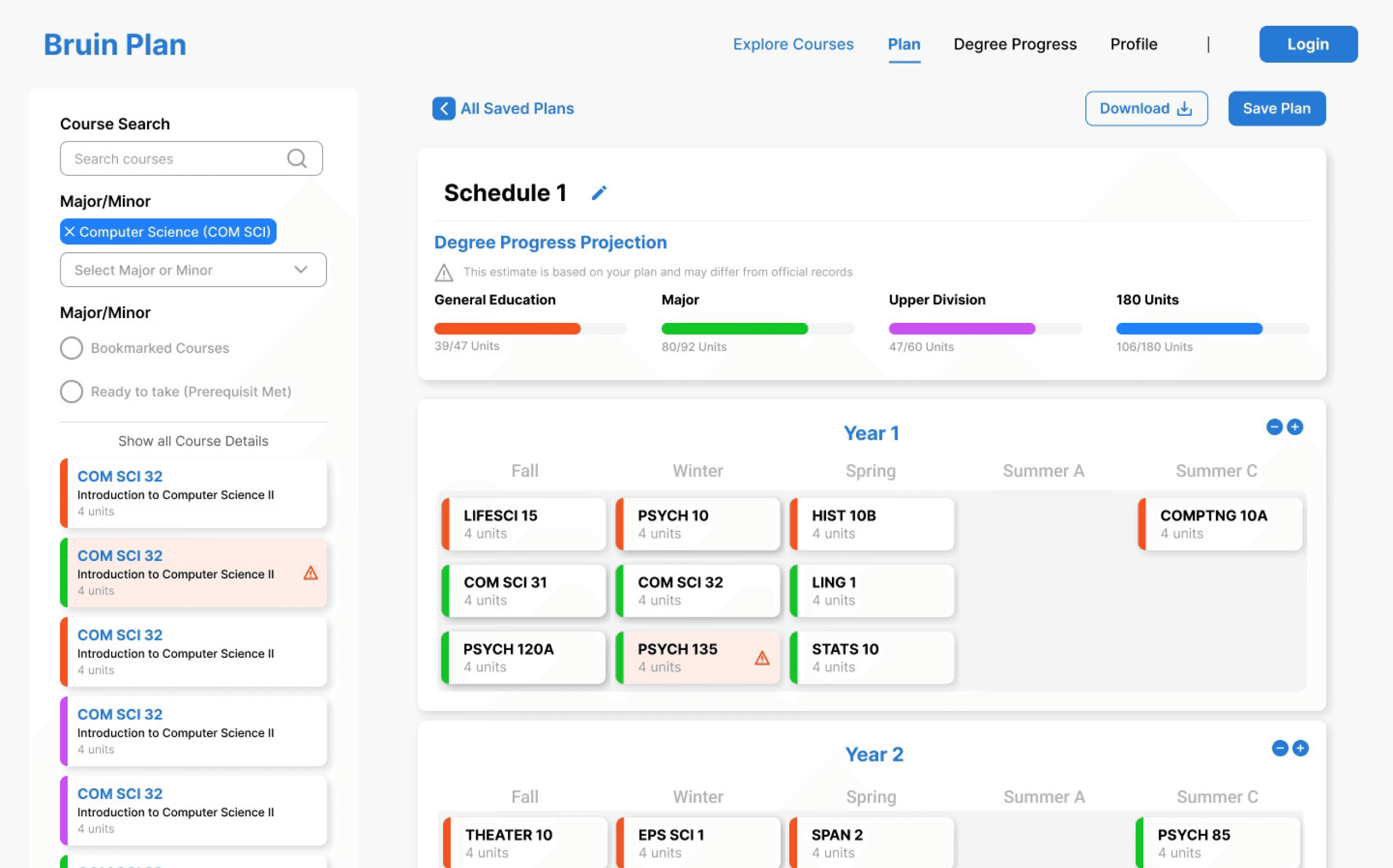
A redesigned enrollment tool.
Role
Product Designer
Timeline
May 2025 - Present
Skills
User Research
Prototyping
Tools
Figma
Figjam
OVERVIEW
What is BruinPlan?
BruinPlan is a course-planning platform designed to help UCLA students plan their academic journey in one place. The product consolidates long-term degree planning, quarter scheduling, degree audit tracking, and course evaluation into a single, streamlined experience—reducing the friction caused by navigating multiple disconnected systems.
THE PROBLEM
A Broken Planning Experience
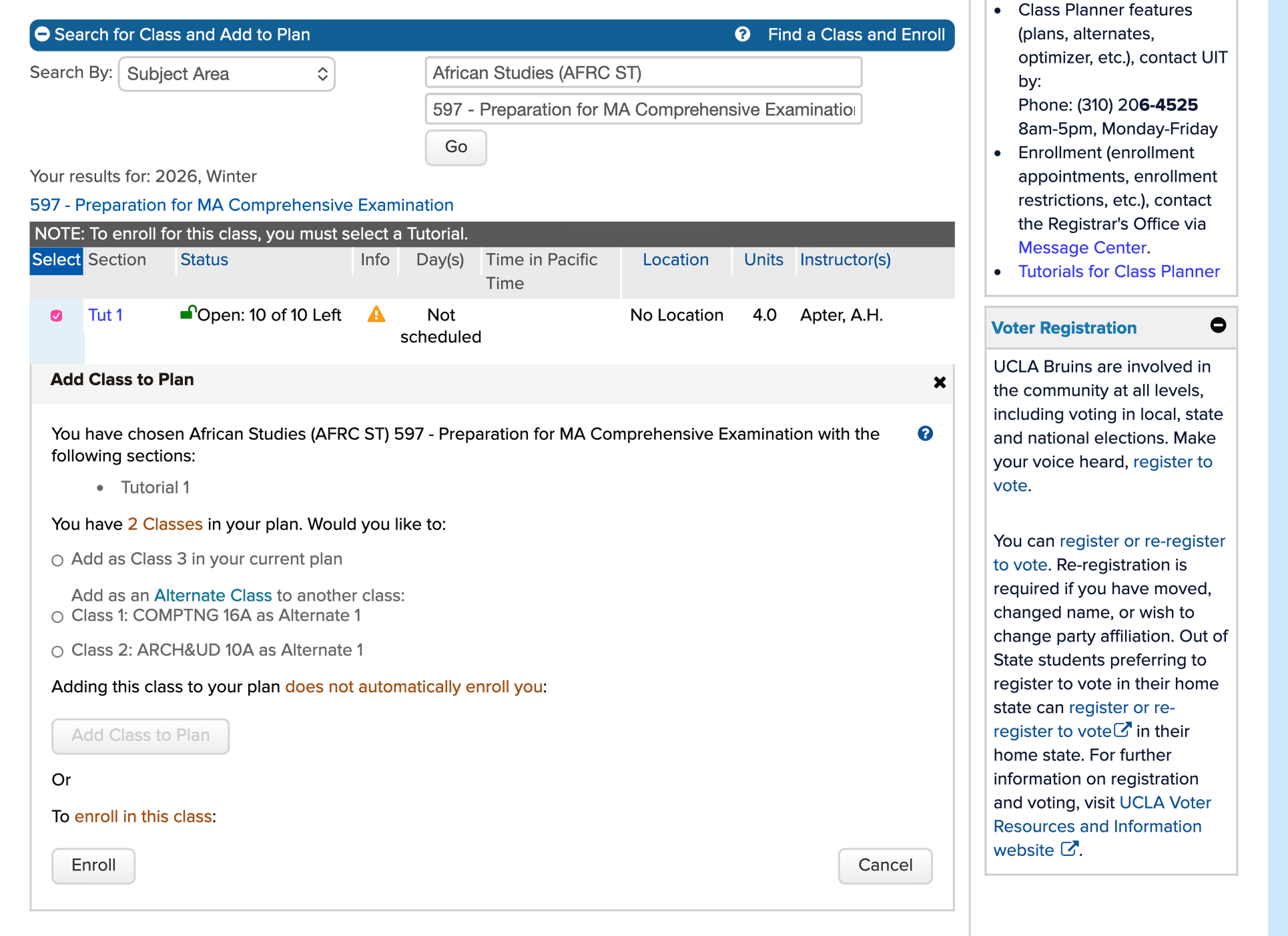
UCLA students currently rely on a fragmented workflow to plan their courses. Planning typically requires jumping between MyUCLA, the Degree Audit Report (DAR), and third-party tools like BruinWalk for professor and class ratings.
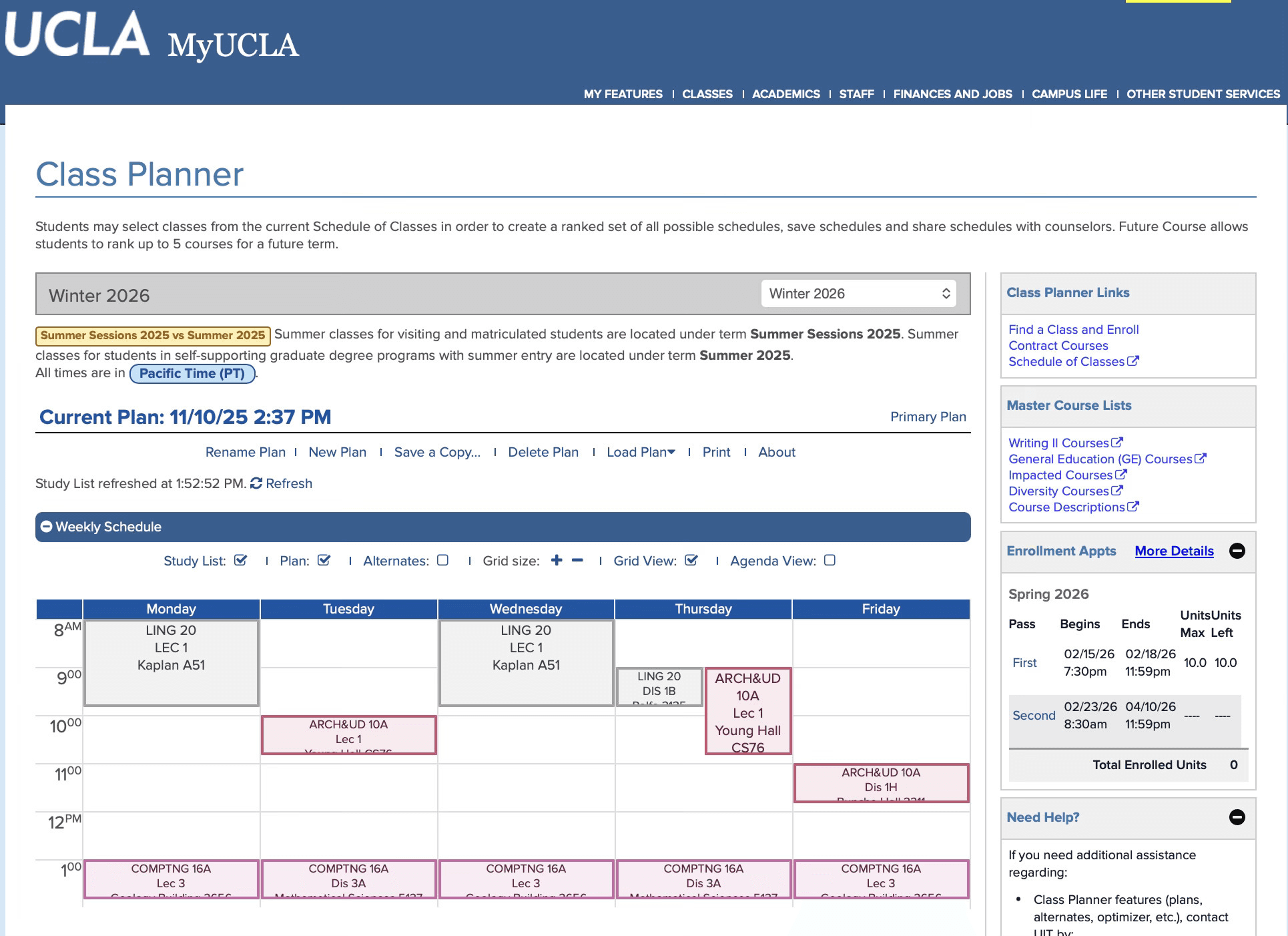
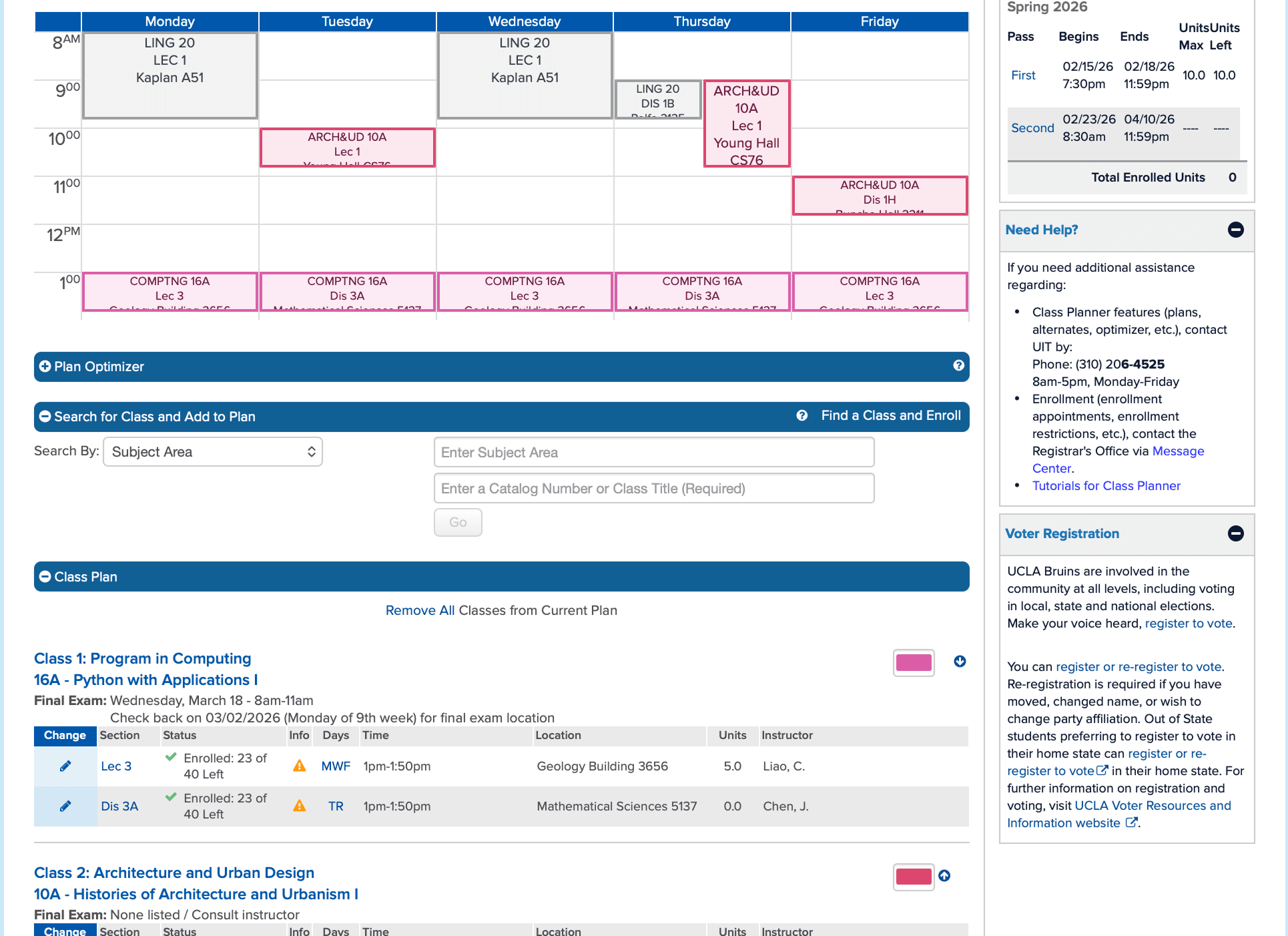
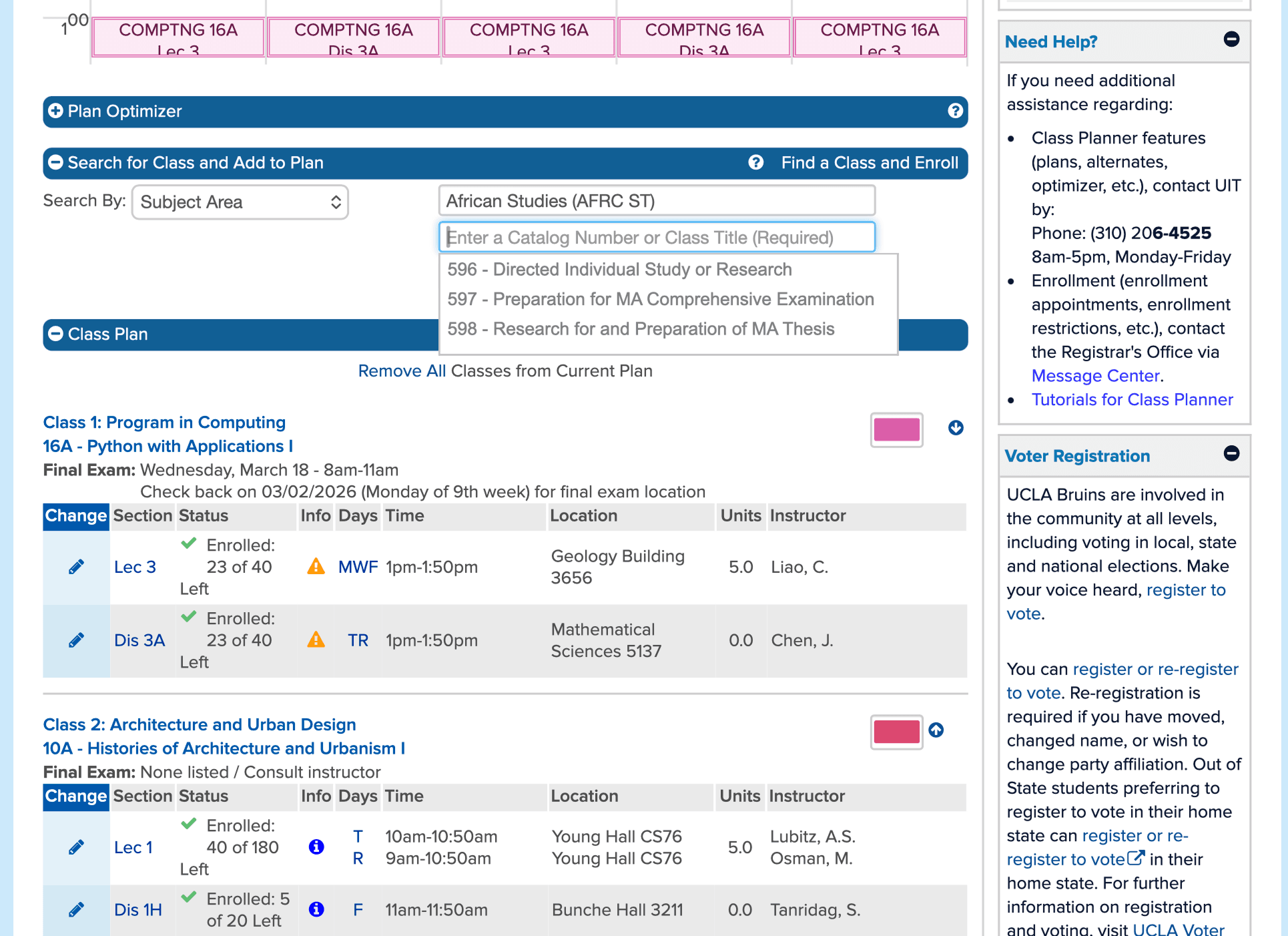
Students described MyUCLA as cluttered and difficult to navigate, often leaving them with multiple tabs open just to answer basic questions like:
What classes do I still need to graduate?
How does this course fit into my long-term plan?
Is this class worth taking with this professor?
MyUCLA UI:
OUR GOAL
Design a unified planning experience that:
Reduces the number of tools and tabs students need
Makes degree progress easy to understand at a glance
Allows students to plan both quarter-by-quarter and across four years
Simplifies the flow from course discovery → planning → graduation tracking
Success was defined qualitatively as fewer clicks, fewer tabs, and a smoother planning flow that mirrors how students actually think about their academic futures.
CONSTRAINTS
Balancing accuracy, clarity, and technical feasibility
Degree Audit Report integration: DAR is a UCLA-owned system with rigid formatting and data constraints.
Course catalog complexity: Supporting the full UCLA course catalog while keeping the interface lightweight.
Work in progress: The product is still in development, so success metrics and adoption data are not yet available.
These constraints required careful design decisions to balance accuracy, clarity, and technical feasibility.
Research
COMPETITIVE ANALYSIS
Evaluating Existing Course Planning Platforms
We evaluated a wide range of course planning tools such as Carta, Berkeley Time, and the MyUCLA class planner.
Here were our key insights:
Carta
Surface nearby accessibility infrastructure on the map so users can quickly locate resources that match their mobility needs.
Berkeley Time
Integrate environment-aware cues (e.g., “approaching a ramp”) so users understand what accessibility features are nearby & what they’re heading toward.
UCLA Study List
Build on common map/directions patterns to reduce learning curve while tailoring routes to accessibility needs.
Key Gap Identified:
Each tool answers one question well, but none support the full decision-making journey:
"What should I take, when should I take it, and how does it get me to graduation?”
CONTEXTUAL INQUIRY
Understanding Enrollment Challenges
To understand how students actually plan courses, we gathered qualitative feedback from UCLA students about their current workflows, frustrations, and priorities.
Key Behaviors Observed
Fragmented Planning Across Multiple Tools
Students reported keeping several tabs open at once—MyUCLA for enrollment, the Degree Audit Report for requirements, and BruinWalk for professor ratings. Planning required constantly switching contexts and mentally stitching information together, making the process feel disjointed and time-consuming.
Manual & Error-Prone Tracking
Because existing systems don’t support holistic planning, students often resorted to manually checking off requirements or tracking progress outside of official tools. This increased the risk of mistakes and made it difficult to trust whether they were actually on track to graduate.
Short-Term Decisions With Long-Term Uncertainty
Course selection was often driven by immediate availability rather than long-term strategy. Without a clear four-year view, students lacked confidence that their quarter-by-quarter choices would support timely graduation or balanced workloads.
Pain Points
From interviews and informal testing, several themes consistently emerged:
Cognitive overload: Students felt overwhelmed by dense information and unclear hierarchy in existing tools.
Lack of visibility: It was difficult to understand how individual courses contributed to graduation progress.
Disconnected systems: Students had to mentally stitch together information from multiple sources.
Uncertainty: Many students were unsure whether their plans would actually keep them on track to graduate.
SOLUTION GOALS
Translating Insights Into Solutions
Guided by our research insights, we defined a set of solution goals to ensure BruinPlan meaningfully supports students navigating the enrollment and course planning process.
01
Four-year planner prioritized
Based on testing, long-term planning became the primary interface rather than an afterthought.
02
Visual progress tracking
Degree requirements were translated into color-coded, scannable indicators.
03
Integrated course context
Ratings, prerequisites, and enrollment status were surfaced at the point of decision-making.
04
Reduced clicks
Adding courses to plans was designed to be fast and reversible, encouraging exploration.
USER FLOWS
Designing the Navigation Experience
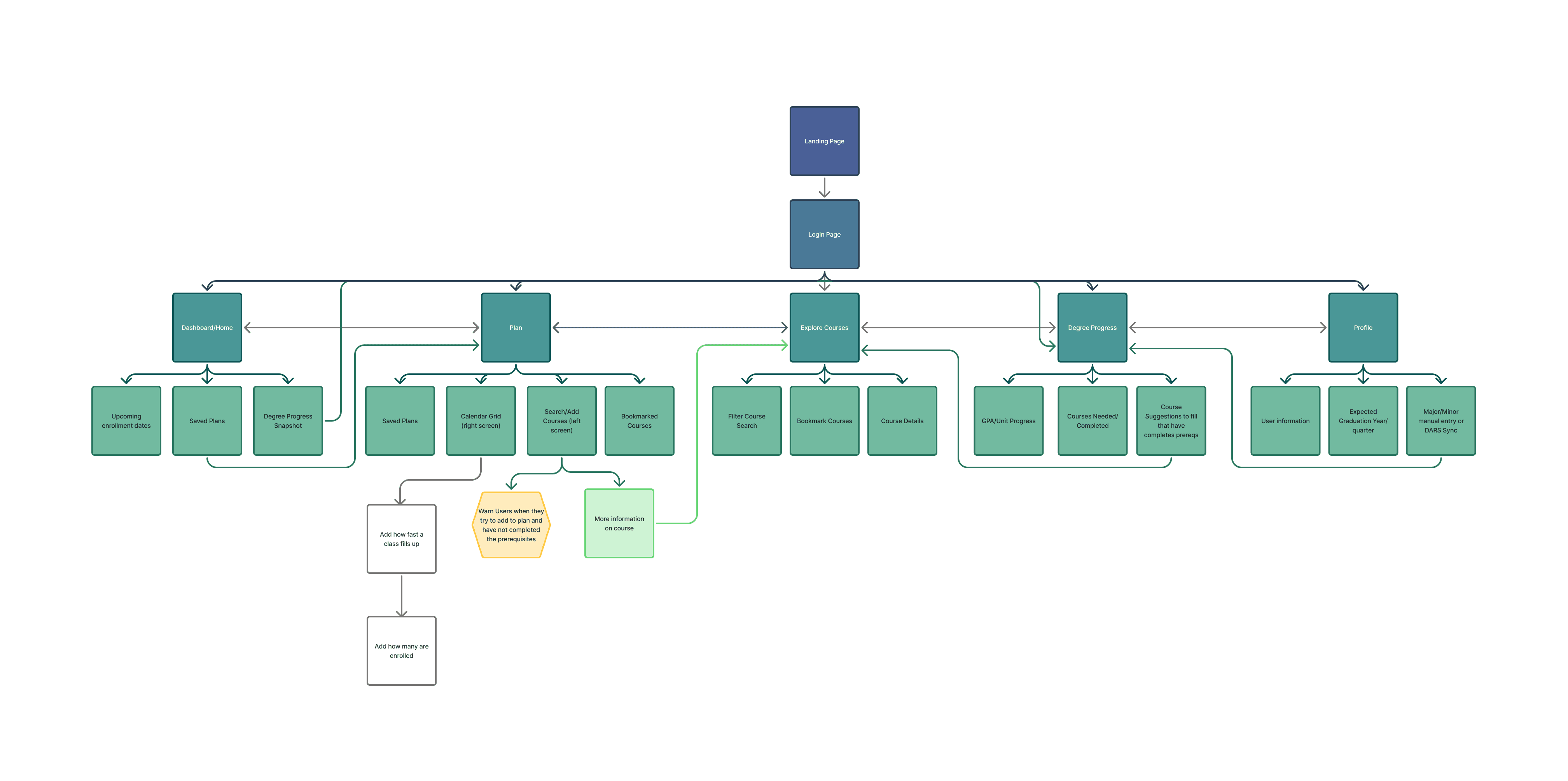
We mapped core user flows to ensure BruinPlan supports how students actually navigate the enrollment system.
LOW-FIDELITY PROTOTYPES
Staying Flexible With Design Solutions
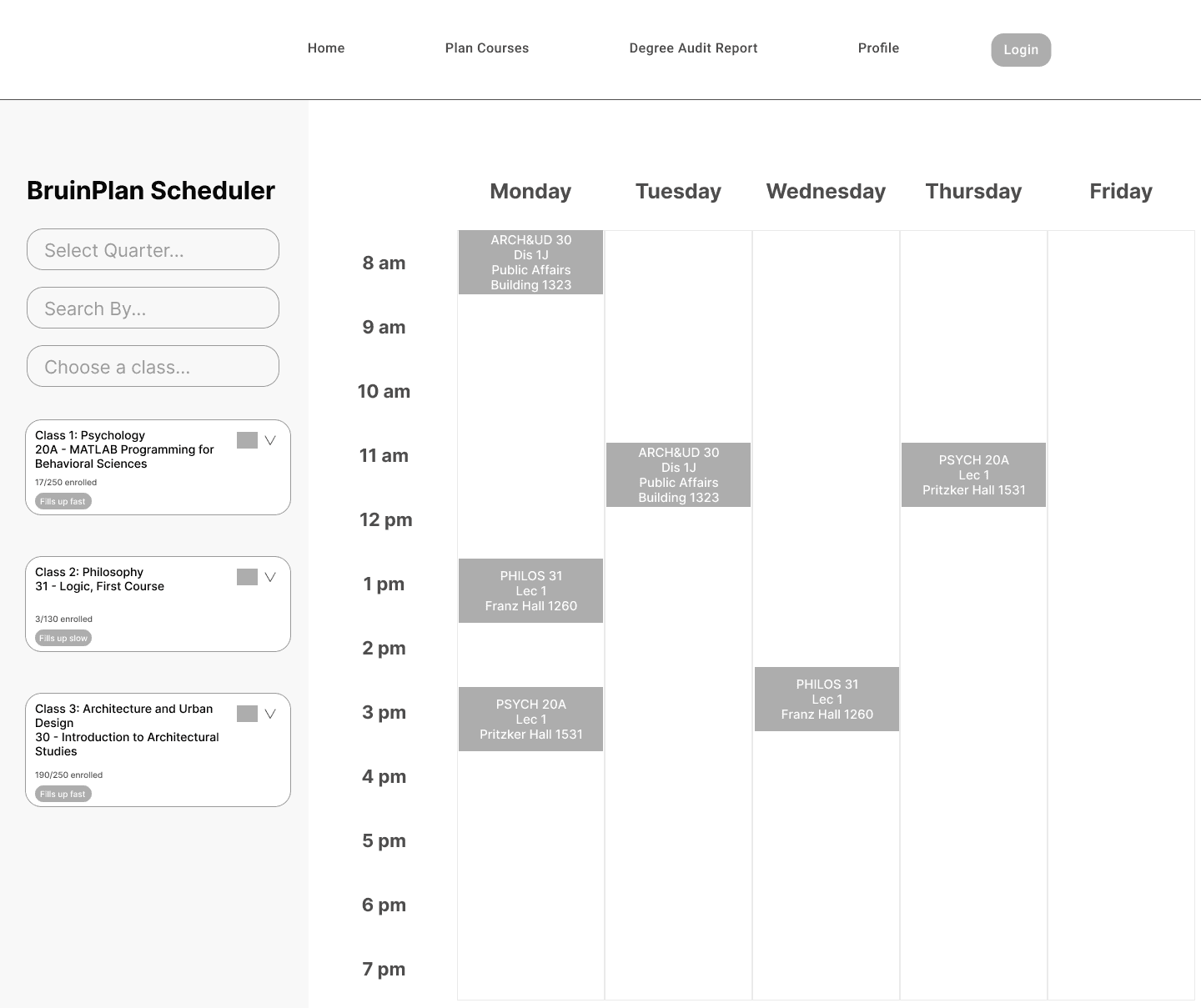
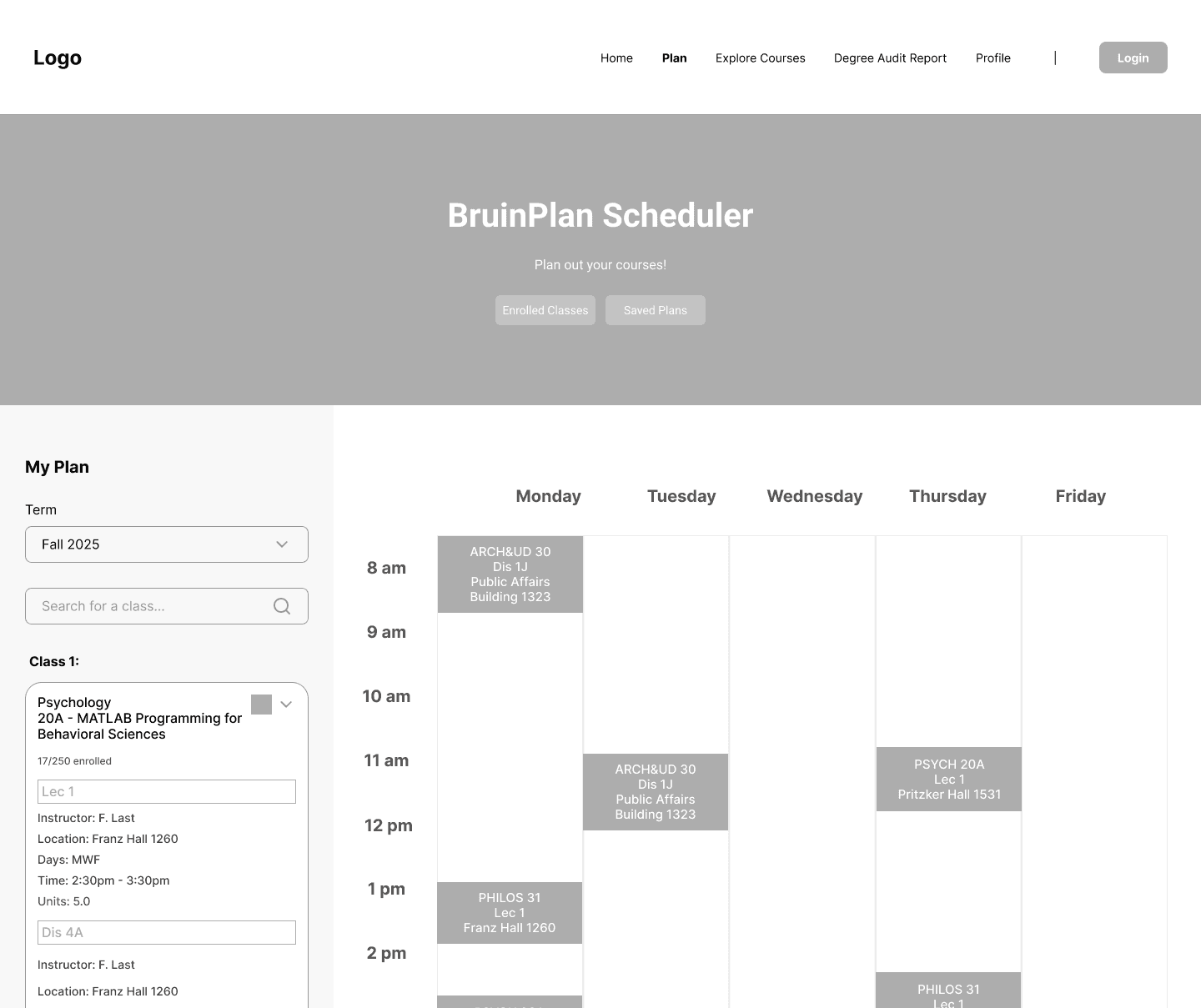
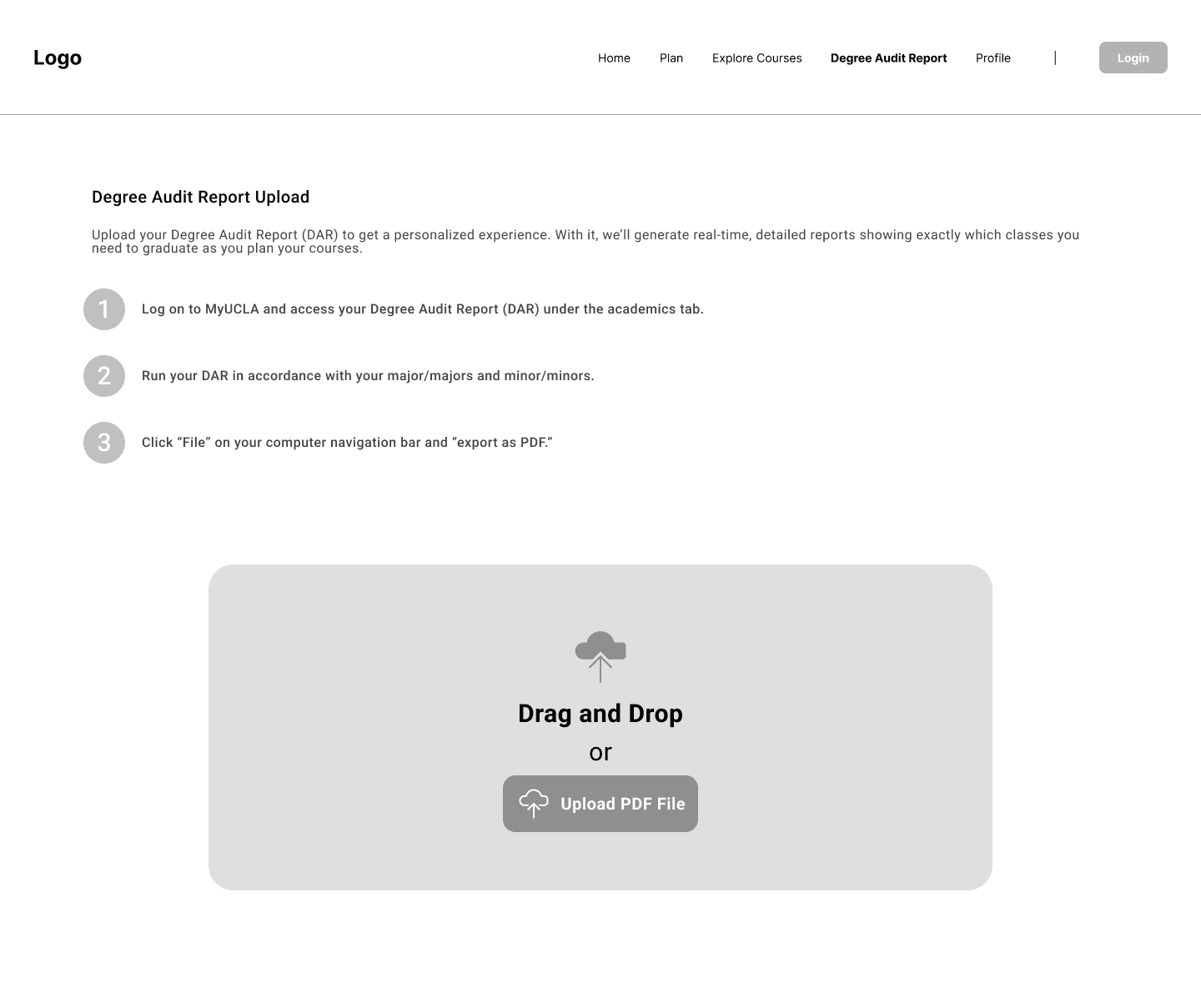
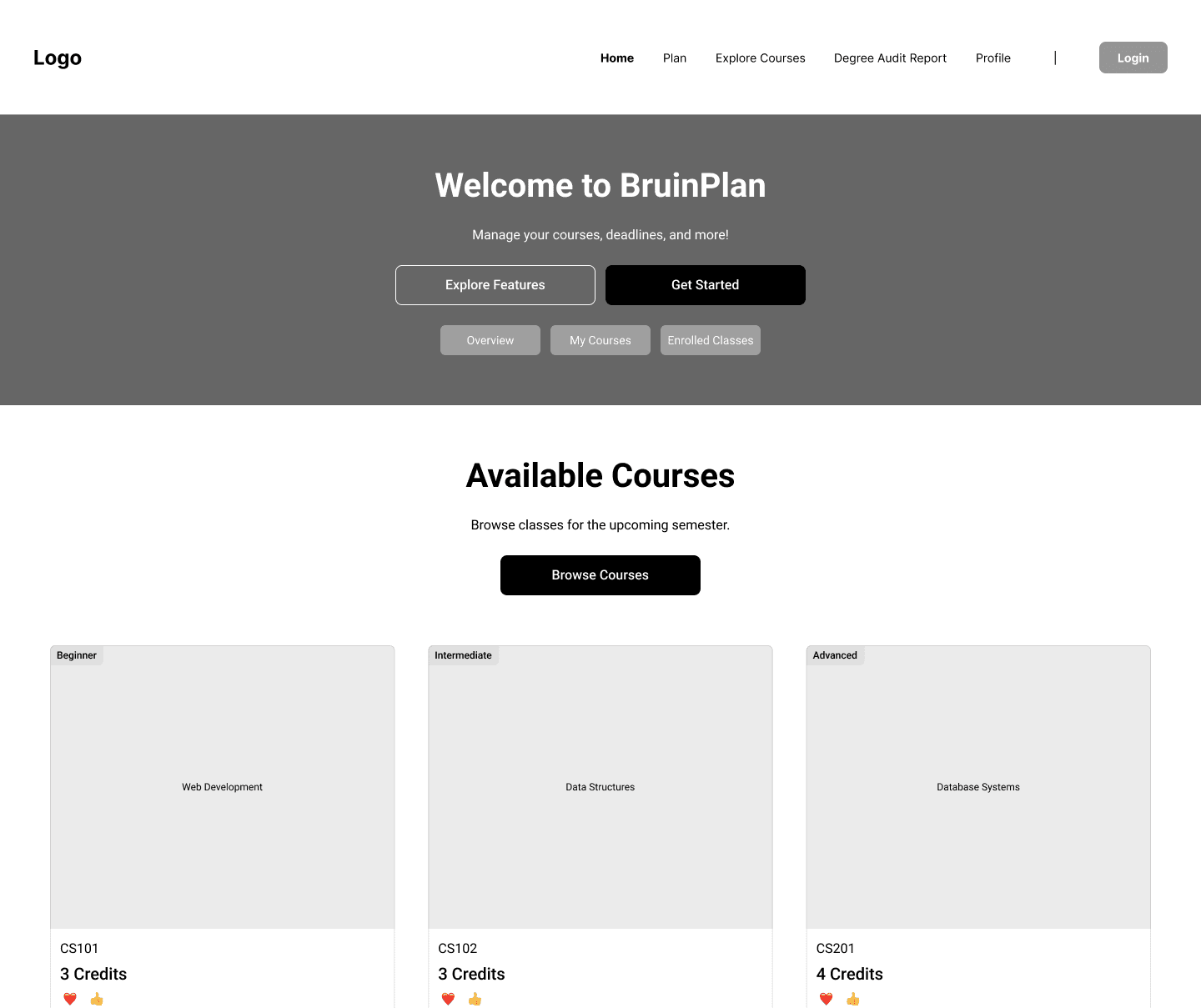
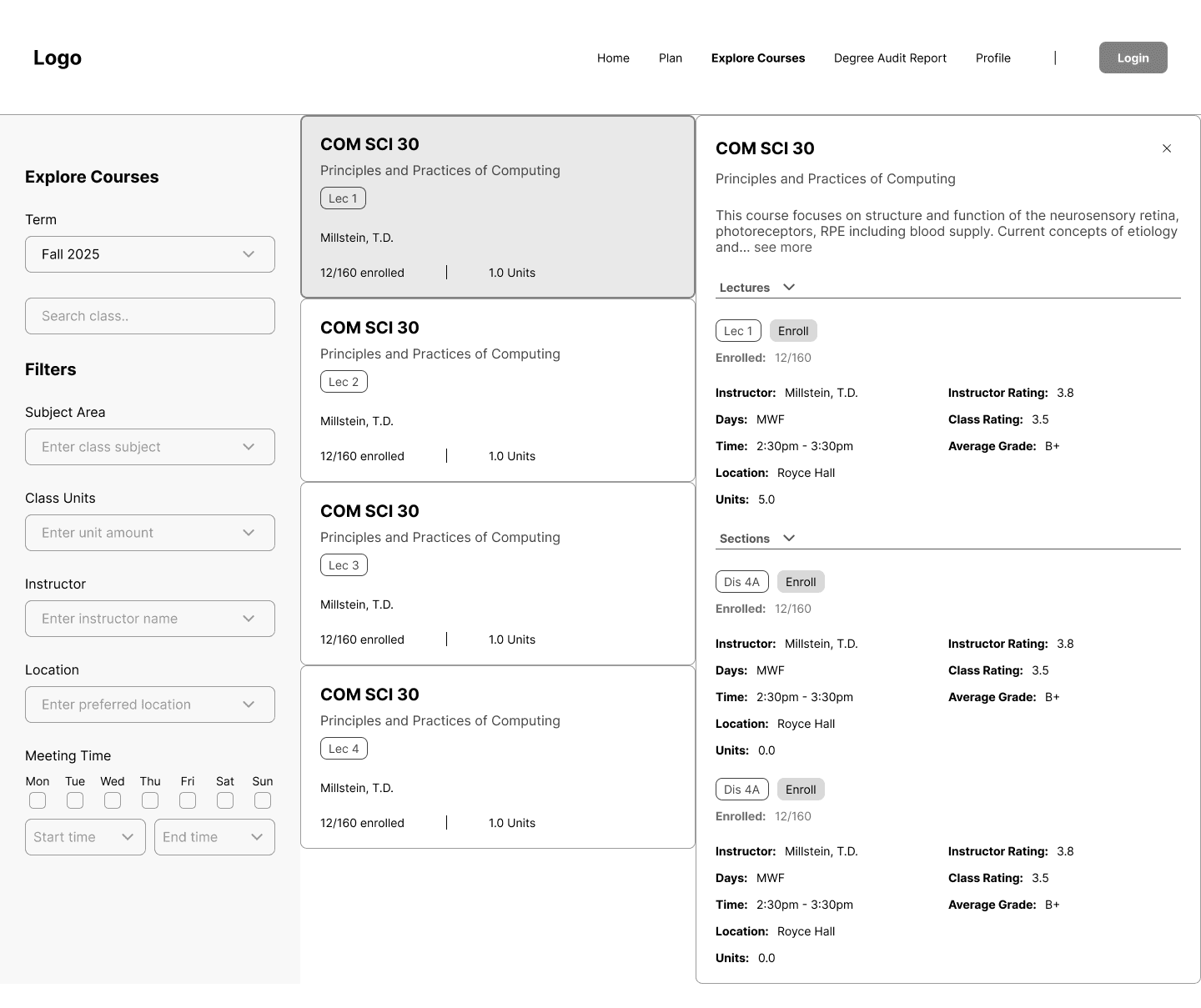
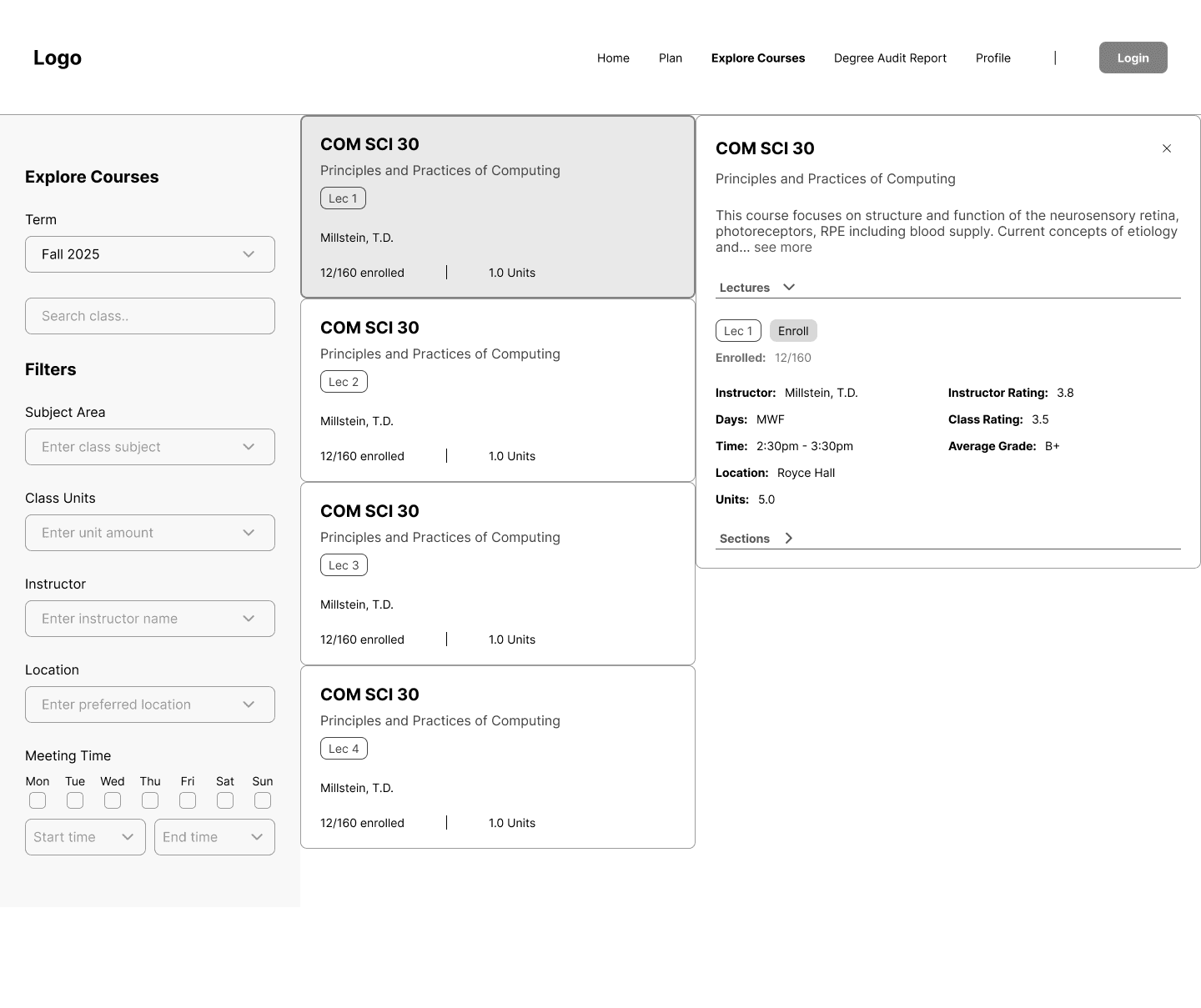
During low-fidelity wireframing, my team and I quickly explored how BruinPlan’s core features could come together in a simple, intuitive flow. We focused on structure and navigation—prioritizing clarity and reducing cognitive load—before refining visual details.
USABILITY TESTING
Usability Testing and Iteration
We conducted usability testing with UCLA students to evaluate whether BruinPlan’s planning flows felt intuitive and supported both long-term and short-term decision-making. Participants were asked to navigate the four-year planner, add courses to a quarter plan, and interpret degree progress information. Sessions focused on observing how easily users could understand the interface without guidance.
Key Findings
Four-year planning felt more intuitive than quarter planning
Most participants gravitated toward the four-year planner first, using it to build a mental model of their academic path before focusing on individual quarters. This validated our decision to prioritize four-year planning as the primary experience.
Labels and hierarchy mattered for confidence
Some users hesitated when interpreting degree progress indicators or course requirements, indicating a need for clearer labels and stronger visual hierarchy to support quick comprehension.
Adding courses needed to feel effortless
While users understood how to add courses to their plans, they expected fewer steps and clearer affordances, reinforcing the importance of minimizing friction in core actions.
Iterations Based on Feedback
Clarified labels and section titles across planning views
Strengthened visual hierarchy to emphasize progress and completion status
Streamlined interactions for adding and adjusting courses within plans
Working Designs
DESIGN SYSTEM
Establishing a Visual Foundation
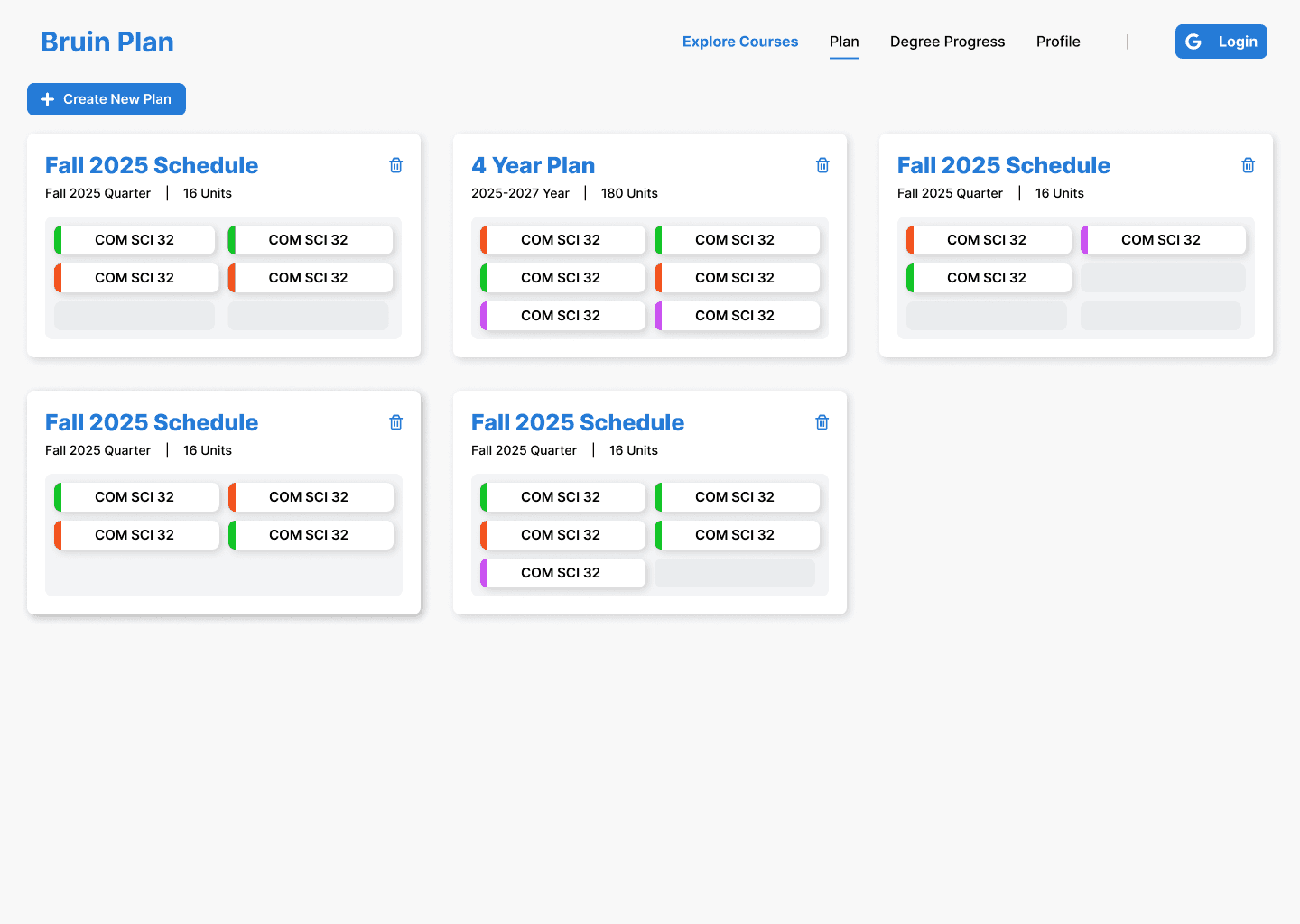
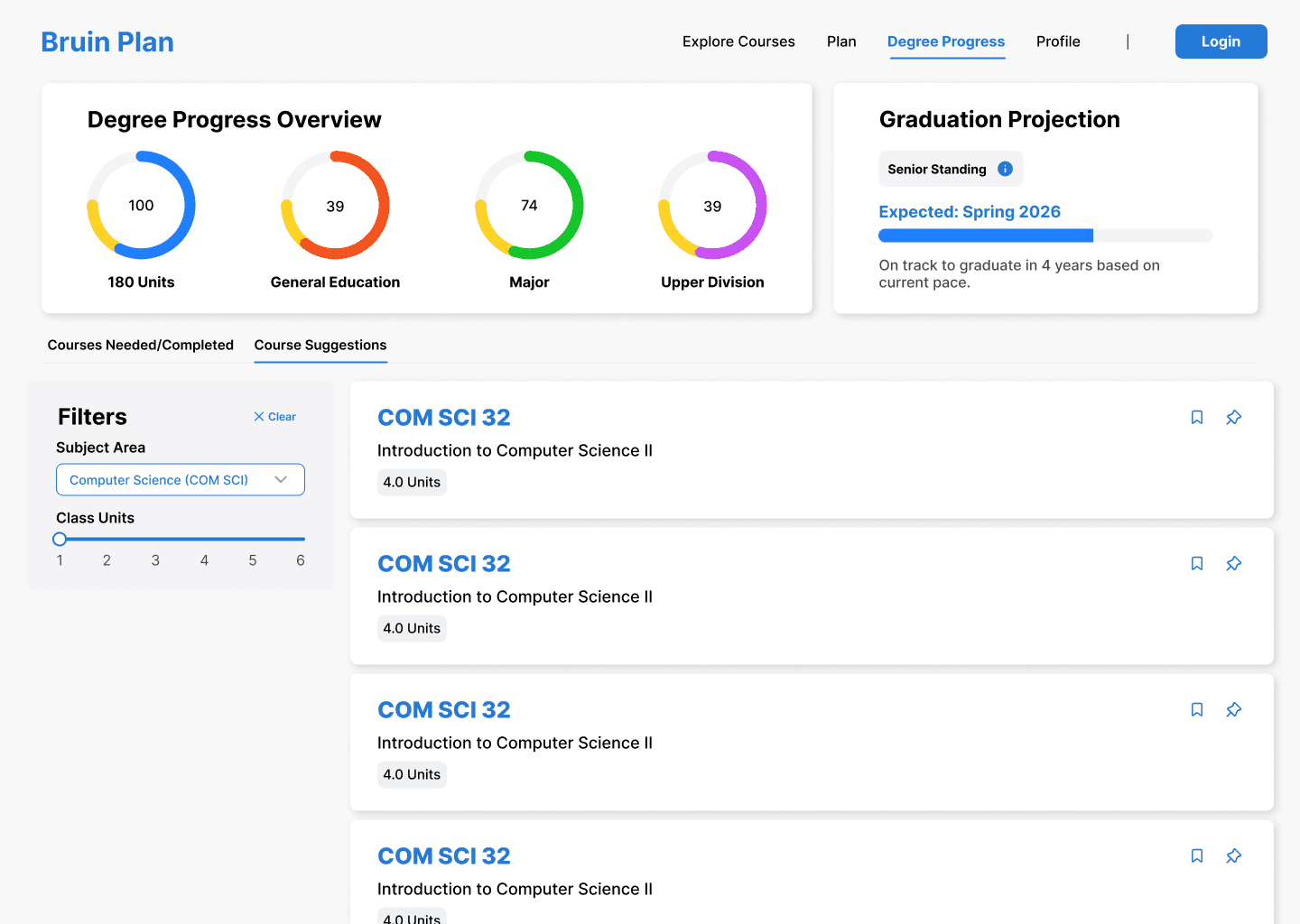
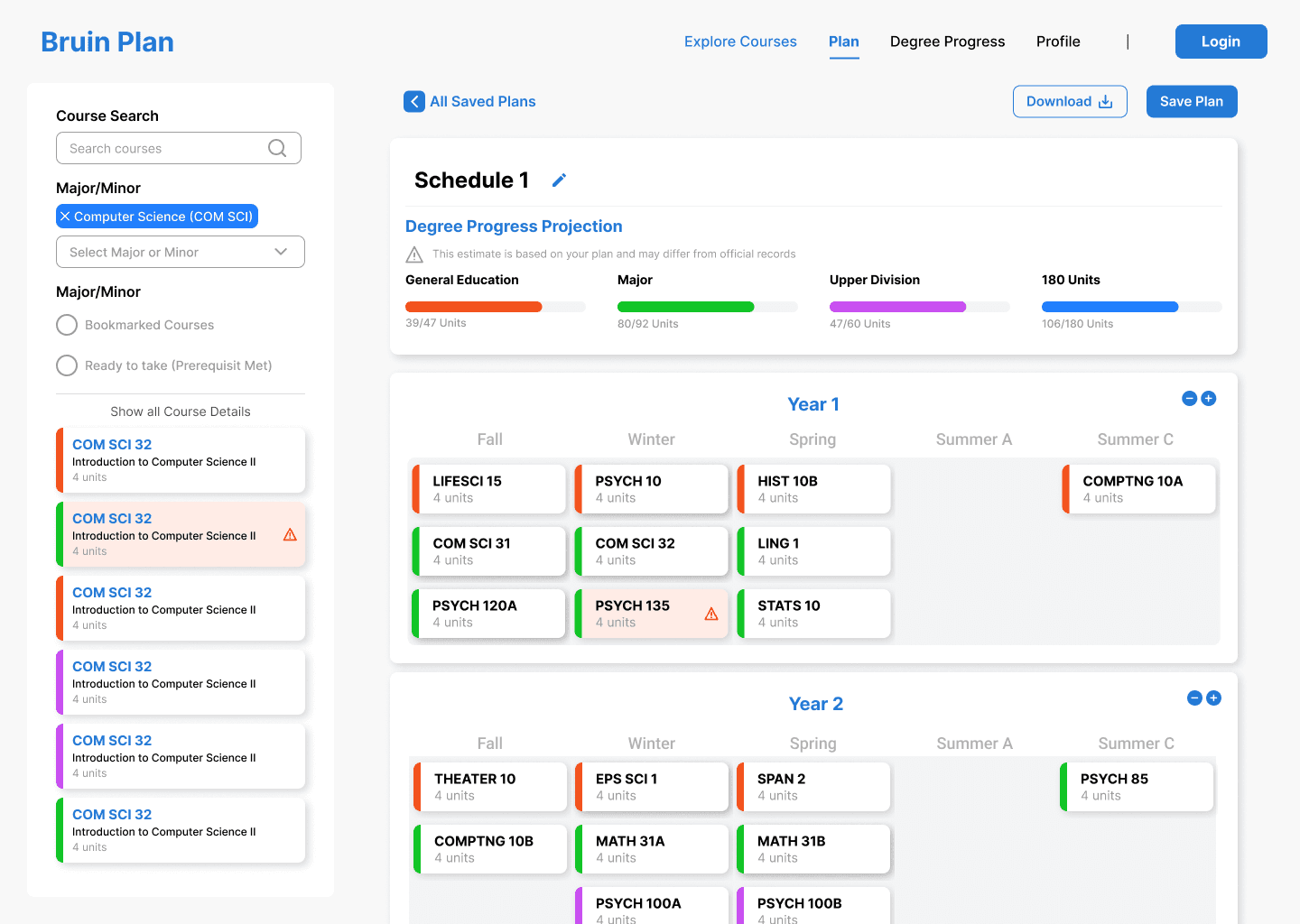
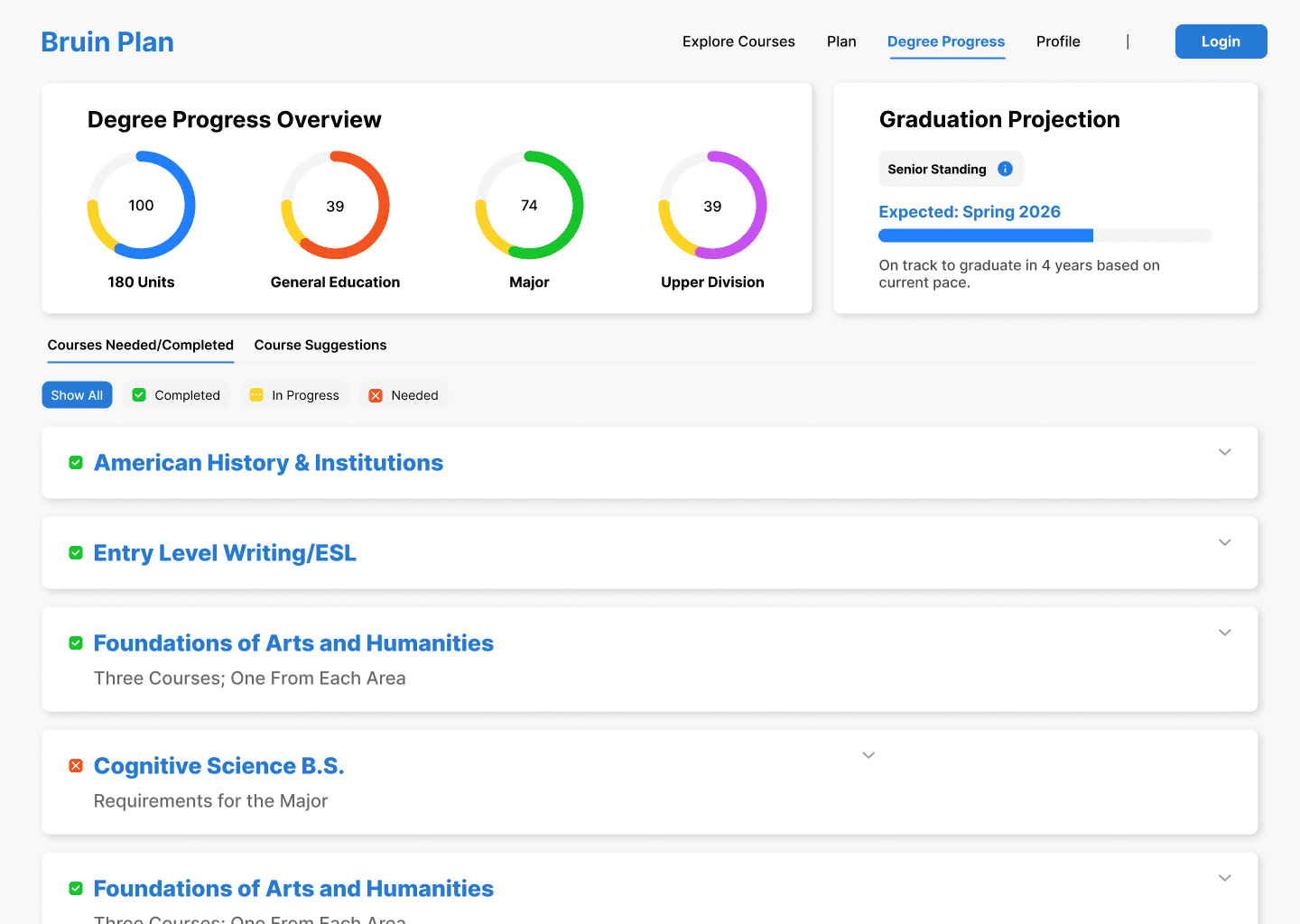
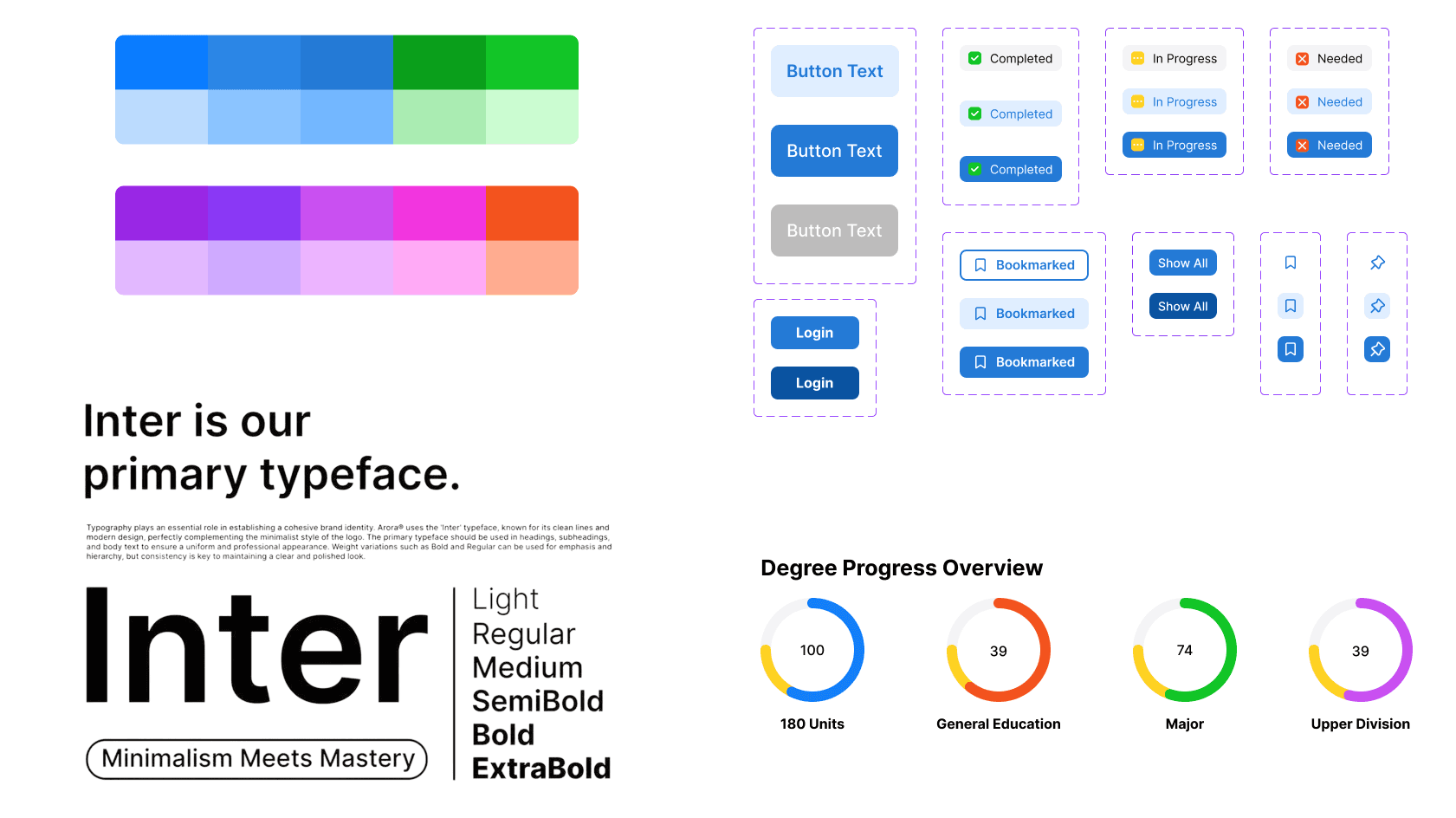
The visual system was designed to reduce cognitive load by using some familiar key features from MyUCLA, including color palette, add class to plan feature, and simplicity at its core to make the user flow intuitive.
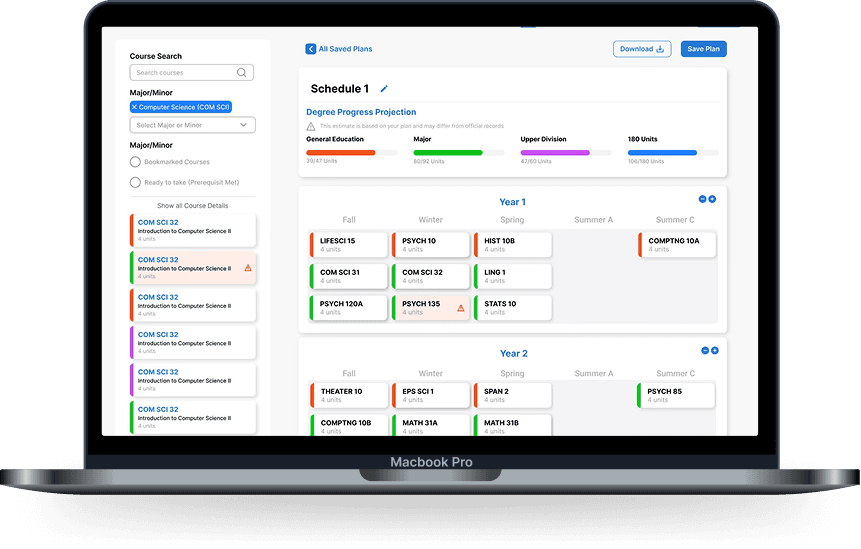
Four-year course planning
Plan courses across all four years to visualize workload, prerequisites, and graduation progress in one place.
Pain point it solves:
Students struggle to understand how individual course choices impact their long-term graduation timeline.
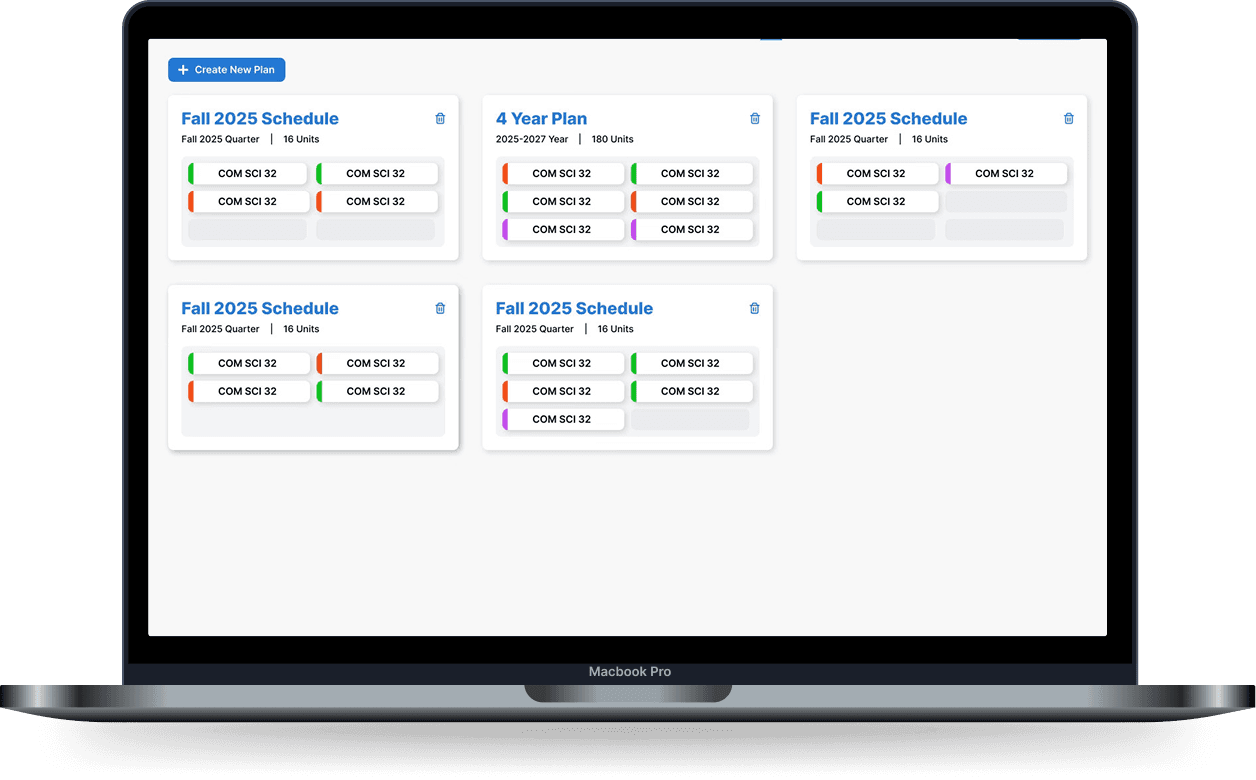
Quarter-by-quarter course planning
Break long-term plans into manageable quarterly schedules that align with enrollment and availability.
Pain point it solves:
Students can plan for the future but lack a clear way to translate those plans into realistic, actionable quarter schedules.
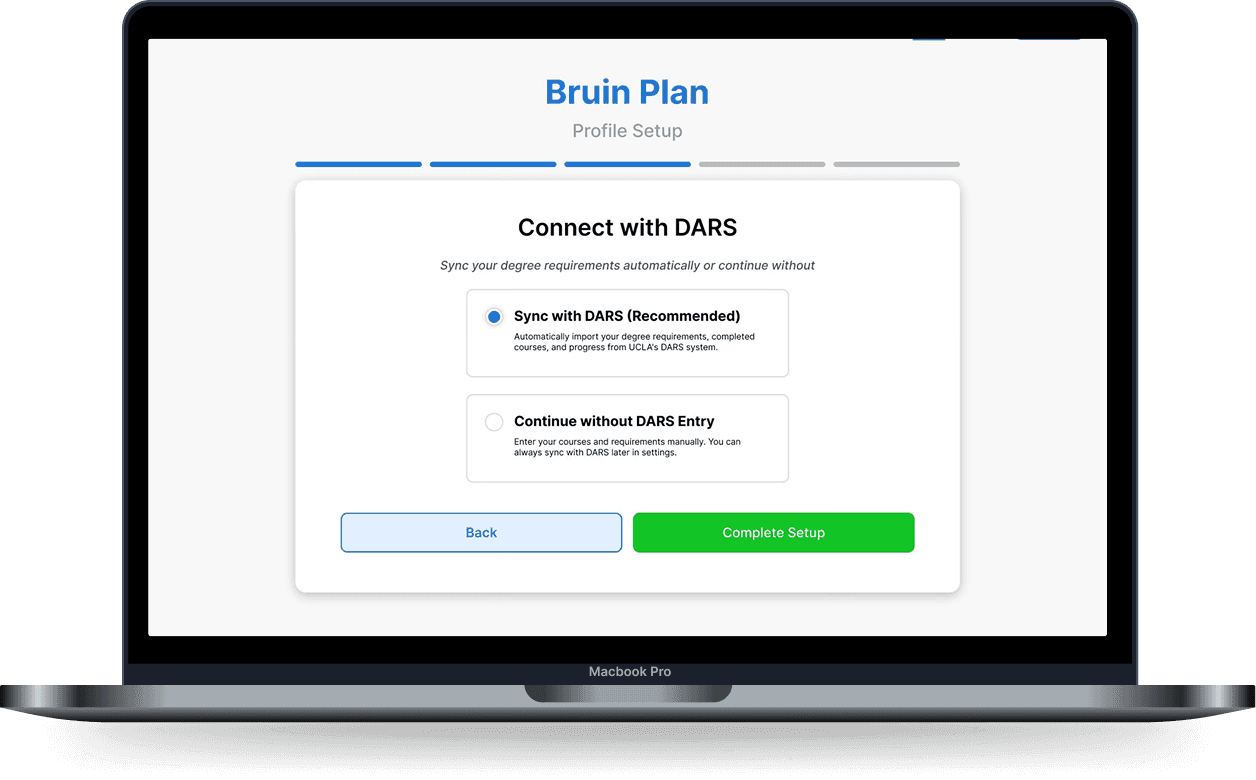
Degree Audit Report (DAR) integration
Sync official degree requirements directly into the planner to track progress in real time.
Pain point it solves:
Degree audits are text-heavy and difficult to interpret, forcing students to manually cross-check requirements across tools.
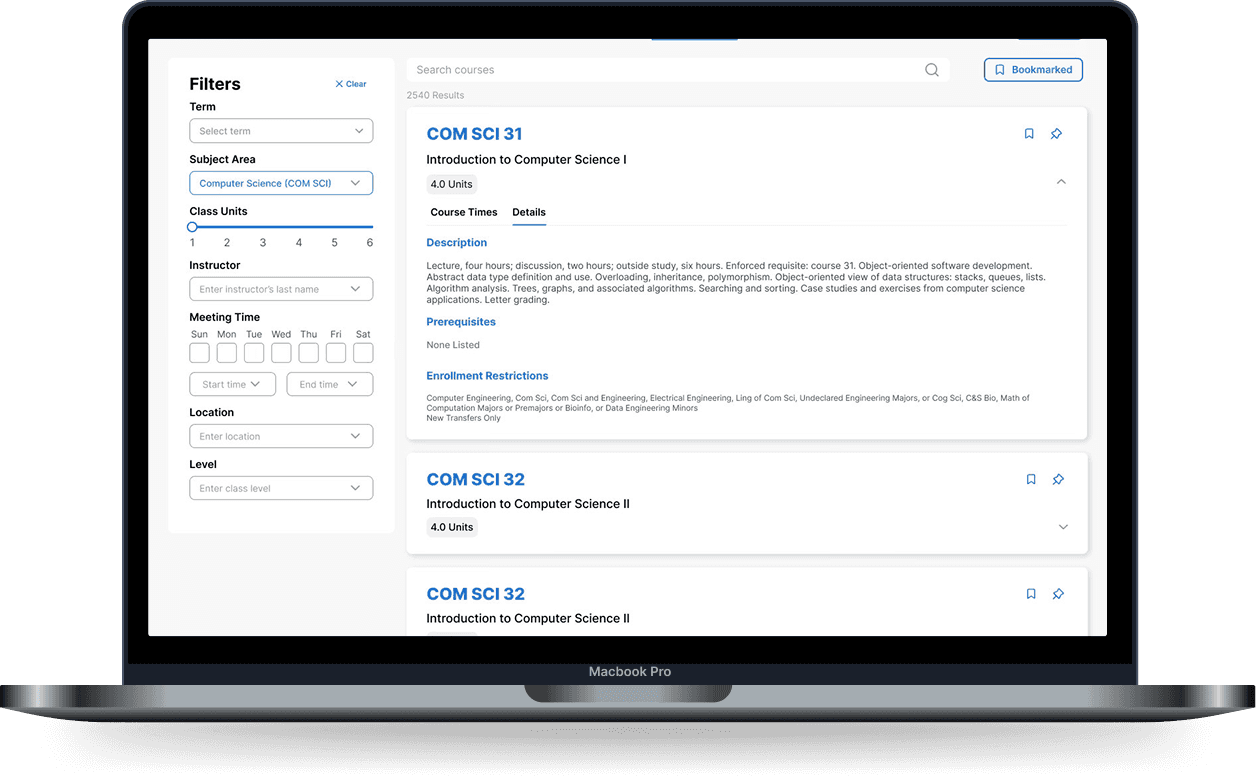
Advanced Course Filtering
Filter courses by term, subject area, units, instructor, meeting time, location, and level to quickly narrow large course catalogs into relevant options.
Pain point it solves:
Students are overwhelmed by long, unfiltered course lists and waste time scrolling or cross-checking details to find classes that actually fit their needs.
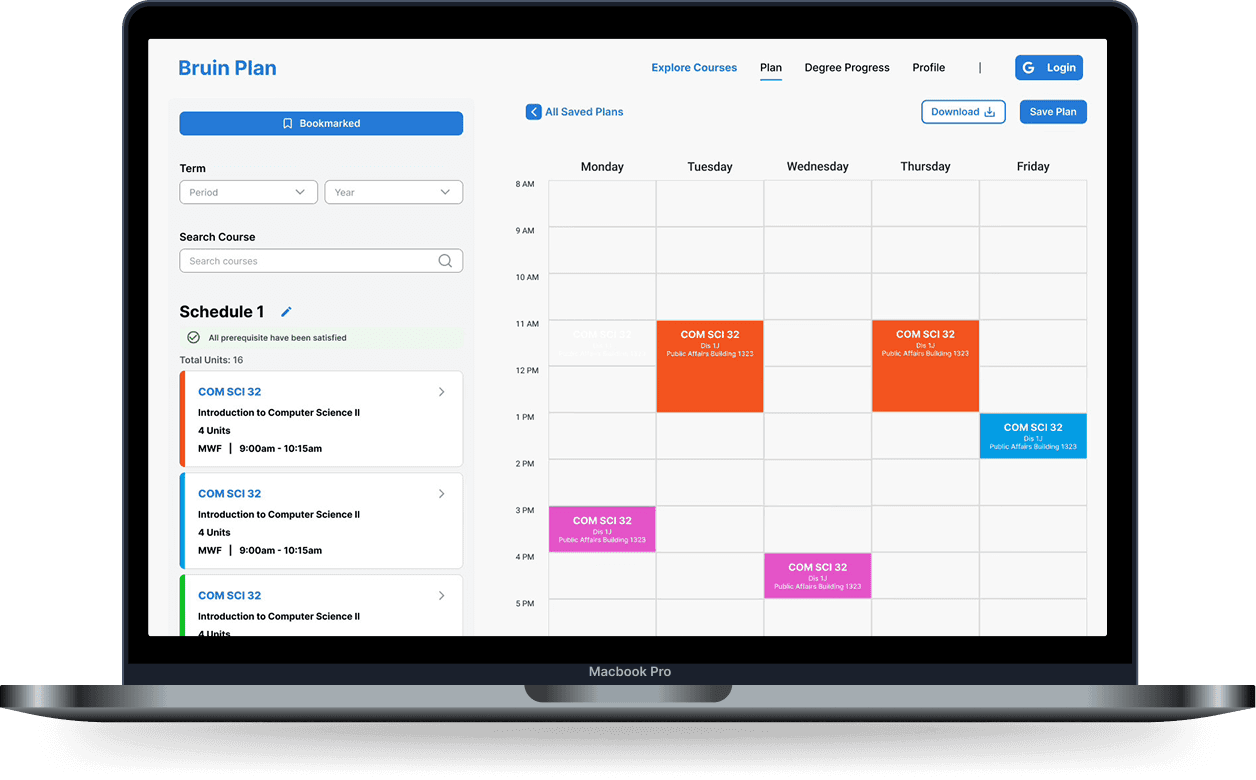
Side-by-Side Weekly Calendar View
View all weekly classes in a vertical, side-by-side calendar layout that makes time conflicts, gaps, and balance easy to scan at a glance.
Pain point it solves:
MyUCLA’s horizontal calendar requires constant scrolling to understand a full schedule, making it difficult to compare days and identify conflicts; BruinPlan’s side-by-side view reduces this friction.
Reflections
Since BruinPlan is still a work in progress, there are many areas we continue to explore and refine. That said, this project has already provided valuable insights into what worked well and where there is opportunity to grow as the product evolves.
HIGHLIGHTS
Strong collaboration with developers
Clear communication with developers helped balance feasibility with usability throughout the design process.
Navigating complex design constraints
Iterated on ways to integrate the Degree Audit Report while maintaining clarity and accuracy in degree progress tracking.
IMPROVEMENTS
Conduct additional usability testing
Run more usability tests to refine interactions and address edge cases in planning flows.
Deepen competitive analysis
Further analyze existing tools to ensure a smoother transition from MyUCLA to BruinPlan.
Role
Product Designer
Timeline
May 2025 - Present
Skills
User Research
Prototyping
Tools
Figma
Figjam
OVERVIEW
What is BruinPlan?
BruinPlan is a course-planning platform designed to help UCLA students plan their academic journey in one place. The product consolidates long-term degree planning, quarter scheduling, degree audit tracking, and course evaluation into a single, streamlined experience—reducing the friction caused by navigating multiple disconnected systems.
THE PROBLEM
A Broken Planning Experience
UCLA students currently rely on a fragmented workflow to plan their courses. Planning typically requires jumping between MyUCLA, the Degree Audit Report (DAR), and third-party tools like BruinWalk for professor and class ratings.
Students described MyUCLA as cluttered and difficult to navigate, often leaving them with multiple tabs open just to answer basic questions like:
What classes do I still need to graduate?
How does this course fit into my long-term plan?
Is this class worth taking with this professor?
MyUCLA UI:
OUR GOAL
Design a unified planning experience that:
Reduces the number of tools and tabs students need
Makes degree progress easy to understand at a glance
Allows students to plan both quarter-by-quarter and across four years
Simplifies the flow from course discovery → planning → graduation tracking
Success was defined qualitatively as fewer clicks, fewer tabs, and a smoother planning flow that mirrors how students actually think about their academic futures.
CONSTRAINTS
Balancing accuracy, clarity, and technical feasibility
Degree Audit Report integration: DAR is a UCLA-owned system with rigid formatting and data constraints.
Course catalog complexity: Supporting the full UCLA course catalog while keeping the interface lightweight.
Work in progress: The product is still in development, so success metrics and adoption data are not yet available.
These constraints required careful design decisions to balance accuracy, clarity, and technical feasibility.
Research
COMPETITIVE ANALYSIS
Evaluating Existing Course Planning Platforms
We evaluated a wide range of course planning tools such as Carta, Berkeley Time, and the MyUCLA class planner.
Here were our key insights:
Carta
Surface nearby accessibility infrastructure on the map so users can quickly locate resources that match their mobility needs.
Berkeley Time
Integrate environment-aware cues (e.g., “approaching a ramp”) so users understand what accessibility features are nearby & what they’re heading toward.
UCLA Study List
Build on common map/directions patterns to reduce learning curve while tailoring routes to accessibility needs.
Key Gap Identified:
Each tool answers one question well, but none support the full decision-making journey:
CONTEXTUAL INQUIRY
Understanding Enrollment Challenges
To understand how students actually plan courses, we gathered qualitative feedback from UCLA students about their current workflows, frustrations, and priorities.
Key Behaviors Observed
Fragmented Planning Across Multiple Tools
Students reported keeping several tabs open at once—MyUCLA for enrollment, the Degree Audit Report for requirements, and BruinWalk for professor ratings. Planning required constantly switching contexts and mentally stitching information together, making the process feel disjointed and time-consuming.
Manual & Error-Prone Tracking
Because existing systems don’t support holistic planning, students often resorted to manually checking off requirements or tracking progress outside of official tools. This increased the risk of mistakes and made it difficult to trust whether they were actually on track to graduate.
Short-Term Decisions With Long-Term Uncertainty
Course selection was often driven by immediate availability rather than long-term strategy. Without a clear four-year view, students lacked confidence that their quarter-by-quarter choices would support timely graduation or balanced workloads.
Pain Points
From interviews and informal testing, several themes consistently emerged:
Cognitive overload: Students felt overwhelmed by dense information and unclear hierarchy in existing tools.
Lack of visibility: It was difficult to understand how individual courses contributed to graduation progress.
Disconnected systems: Students had to mentally stitch together information from multiple sources.
Uncertainty: Many students were unsure whether their plans would actually keep them on track to graduate.
SOLUTION GOALS
Translating Insights Into Solutions
Guided by our research insights, we defined a set of solution goals to ensure BruinPlan meaningfully supports students navigating the enrollment and course planning process.
01
Four-year planner prioritized
Based on testing, long-term planning became the primary interface rather than an afterthought.
02
Visual progress tracking
Degree requirements were translated into color-coded, scannable indicators.
03
Integrated course context
Ratings, prerequisites, and enrollment status were surfaced at the point of decision-making.
04
Reduced clicks
Adding courses to plans was designed to be fast and reversible, encouraging exploration.
USER FLOWS
Designing the Navigation Experience
We mapped core user flows to ensure BruinPlan supports how students actually navigate the enrollment system.
LOW-FIDELITY PROTOTYPES
Staying Flexible With Design Solutions
During low-fidelity wireframing, my team and I quickly explored how BruinPlan’s core features could come together in a simple, intuitive flow. We focused on structure and navigation—prioritizing clarity and reducing cognitive load—before refining visual details.
USABILITY TESTING
Usability Testing and Iteration
We conducted usability testing with UCLA students to evaluate whether BruinPlan’s planning flows felt intuitive and supported both long-term and short-term decision-making. Participants were asked to navigate the four-year planner, add courses to a quarter plan, and interpret degree progress information. Sessions focused on observing how easily users could understand the interface without guidance.
Key Findings
Four-year planning felt more intuitive than quarter planning
Most participants gravitated toward the four-year planner first, using it to build a mental model of their academic path before focusing on individual quarters. This validated our decision to prioritize four-year planning as the primary experience.
Labels and hierarchy mattered for confidence
Some users hesitated when interpreting degree progress indicators or course requirements, indicating a need for clearer labels and stronger visual hierarchy to support quick comprehension.
Adding courses needed to feel effortless
While users understood how to add courses to their plans, they expected fewer steps and clearer affordances, reinforcing the importance of minimizing friction in core actions.
Iterations Based on Feedback
Clarified labels and section titles across planning views
Strengthened visual hierarchy to emphasize progress and completion status
Streamlined interactions for adding and adjusting courses within plans
Working Designs
DESIGN SYSTEM
Establishing a Visual Foundation
The visual system was designed to reduce cognitive load by using some familiar key features from MyUCLA, including color palette, add class to plan feature, and simplicity at its core to make the user flow intuitive.
Four-year course planning
Plan courses across all four years to visualize workload, prerequisites, and graduation progress in one place.
Pain point it solves:
Students struggle to understand how individual course choices impact their long-term graduation timeline.
Quarter-by-quarter course planning
Break long-term plans into manageable quarterly schedules that align with enrollment and availability.
Pain point it solves:
Students can plan for the future but lack a clear way to translate those plans into realistic, actionable quarter schedules.
Degree Audit Report (DAR) integration
Sync official degree requirements directly into the planner to track progress in real time.
Pain point it solves:
Degree audits are text-heavy and difficult to interpret, forcing students to manually cross-check requirements across tools.
Advanced Course Filtering
Filter courses by term, subject area, units, instructor, meeting time, location, and level to quickly narrow large course catalogs into relevant options.
Pain point it solves:
Students are overwhelmed by long, unfiltered course lists and waste time scrolling or cross-checking details to find classes that actually fit their needs.
Side-by-Side Weekly Calendar View
View all weekly classes in a vertical, side-by-side calendar layout that makes time conflicts, gaps, and balance easy to scan at a glance.
Pain point it solves:
MyUCLA’s horizontal calendar requires constant scrolling to understand a full schedule, making it difficult to compare days and identify conflicts; BruinPlan’s side-by-side view reduces this friction.
Reflections
Since BruinPlan is still a work in progress, there are many areas we continue to explore and refine. That said, this project has already provided valuable insights into what worked well and where there is opportunity to grow as the product evolves.
HIGHLIGHTS
Strong collaboration with developers
Clear communication with developers helped balance feasibility with usability throughout the design process.
Navigating complex design constraints
Iterated on ways to integrate the Degree Audit Report while maintaining clarity and accuracy in degree progress tracking.
IMPROVEMENTS
Conduct additional usability testing
Run more usability tests to refine interactions and address edge cases in planning flows.
Deepen competitive analysis
Further analyze existing tools to ensure a smoother transition from MyUCLA to BruinPlan.
BruinPlan
A redesigned enrollment tool.
OVERVIEW
What is BruinPlan?
BruinPlan is a course-planning platform designed to help UCLA students plan their academic journey in one place. The product consolidates long-term degree planning, quarter scheduling, degree audit tracking, and course evaluation into a single, streamlined experience—reducing the friction caused by navigating multiple disconnected systems.
THE PROBLEM
A Broken Planning Experience
UCLA students currently rely on a fragmented workflow to plan their courses. Planning typically requires jumping between MyUCLA, the Degree Audit Report (DAR), and third-party tools like BruinWalk for professor and class ratings.
Students described MyUCLA as cluttered and difficult to navigate, often leaving them with multiple tabs open just to answer basic questions like:
What classes do I still need to graduate?
How does this course fit into my long-term plan?
Is this class worth taking with this professor?
MyUCLA UI:
OUR GOAL
Design a unified planning experience that:
Reduces the number of tools and tabs students need
Makes degree progress easy to understand at a glance
Allows students to plan both quarter-by-quarter and across four years
Simplifies the flow from course discovery → planning → graduation tracking
Success was defined qualitatively as fewer clicks, fewer tabs, and a smoother planning flow that mirrors how students actually think about their academic futures.
CONSTRAINTS
Balancing accuracy, clarity, and technical feasibility
Degree Audit Report integration: DAR is a UCLA-owned system with rigid formatting and data constraints.
Course catalog complexity: Supporting the full UCLA course catalog while keeping the interface lightweight.
Work in progress: The product is still in development, so success metrics and adoption data are not yet available.
These constraints required careful design decisions to balance accuracy, clarity, and technical feasibility.
Research
COMPETITIVE ANALYSIS
Evaluating Existing Course Planning Platforms
We evaluated a wide range of course planning tools such as Carta, Berkeley Time, and the MyUCLA class planner.
Here were our key insights:
Carta
Surface nearby accessibility infrastructure on the map so users can quickly locate resources that match their mobility needs.
Berkeley Time
Integrate environment-aware cues (e.g., “approaching a ramp”) so users understand what accessibility features are nearby & what they’re heading toward.
UCLA Study List
Build on common map/directions patterns to reduce learning curve while tailoring routes to accessibility needs.
Key Gap Identified:
Each tool answers one question well, but none support the full decision-making journey:
"What should I take, when should I take it, and how does it get me to graduation?”
CONTEXTUAL INQUIRY
Understanding Enrollment Challenges
To understand how students actually plan courses, we gathered qualitative feedback from UCLA students about their current workflows, frustrations, and priorities.
Key Behaviors Observed
Fragmented Planning Across Multiple Tools
Students reported keeping several tabs open at once—MyUCLA for enrollment, the Degree Audit Report for requirements, and BruinWalk for professor ratings. Planning required constantly switching contexts and mentally stitching information together, making the process feel disjointed and time-consuming.
Manual & Error-Prone Tracking
Because existing systems don’t support holistic planning, students often resorted to manually checking off requirements or tracking progress outside of official tools. This increased the risk of mistakes and made it difficult to trust whether they were actually on track to graduate.
Short-Term Decisions With Long-Term Uncertainty
Course selection was often driven by immediate availability rather than long-term strategy. Without a clear four-year view, students lacked confidence that their quarter-by-quarter choices would support timely graduation or balanced workloads.
Pain Points
From interviews and informal testing, several themes consistently emerged:
Cognitive overload: Students felt overwhelmed by dense information and unclear hierarchy in existing tools.
Lack of visibility: It was difficult to understand how individual courses contributed to graduation progress.
Disconnected systems: Students had to mentally stitch together information from multiple sources.
Uncertainty: Many students were unsure whether their plans would actually keep them on track to graduate.
SOLUTION GOALS
Translating Insights Into Solutions
Guided by our research insights, we defined a set of solution goals to ensure BruinPlan meaningfully supports students navigating the enrollment and course planning process.
01
Four-year planner prioritized
Four-year planner prioritized
Based on testing, long-term planning became the primary interface rather than an afterthought.
02
Visual progress tracking
Visual progress tracking
Degree requirements were translated into color-coded, scannable indicators.
03
Integrated course context
Integrated course context
Ratings, prerequisites, and enrollment status were surfaced at the point of decision-making.
04
Reduced clicks
Reduced clicks
Adding courses to plans was designed to be fast and reversible, encouraging exploration.
USER FLOWS
Designing the Navigation Experience
We mapped core user flows to ensure BruinPlan supports how students actually navigate the enrollment system.
LOW-FIDELITY PROTOTYPES
Staying Flexible With Design Solutions
During low-fidelity wireframing, my team and I quickly explored how BruinPlan’s core features could come together in a simple, intuitive flow. We focused on structure and navigation—prioritizing clarity and reducing cognitive load—before refining visual details.
USABILITY TESTING
Usability Testing and Iteration
We conducted usability testing with UCLA students to evaluate whether BruinPlan’s planning flows felt intuitive and supported both long-term and short-term decision-making. Participants were asked to navigate the four-year planner, add courses to a quarter plan, and interpret degree progress information. Sessions focused on observing how easily users could understand the interface without guidance.
Key Findings
Four-year planning felt more intuitive than quarter planning
Most participants gravitated toward the four-year planner first, using it to build a mental model of their academic path before focusing on individual quarters. This validated our decision to prioritize four-year planning as the primary experience.
Labels and hierarchy mattered for confidence
Some users hesitated when interpreting degree progress indicators or course requirements, indicating a need for clearer labels and stronger visual hierarchy to support quick comprehension.
Adding courses needed to feel effortless
While users understood how to add courses to their plans, they expected fewer steps and clearer affordances, reinforcing the importance of minimizing friction in core actions.
Iterations Based on Feedback
Clarified labels and section titles across planning views
Strengthened visual hierarchy to emphasize progress and completion status
Streamlined interactions for adding and adjusting courses within plans
Working Designs
DESIGN SYSTEM
Establishing a Visual Foundation
The visual system was designed to reduce cognitive load by using some familiar key features from MyUCLA, including color palette, add class to plan feature, and simplicity at its core to make the user flow intuitive.
Four-year course planning
Plan courses across all four years to visualize workload, prerequisites, and graduation progress in one place.
Pain point it solves:
Students struggle to understand how individual course choices impact their long-term graduation timeline.
Quarter-by-quarter course planning
Break long-term plans into manageable quarterly schedules that align with enrollment and availability.
Pain point it solves:
Students can plan for the future but lack a clear way to translate those plans into realistic, actionable quarter schedules.
Degree Audit Report (DAR) integration
Sync official degree requirements directly into the planner to track progress in real time.
Pain point it solves:
Degree audits are text-heavy and difficult to interpret, forcing students to manually cross-check requirements across tools.
Advanced Course Filtering
Filter courses by term, subject area, units, instructor, meeting time, location, and level to quickly narrow large course catalogs into relevant options.
Pain point it solves:
Students are overwhelmed by long, unfiltered course lists and waste time scrolling or cross-checking details to find classes that actually fit their needs.
Side-by-Side Weekly Calendar View
View all weekly classes in a vertical, side-by-side calendar layout that makes time conflicts, gaps, and balance easy to scan at a glance.
Pain point it solves:
MyUCLA’s horizontal calendar requires constant scrolling to understand a full schedule, making it difficult to compare days and identify conflicts; BruinPlan’s side-by-side view reduces this friction.
Reflections
Since BruinPlan is still a work in progress, there are many areas we continue to explore and refine. That said, this project has already provided valuable insights into what worked well and where there is opportunity to grow as the product evolves.
HIGHLIGHTS
Strong collaboration with developers
Clear communication with developers helped balance feasibility with usability throughout the design process.
Navigating complex design constraints
Iterated on ways to integrate the Degree Audit Report while maintaining clarity and accuracy in degree progress tracking.
IMPROVEMENTS
Conduct additional usability testing
Run more usability tests to refine interactions and address edge cases in planning flows.
Deepen competitive analysis
Further analyze existing tools to ensure a smoother transition from MyUCLA to BruinPlan.
Role
Product Designer
Timeline
May 2025 - Present
Skills
User Research
Prototyping
Tools
Figma
Figjam